



John Rofrano
 3
COW Coins
3
COW Coins
Forum Replies Created
-

[Claude Lyneis] “Still, I like to see for myself, what the 5 k or retina screen looks like.”
It is incredibly gorgeous!!! I stopped by my local Apple Store at the Danbury Mall and they had an iMac 5K Retina with FCP X running loaded with 4K footage. The display was unbelievable. Then when you realize that the PREVIEW window was full 4K resolution (because the while display is 5K) it just blew me way. The 4K footage edited effortlessly. If I was working in 4K I would have definitely bought the iMac 5K right then and there.
They also had a new Mac Pro on display connected to a 27″ Thunderbolt Display. I’m guessing that your Apple Store is different because I got to see the two thing I stopped by to see (Mac Pro and iMac 5K) and wasn’t disappointed at all and it certainly wasn’t depressing. I’m still considering buying an iMac 5K based on that trip to the Apple Store. Quite effective.
~jr
http://www.johnrofrano.com
http://www.vasstsoftware.com -
I have no official information but Vegas Pro has always checked for updates and notified us when one is available. If you didn’t turn this off, Vegas Pro 14 will let you know when a new update is available. You will probably be able to download it from the My Products section of your Account page: https://www.magix.com/us/support/my-service-center/
~jr
http://www.johnrofrano.com
http://www.vasstsoftware.com -
I guess the question is: “Who did you buy Vegas Pro 13.0 from?” Sony? or MAGIX?
I’m going to assume that you bought it from MAGIX since Sony would not have offered you Vegas Pro 14 for free so you should login to your MAGIX account and click on My Products. That should show you a download link and serial number for both Vegas Pro 13 and Vegas Pro 14.
Here is a direct link to the account page:
https://www.magix.com/us/support/my-service-center/
See if that helps.
~jr
http://www.johnrofrano.com
http://www.vasstsoftware.com -
It looks like webm is a push by Google to replace HTML5 because Google hates when it doesn’t own everything. I can’t imagine anyone else taking notice of it. HTML5 is the future, not some Google stuff. Good luck with it.
~jr
http://www.johnrofrano.com
http://www.vasstsoftware.com -
[Scott Francis] “I found some online converters that take time, have to uploaded and downloaded, but worked ok. Still looking for something free and downloadable with a GUI.”
Why don’t you go to the web site that developed Webm and use their recommendations? Here are all the recommended tools from the Webm project itself both free and paid for. I suggest you use one of these:
https://www.webmproject.org/tools/
~jr
http://www.johnrofrano.com
http://www.vasstsoftware.com -
John Rofrano
October 1, 2016 at 1:35 pm in reply to: I’ve had Sony Vegas Platinum 12.0 for a long time, want to upgrade to Platinum 13.0[patrick vandergeten] “I contacted the (excellent!) helpdesk of Sony a week ago and got a message with the info that Sony stopd with consumer video editing software like Movie Studio and that Magix continues the software and support etc. Can somebody confirm this?”
Yes, Sony has sold all of it’s software assets (with the exception of Catalyst Suite) to MAGIX. You will need to contact MAGIX for Movie Studio support.
Sony has nothing to do with Movie Studio, Vegas Pro, DVD Architect, CD Architect, ACID, Sound Forge, SpectraLayers Pro, etc. anymore.
~jr
http://www.johnrofrano.com
http://www.vasstsoftware.com -
[John Norton] “I understand that was some time ago, perhaps Nvidias OpenCl has got better over the years?”
This could very well be the case.
[John Norton] “I don’t have any axe to grind, Amd/Nvidia. Do you have any recent benchmarks that show AMD is still better at OpenCL than Nvidia, or is this just hearesay?”
I don’t follow benchmarks much and with OpenCL the difference between workstation class cards and gaming cards varies widely due to their different drivers. My comments are largely based on Vegas Pro users who have purchased both cards and prefer the performance they get from AMD Radeon cards. It seems that all of the Vegas Pro NVIDIA GeForce based customers are not as happy.
Here is a Vegas Pro benchmark from AnandTech showing AMD well above NVIDIA for performance:
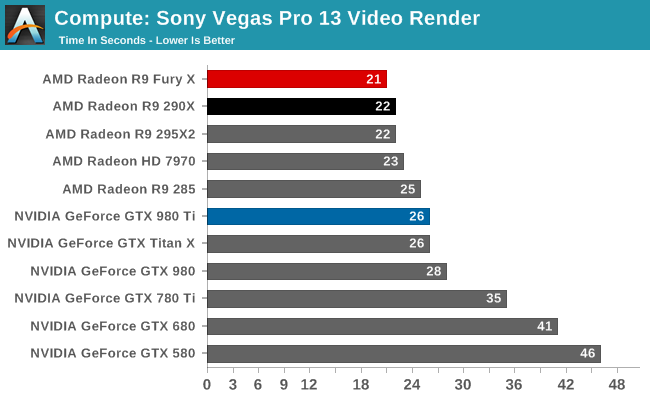
I also did my own testing with Vegas Pro on two cards that are 100% supported, the NVIDIA Quadro 4000 and AMD Radeon HD 5870 and the AMD was the clear winner. Obviously these are 2010 cards because Vegas Pro doesn’t support anything new than 2010 cards for GPU rendering. 🙁
~jr
http://www.johnrofrano.com
http://www.vasstsoftware.com -
[Peter Holt] “the camera has to be USB-connected (which means removing it from its waterproof housing – not always desirable, because it “wastes” a silica gel moisture absorbing pad) and you need to carry a windows computer.”
Wow, what that’s a major design flaw. I’m glad I bought a GoPro. I have no such problems opening the GoPro housing to use via USB and then closing it again. Sorry to hear what a horrible design Sony has.
~jr
http://www.johnrofrano.com
http://www.vasstsoftware.com -
John Rofrano
September 24, 2016 at 10:46 am in reply to: Having trouble keeping multiple tracks from becoming discombobulated.[Jeff David] “Anyways, I am interested to know how others are able to edit 4 tracks or 3 tracks and avoid the diff segements getting out of whack?”
I’ve edited projects with 20+ video and audio tracks combined and never had any problems.
I believe the key is to NOT use Ripple Edit! This is poorly implemented and should be avoided unless you are certain of what you are doing. It will happily move events under other events hiding them in the process and, in general, will cause massive discombobulation if you are not careful. I think your use of Ripple Edit might be causing your problem. Just stop using it.
~jr
http://www.johnrofrano.com
http://www.vasstsoftware.com -
[Peter Holt] “John – if you can find software which losslessly merges the 4GB AVC chunks, that would be very interesting. I have not found anything from Sony.”
It took me 10 seconds to find the software for your camera yesterday when I did a Google search:
This is what I did:
- Go to: https://www.sony.com/electronics/actioncam/fdr-x1000v-body-kit
- Select Support
- Click on: Drivers and Software
- On the left Navigation list look under Software & Apps and you’ll find: Action Cam Movie Creator
It says:
With this application, we provide the following functions: (for Windows and Mac)
- Easily & intuitively make impressive movies of your experience taken by Action Cam.
(Merge videos, GPS data overlay, slow/fast-forward editing, and trim/combine) - Get the latest notifications related to Action Cam and access Action Cam channels to get the latest information.
- Activate the Streaming feature to further utilize the Action Cam.
- Update the system software of Action Cam.
It sounds like this software can be used to import your videos at the length they were recorded. I could be wrong but it’s worth a try. This is what the GoPro Studio software does for their action cameras. Hopefully Sony’s software is similar.
[David Shirey] “You might want to try Sony’s software specifically for that camera. I found them here:”
*exactly* David.
I’m sure the software came on a CD and you have it lying around somewhere or maybe you threw it out with the box. Either way, your camera came with software to import the video. Use it for importing and use Vegas Pro for editing.
~jr
http://www.johnrofrano.com
http://www.vasstsoftware.com