

-
v14 – a list of supported GPUs anywhere?
Posted by Peter Holt on September 21, 2016 at 1:37 pmIs the GTX750 Kalm 2GB card supported by v14?
It crashes v13 pretty well; one has to disable GPU everywhere possible to use the program.
I don’t want to change the video card because this is the fastest fanless card on the market, and it plays 1080P 50FPS 50mbits/sec nicely.
John Norton replied 9 years, 9 months ago 9 Members · 15 Replies -
15 Replies
-

László Kovács
September 21, 2016 at 2:32 pmHmmm…
Not sure, does this help?
https://www.vegascreativesoftware.com/us/vegas-pro/specifications/#productMenuBest regards
László Kovács
-

Peter Holt
September 21, 2016 at 2:40 pmFor the GTXxxx (Nvidia) that just says
Requires a CUDA-enabled graphics card and driver 270.xx or later.
GeForce GPUs: GeForce GTX 4xx Series or higher (or GeForce GT 2xx Series or higher with driver 297.03 later).
Quadro GPUs: Quadro 600 or higher (or Quadro FX 1700 or higher with driver 297.03 or later).which I strongly suspect is nonsense because mine “does” CUDA and is almost brand new but it still doesn’t work.
-

John Rofrano
September 23, 2016 at 5:31 pm[Peter Holt] “which I strongly suspect is nonsense because mine “does” CUDA and is almost brand new but it still doesn’t work.”
What doesn’t work? Vegas Pro timeline GPU acceleration uses OpenCL. To the extent that your NVIDIA card supports OpenCL it should work. ATI/AMD Radeon cards tend to support OpenCL better than NVIDIA so your performance might not be as good as an AMD card.
The Render GPU acceleration that does support CUDA only supports cards using the older Fermi architecture. It does not support any Kepler or newer cards. Basically that means the Geforce GTX 465 – 480, GTX 560 – 590 are supported and all other NVIDIA cards are not.
~jr
http://www.johnrofrano.com
http://www.vasstsoftware.com -

Aaron Star
September 25, 2016 at 12:19 amBecause Vegas 13 timeline effects operate in a very similar way to Luxmark’s rendering engine utilizes compute resources. Luxmark ranking generally offers a good view as to cards that will be best for Vegas.
https://www.anandtech.com/show/9621/the-amd-radeon-r9-nano-review/15
The latest version of Luxmark’s render engine looks to have the NV1080 coming out way head of the Fury X, this may not mean that the 1080 will perform well in Vegas. Scores using the Luxmark engine 2.0 would be better scores to consider, since Vegas has not been updated in a long while. NV has been caught repairing benchmark operation for marketing reasons. Someone would have to test Vegas on the NV1080 then report the results. Anandtech has dropped Vegas as test benchmark since Magix bought the the software.
-
Peter Holt
September 25, 2016 at 6:42 amOK, thank you all. Looks like the GTX750 is not going to be supported. I have disabled GPU acceleration throughout; Pro 13 doesn’t work otherwise.
-

John Norton
September 25, 2016 at 2:11 pm“ATI/AMD Radeon cards tend to support OpenCL better than NVIDIA so your performance might not be as good as an AMD card.”
I understand that was some time ago, perhaps Nvidias OpenCl has got better over the years?
I don’t have any axe to grind, Amd/Nvidia. Do you have any recent benchmarks that show AMD is still better at OpenCL than Nvidia, or is this just hearesay?
-
John Rofrano
September 25, 2016 at 2:33 pm[John Norton] “I understand that was some time ago, perhaps Nvidias OpenCl has got better over the years?”
This could very well be the case.
[John Norton] “I don’t have any axe to grind, Amd/Nvidia. Do you have any recent benchmarks that show AMD is still better at OpenCL than Nvidia, or is this just hearesay?”
I don’t follow benchmarks much and with OpenCL the difference between workstation class cards and gaming cards varies widely due to their different drivers. My comments are largely based on Vegas Pro users who have purchased both cards and prefer the performance they get from AMD Radeon cards. It seems that all of the Vegas Pro NVIDIA GeForce based customers are not as happy.
Here is a Vegas Pro benchmark from AnandTech showing AMD well above NVIDIA for performance:
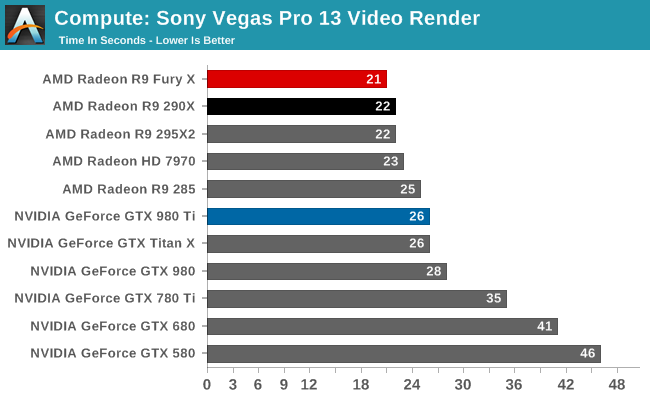
I also did my own testing with Vegas Pro on two cards that are 100% supported, the NVIDIA Quadro 4000 and AMD Radeon HD 5870 and the AMD was the clear winner. Obviously these are 2010 cards because Vegas Pro doesn’t support anything new than 2010 cards for GPU rendering. 🙁
~jr
http://www.johnrofrano.com
http://www.vasstsoftware.com -

Matthew Jeschke
December 19, 2016 at 4:05 amI am quite confused on the model numbers for Radeon. A while back you mentioned the R9 290 was a good card for vegas. Is it still king of the hill?
I do not use adobe for video… and rising SVP 14, some burris plug-ins, and just purchased Hit Film a few days ago. I dabble in DaVinci resolve as well.
Want something that can handle me throwing 4k raw at it… or at least a 1080p raw workflow without proxies.
————————————–
I do Architectural Photograph & Cinematography as a part of being a Residential Real Estate Consultant.
Some of my work can be seen at,
https://www.youtube.com/keystoaz/
https://www.vimeo.com/matthewjeschke/
https://www.keystoaz.com/PS. It\’s an excellent excuse to ride off what I love, Camera equipment 🙂
-

Salim Samou
December 19, 2016 at 10:43 pmJohn ,as of this day ,what would be the best gpu to buy for magicx 14 ,mainly for timeline 4K playback performance ,my main issue is lagging playback and having the ability to utilize the gpu (or as much as Vegas allows with its best supported card to date. ) ..rendering time is not important as I have lots of cores (32) on my system and lots of ram 96 .even with those timeline lags with pro res 4K files (hd or 2k not so much) .
-

Dave Haynie
December 20, 2016 at 7:01 amI recently upgraded my video card… a new 3440×1440 monitor joined my dual 2560×1440 monitors, and I needed a card to support 4K-class resolutions. I got an AMD Radeon RX480, currently replaing the old HD6970. I could technically have both in there, but haven’t a reason yet.
I ran the red car benchmark… curious results.
Running full quality HD preview, it’s like butter… not a glitch. And the GPU seems to be taking a nap, whereas my old one was running in the 36-40% range. But without a GPU, this is very stuttery, so definitely using the new GPU in there.
Then I ran a couple of renders. Rendering Sony AVC at 1080i60 and 16Mb/s gave me 1:36, versus the 1:34 I saw with the old card (though I didn’t set up a clean benchmark environment with all other apps shut down)… essentially the same.
The MainConcept AVC render at 1080i60 and 25Mb/s was curious. I didn’t see any CPU/GPU option in Vegas 14… either it’s not there at all, or they finally don’t show it if it can’t help. Anyway, my system with the old GPU did it in 0:57 minutes… pretty fast. Without GPU, 5:19 minutes… these are all with 8-bit math. With the new GPU I got 3:09 minutes. So clearly, the AVC plug-in is not getting GPU acceleration, as expected. But the overall system Vegas system is.
-Dave
Reply to this Discussion! Login or Sign Up