Forum Replies Created

Page 19 of 46
  • Jim Scott

    October 6, 2020 at 1:58 pm in reply to: Help! 2D dots grid disturbed by a square

    Glad to help, but I mistakenly said X and Y directions when it should have been X and Z in my example.

  • Jim Scott

    October 6, 2020 at 5:50 am in reply to: Help! 2D dots grid disturbed by a square

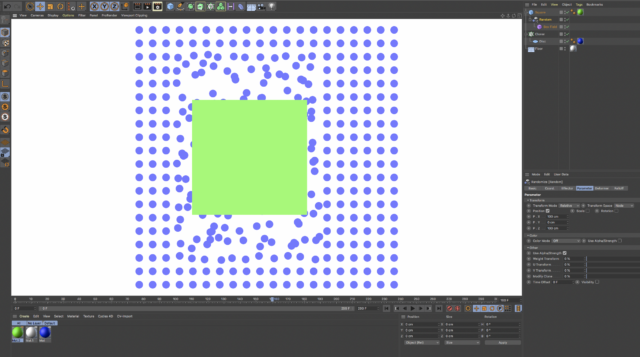
    Sure. Use a cloner to create the dots grid. Add a random effector to the cloner and make it a child of the moving square. Reset its PSR to align it with the square. Use a field in the effector’s falloff to control the shape and size of the disturbance. Since it’s a 2D animation set the random effector’s parameters to displace the dots in the X and Y directions. Voila.

  • Jim Scott

    October 5, 2020 at 2:32 am in reply to: Newbie advice on collision tags

    I should have made it clear in my last reply that I was specifically responding to your desire to use keyframe animation with dynamics, but I failed to do that, so I just wanted to add that there are many other ways to animate in C4D, including effectors, fields and forces. I hope that I didn’t confuse you too much by implying that keyframing and dynamics are the only ways to animate, and that my discussion of dynamics and keyframing was helpful.

  • Jim Scott

    October 4, 2020 at 9:52 pm in reply to: Newbie advice on collision tags

    Hi Matthew,

    When animating in C4D you can choose to use either keyframing to move an object, or dynamics, but not both at the same time. Once you add a rigid body tag to an object its movement can no longer be keyframed (it’s now “rigid,” if that helps), which is what you discovered. Notice that in the parameters of a rigid body tag its “Dynamic” setting is “On,” meaning it only responds to dynamics (physics – gravity, friction, bounce). Because of this, you can’t move your objects to new positions through keyframing AND have them bounce off of each other through dynamics. It’s either one or the other. You can keyframe the movement of objects with collider body tags because their dynamics is off, but any pieces that you want to bounce off of them must have rigid body tags (dynamics on) and therefore can not be moved through keyframing. It is possible to keyframe the “Dynamic” setting of a tag from Off to On (in order to change it from a collider object able to push rigid objects, to a rigid object able to be pushed by collider objects) but if it’s touching any other dynamic object when you do so they will explode apart.

    Unless someone else knows some magic to get around this issue I’m afraid that you’re stuck with keyframing the tangram pieces from one position to another in order to form new shapes while being careful not to allow any pieces to intersect. It’s an interesting project, and if I come up with some other approach I will let you know.

    Hope this helps.

  • Jim Scott

    October 1, 2020 at 8:47 pm in reply to: How to retrieve the rendered view?

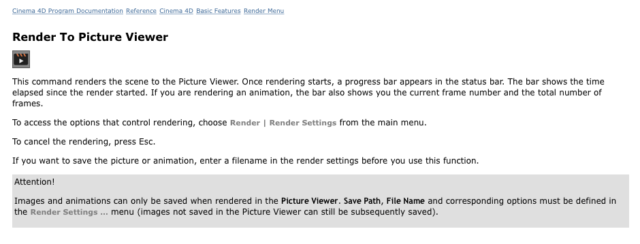
    I feel your pain, but unfortunately I don’t know of a solution other than rendering to the Picture Viewer. From the help files:

  • Jim Scott

    October 1, 2020 at 12:57 pm in reply to: Animation speed on a shader field not working for me

    I am glad to have helped. Good luck with the project.

  • Jim Scott

    October 1, 2020 at 2:15 am in reply to: Animation speed on a shader field not working for me

    I got the file Chad, thanks. It seems to be working fine with your settings, but I don’t know what look you’re going for. As you probably discovered, .001 seems to be the lowest speed it will accept. The movement of the bars is going to be a function of not only the animation speed of the noise, but of the loop period — how long the noise takes to loop back to its original setting. With a shorter loop period the movement is going to be pretty fast with even low animation speeds because it needs to return to its original setting sooner. Increasing the loop period will therefore slow down the movement. If you need slow movement with shorter loops, I think the only way is to decrease the amount of Y axis displacement.

    Sorry if I can’t be more helpful.

  • Jim Scott

    September 30, 2020 at 11:53 pm in reply to: Animation speed on a shader field not working for me

    Here’s the response from Tim Wilson, Creative COW Editor-in-Chief:

    File upload is on the roadmap for the next round of forums development, along with a few other goodies that we had to leave behind for a bit while we launch. The workaround for now would be to include a link to one of the free file hosting sites, or sites that people already have accounts (Google Drive, iCloud, Dropbox, etc).

    I’m afraid that we don’t have a date for bringing back upload, but it’s coming!

  • Jim Scott

    September 30, 2020 at 10:49 pm in reply to: Animation speed on a shader field not working for me

    You’re right. I don’t see an upload link either. I’ll see what the administrator’s say.

  • Jim Scott

    September 30, 2020 at 9:44 pm in reply to: Animation speed on a shader field not working for me

    You should be able to use values less than 1 for animation speed. I just tried .001 and it worked fine, though you must let the animation run longer to be able to notice the change. If you haven’t set a loop period, small values for animation speed will be hard to see if the parameters in the random effector are small. Set a short loop period and you should easily see the movement. If you still can’t get it to work upload the project file so that we can see exactly what you’re working with.

Page 19 of 46

We use anonymous cookies to give you the best experience we can.
Our Privacy policy | GDPR Policy