

Activity › Forums › Maxon Cinema 4D › Animation speed on a shader field not working for me
-
Animation speed on a shader field not working for me
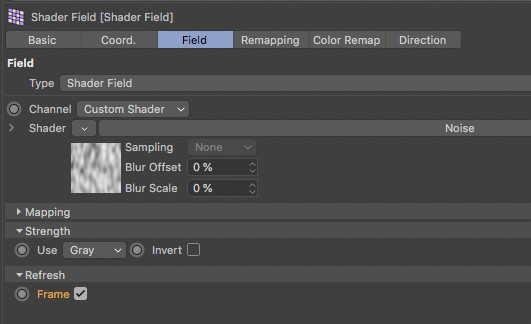
Posted by Chad Demoss on September 30, 2020 at 12:11 amI have a random effector on a cloner effecting the Y axis. I added a shader field and made it noise. I tried adding 1,2, 100 whatever to the animation speed and nothing happens. I know the shader is working because I can see the objects moving around when I adjust contrast, scale or other properties but I don’t see anything happen when I change the speed. I tried to render thinking maybe its just not showing in the project and still nothing. Once i figure this out I would also like to loop it and I assume that this is what “loop period” is for?
Tim Wilson replied 5 years, 11 months ago 3 Members · 12 Replies -
12 Replies
-

Jim Scott
September 30, 2020 at 1:57 amTry enabling “Frame” in the “Refresh” settings. See the help files for Shader Field: Field > Animation Frame Dependent. And you are right about “Loop Period.” It will loop the animation over the value in seconds.

-

Chad Demoss
September 30, 2020 at 3:43 pmWell what do you know that fixed it. thanks for your help Jim.
-
Chad Demoss
September 30, 2020 at 8:51 pmnow ive run into one other problem I have animation speed set to 1 and I want to slow the animation down but when I put any value under 1 such as .3 it isn’t doing anything. If I set the animation speed above 1 it is speeding it up. Can I not go slower then 1 animation speed?
-
Jim Scott
September 30, 2020 at 9:44 pmYou should be able to use values less than 1 for animation speed. I just tried .001 and it worked fine, though you must let the animation run longer to be able to notice the change. If you haven’t set a loop period, small values for animation speed will be hard to see if the parameters in the random effector are small. Set a short loop period and you should easily see the movement. If you still can’t get it to work upload the project file so that we can see exactly what you’re working with.
-
Chad Demoss
September 30, 2020 at 10:37 pmI’m not sure where to upload a file on this new site now. I see attach a photo but the upload linking is gone now.
-
Jim Scott
September 30, 2020 at 10:49 pmYou’re right. I don’t see an upload link either. I’ll see what the administrator’s say.
-
Jim Scott
September 30, 2020 at 11:53 pmHere’s the response from Tim Wilson, Creative COW Editor-in-Chief:
File upload is on the roadmap for the next round of forums development, along with a few other goodies that we had to leave behind for a bit while we launch. The workaround for now would be to include a link to one of the free file hosting sites, or sites that people already have accounts (Google Drive, iCloud, Dropbox, etc).
I’m afraid that we don’t have a date for bringing back upload, but it’s coming!
-
Chad Demoss
October 1, 2020 at 12:38 am -
Jim Scott
October 1, 2020 at 2:15 amI got the file Chad, thanks. It seems to be working fine with your settings, but I don’t know what look you’re going for. As you probably discovered, .001 seems to be the lowest speed it will accept. The movement of the bars is going to be a function of not only the animation speed of the noise, but of the loop period — how long the noise takes to loop back to its original setting. With a shorter loop period the movement is going to be pretty fast with even low animation speeds because it needs to return to its original setting sooner. Increasing the loop period will therefore slow down the movement. If you need slow movement with shorter loops, I think the only way is to decrease the amount of Y axis displacement.
Sorry if I can’t be more helpful.
-
Chad Demoss
October 1, 2020 at 3:21 amThanks so much for your help Jim
I misunderstood the loop period and now realize turning it up higher is actually slowing it down. For some reason I was thinking the opposite 2 loop period would mean it looped twice and came to a stop. turning the loop period to 5 is perfect. Now ill add this to the rest of my project and I think it’s done.

Reply to this Discussion! Login or Sign Up