Forum Replies Created

Page 17 of 46
  • Jim Scott

    November 6, 2020 at 12:54 am in reply to: Rotation Error in Perspective

    Concerning the pain of reinstalling a lot of plugins, are you using a version of C4D that included the ability to list a search path for plugins in the preferences? I can’t remember at the moment when that change occurred — either R20 or R21 I think. That would save both hard drive space and some of the reinstall hassle.

    Edit: I just checked and it was R20 where that change began.

  • Jim Scott

    November 6, 2020 at 12:45 am in reply to: Multi Shader random textures movement

    I don’t know what would cause the rendered texture to be different than what is displayed in the viewport. When I test my own example the textures rendered in the Picture Viewer are identical to those in the viewport. Any chance you were altering the random seed in-between renders?

  • Jim Scott

    November 5, 2020 at 5:37 pm in reply to: Multi Shader random textures movement

    Great. Glad to help. Thanks for reporting back.

  • Jim Scott

    November 5, 2020 at 1:14 am in reply to: Rotation Error in Perspective

    I have occasionally experienced a similar bug in R21, but it’s always pan that stops working. I can, however, always get it working again by restarting C4D. Since restarts don’t work for you, and I assume you don’t have a protection tag on the camera, I am unfortunately at a loss to help… but I do feel your pain.

    Concerning the axis lock/unlock buttons, as I understand them they are strictly for restricting the movement, rotation, and scale of OBJECTS while dragging those particular tools in the viewport, and have no affect on CAMERA manipulation.

    I hope you get it sorted out.

  • Jim Scott

    November 4, 2020 at 10:41 pm in reply to: Multi Shader random textures movement

    It sounds like the Color Mode of the second effector (which I’m guessing is also a Random effector) is also set to “Effector Color.” Make sure it’s set to “Off.” If that’s not the issue, please post your project file.

  • Jim Scott

    October 28, 2020 at 2:08 am in reply to: Transparent Background

    Import the video and logo into a new AE project. Drag the video onto the “Create a new Composition” button at the bottom of the Project window. This will create a new composition with the settings of the video. Drag the logo into the Composition window and place it above the video layer. You can then resize and reposition it as desired.

  • Glad to help. And thanks for reporting back.

  • Hi Steve,

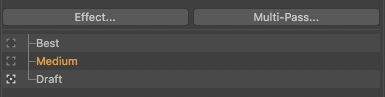
    It works fine for me. Make sure that you are using the updated render setting by enabling it in the square next to it. It’s possible to be looking at another setting (Medium, for example) by selecting the name, but be using another one (Draft in my screenshot).

  • Jim Scott

    October 19, 2020 at 2:20 pm in reply to: Cloner problem

    I hope all that time I spent hunting down a solution to your issue was helpful and appreciated, but I guess I’ll never know.

  • Jim Scott

    October 12, 2020 at 4:20 pm in reply to: How to create a unfold / peel off animation.

    For more help, please upload your project file. Use the “attach document” button at the bottom of the reply window.

Page 17 of 46

We use anonymous cookies to give you the best experience we can.
Our Privacy policy | GDPR Policy