Forum Replies Created

Page 2 of 6
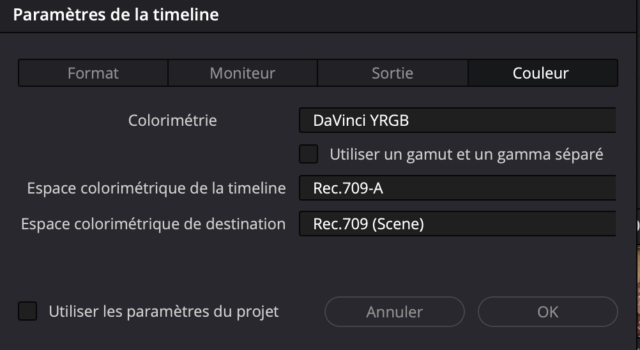
  • Thank you Michael. Effectively, the colorspace of the timeline had a slight difference.

    One output color space was on Rec.709 A et the other one on Rec.709 (Scene).

    So I put them both on Rec.709 (Scene) but the problem remains.

    I am looking at the file within DV on the same monitor, but on two different sequence and the grading still does not appear the same. Could vertical resolution (one is a 2160×3840) affect the color ?

  • Jean Tertrain

    March 16, 2025 at 10:03 am in reply to: my DVR is sick

    (is there an edit button when you access the forum through a phone ?)

    i think it’s getting better :

    https://youtube.com/shorts/b-fwvrAWxj4?si=DOINSSSCFdHgJON4

    Some contents or functionalities here are not available due to your cookie preferences!

    This happens because the functionality/content marked as “Google Youtube” uses cookies that you choosed to keep disabled. In order to view this content or use this functionality, please enable cookies: click here to open your cookie preferences.

  • Jean Tertrain

    November 27, 2024 at 2:06 pm in reply to: Footage overexposed after importing in DVR

    You are the best, many thanks Devrim.

    I would just like to share these screens, where I actually found a semi-way of using them with quite ease. It is yes very bright, but it has a “studio” tone.

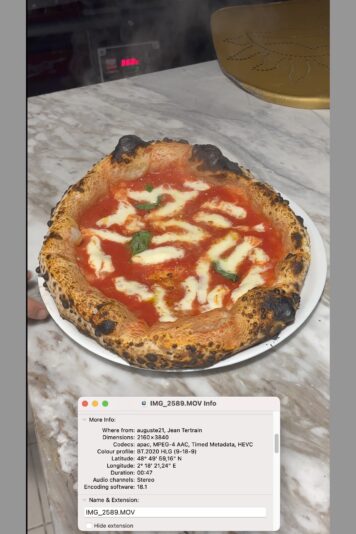
    1. raw screen from Mac native player

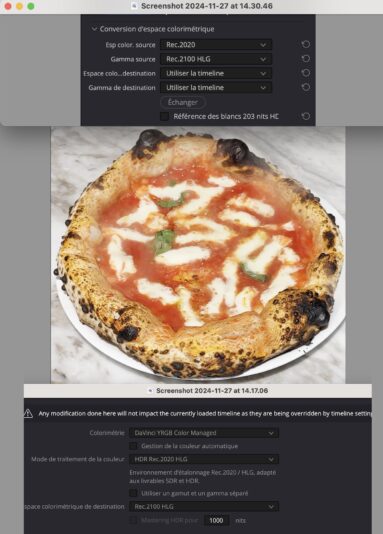
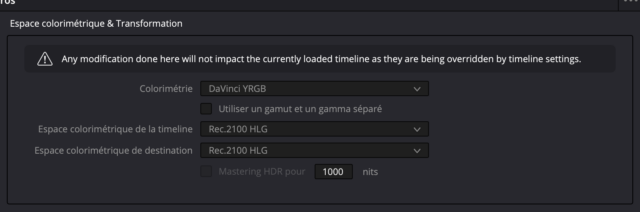
    2. raw imported in DVR (Rec.709A)

    3. trying things which looks “okay” (if you have any input regarding making it a little less flashy)

    __

    Which screen or Apple product could I buy (the cheaper) to get a HDR-able screen ?

    I can read here : https://support.apple.com/en-us/102205 that MacBook Pro have HDR screens since 2018 (so I could manage something on Backmarket), but for example here :

    https://support.apple.com/fr-fr/111925

    I see no trace of HDR capacity whatsoever, so I’m a little lost.

    __

    Final commentary, I just desactived HDR on my iPhone :D. For now.

  • Jean Tertrain

    November 26, 2024 at 2:20 pm in reply to: Contrast before and after exporting

    Okay Mads, thanks again, but in which container : .MP4 like you said earlier ?

  • Jean Tertrain

    November 26, 2024 at 12:34 pm in reply to: Contrast before and after exporting

    Thank you again Michael et Mads.

    So if I understand correct : DNxHQX 10 bit and DNx444 12 bit are not suitable for Youtube ?

    I would like to know what is the best one I could use in general and for Youtube, if I may ask.

    I have at the moment a lot of space on my disk (1To).

  • Jean Tertrain

    November 26, 2024 at 12:20 pm in reply to: Footage overexposed after importing in DVR

    Thank you a lot to you two (Devrim and John), where can I find these tutorials please John ?

    Here is how I clicked my Color buttons, but I get no changes…

  • Jean Tertrain

    November 26, 2024 at 11:45 am in reply to: Contrast before and after exporting

    Michael, a lof of thanks.

    Which one is better between DNxHQX 10 bit and DNx444 12 bit ?

    Can I use these for uploading my video to Youtube (or Instagram) with the best quality I can get out of my sequence ?

  • Jean Tertrain

    November 25, 2024 at 10:46 pm in reply to: Contrast before and after exporting

    Thank you very much for the help Mads.

    Atb

    Jean

  • Jean Tertrain

    November 22, 2024 at 1:52 pm in reply to: Contrast before and after exporting

    Thank you Michael.
    I found out that the problem was that I did not have the 709A option clicked on (both in my project and in DVR settings).
    So would you export it now, for the best quality : in ProRes HQ or MP4 H264 (OR H265) ?

  • Jean Tertrain

    November 21, 2024 at 12:20 pm in reply to: Contrast before and after exporting

    Hey Mads,

    First, thank you for your kind and lucid feedback.

    I’m at the moment exporting a ProRes file as you suggested, I will see how it goes 🙂

    You are right that I’m blowing the file as much as I can, as the film (48 minutes) will be uploaded to… (suspense and suspense) Youtube, with it’s nasty compressor.

    So I’m trying to get it there, in the beginning, as information rich as I can.

    __

    Which brings me the following question, in my case, with shots shot mainly on iPhone (SE 2020, if it has any importance), does it matter really that I select, a .H264 or a .H.265 (latter which I read was giving higher quality in 4K), and mostly, does it matter that I select 10 Mbps or 100 Mbps ?

    🖥

    As you said, maybe all the information is already exported in a 10 Mbps file… but I’m trying to be sure, as again, the Youtube compressor is a doom to already poor information videos.

    Thank you a gain a lot for reading me and for your help 🙂

    Jean

Page 2 of 6

We use anonymous cookies to give you the best experience we can.
Our Privacy policy | GDPR Policy