Forum Replies Created

Page 36 of 277
  • Filip Vandueren

    May 15, 2022 at 9:38 am in reply to: .replace method not working

    Hi Pete,

    The regex you created will replace every digit (character class \d) with “test”, and there are no digits in your sourceText.

    if you wanted to replace the letter d, don’t use a backslash, if you wanted all non-digit characters, use \D

  • It’s legit and officially documented by Adobe that this should work.

    What it doesn’t do is actually “bake” the expression while you’re still working on the comp: anything – including changing the name of say an unused solid in the project panel – can in theory alter the outcome of an expression, so it keeps recalculating while you are tweaking and changing stuff, but it doesn’t recalculate on every frame while ram-previewing or rendering.

  • Filip Vandueren

    May 11, 2022 at 9:26 am in reply to: Color change triggered by marker name

    Hi Jean,

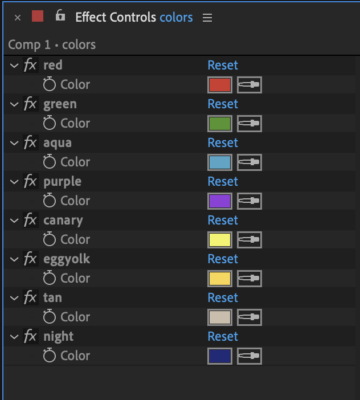
    i suppose you have your 10 colors set up as Color Controls on a Null layer ?

    (see attachment)

    The basic way of animating with markers could then be like this:

    expression on any color- property:

    markers = thisLayer.marker; // can also be thisComp.marker or another layer's markers.
    colorsLayer = thisComp.layer("colors"); // a Null layer where the colors are stored as named color control effects
    transitionTime = framesToTime(15);
    nearestMarker = markers.nearestKey(time);
    // do the necessary stuff to get current and previous markers without errors:
    curMarker = markers.key(
    clamp( nearestMarker.index - (nearestMarker.time>time) , 1, markers.numKeys)
    );
    prevMarker = markers.key(
    clamp( nearestMarker.index - (nearestMarker.time>time) -1, 1, markers.numKeys)
    );
    colorName_1 = prevMarker.comment;
    colorName_2 = curMarker.comment;
    if (curMarker.index == 1) {
    colorValue_1 = value; // we are before the first marker and default to the original value
    } else {
    colorValue_1 = colorsLayer.effect(colorName_1)("Color").value;
    }
    colorValue_2 = colorsLayer.effect(colorName_2)("Color").value;
    linear(time, curMarker.time, curMarker.time+transitionTime, colorValue_1, colorValue_2);

    If you want to actually do this within subcomps based on markers in another comp, (the exact oprder wasn’t clear to me from your explanation) then it might be better to also use essential properties, so the animation of certain things within the precomp can be done in the current timeline.

  • Filip Vandueren

    May 9, 2022 at 9:39 am in reply to: Fill the inside of a hollow/outline font

    It’s an effect I never use, but Paint Bucket, inverted fill can do something like you ask. It won’t _not_ fill the inside of an O or other enclosed shapes though.

    Another approach could be with Red giant’s Alpha Cleaner -> Plug holes, with some finessing you can get values that see the insides of the outlines as a hole in the alpha, but it’ll be hard to keep the shapes antialiased.

    Lastly, it might just be easier to hack the font with birdfont to make a version that isn’t outline only, if that variation doesn’t already exist.

  • When you rotate the emitter, you are rotating where the emitter is facing, any particles that have spawned get their initial orientation from this, but once they left the emitter, they continue on their path and don’t care anymore what direction the emitter is facing.

    As long as you are not keyframing, and you change the emitter’s rotation, it looks as if you are rotating the entire system, but when you keyframe, only new particles will face the new direction. If you’re emitting in omni directions, it might even look as if nothing is happening.

    In short, you might want to rotate the world instead of the emitter, this will give the illusion fo orbiting the particle system.

  • You would not do uppercase() at all, and add extra entries for the lowercase characters in the multitap object.

    The way it works is that if it doesn’t find it in the multitap-object, the character appears immediately, if it’s in the multitap, it goes through every character in that string.

    So you could also do c: “ABC2abc”, but that’s not how it worked back then I think. There were extra menu buttons to switch lowercase/uppercase in the phones, no?

    Instead of basing the next step on the time/frames, you could tie that to a slider of course. The main thing to remember is that you are animating through the amount of taps, not the final characters.

  • Hey Adam, this should be an expression on the sourceText of a text-layer

  • The easy solution would be to parent to a Null and rotate the Null.

    Also, the position of the anchorPoint isn’t really relevant in this problem, I think.
    The rotation would have to happen relative to a point of the composition (for example [0,0], or the position of the layer’s first psoiton keyframe etc.)

    That being said, here’s an expression that would work:

    rotationPoint = [0,0];
    rotationAngle = degreesToRadians(90);
    vector = value - rotationPoint;
    angle = Math.atan2(vector[1],vector[0]) + rotationAngle;
    rotationPoint + [Math.cos(angle), Math.sin(angle)]*length(vector);
  • Filip Vandueren

    May 5, 2022 at 2:28 pm in reply to: Mixing Colors red and yellow to make orange

    It’s a matter of tweaking the tolerance so only the orange gets selected

  • Filip Vandueren

    May 5, 2022 at 11:29 am in reply to: Mixing Colors red and yellow to make orange

    Using screen you should get something that is somewhat orange, then you can use the “Hue/Saturation” or “Change to Color” effect to get it to the precise shade you want.

Page 36 of 277

We use anonymous cookies to give you the best experience we can.
Our Privacy policy | GDPR Policy