Creative Communities of the World Forums

The peer to peer support community for media production professionals.

Activity Forums Adobe After Effects Expressions Color change triggered by marker name

  • Color change triggered by marker name

    Posted by Jean Livenais on May 10, 2022 at 12:36 pm

    Hi everybody!

    I am new to this programing world, but it’s very interesting and satisfying (when it works) to program animations!

    So thank you for helping new geeks like me 😉

    I’ve tryed to pick some bits of expressions here and there to cook an appropriate one, but it’s a kind of complicated to figure it out for now.

    I want to change the color of a composition triggered by marker’s name in the parent composition, with an ease effect between the previous color and the color triggered by the marker.

    I have 10 colors color A, color B, etc…

    I’d like the transition to be 15 frames long, starting before the marker and complete at the marker.

    I guess it is a piece of cake for you, thanks for your help.


    Jean Livenais replied 4 years, 3 months ago 2 Members · 2 Replies
  • 2 Replies
  • Filip Vandueren

    May 11, 2022 at 9:26 am

    Hi Jean,

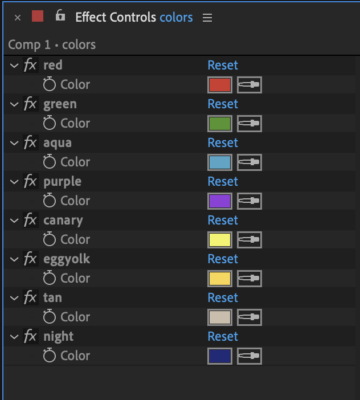
    i suppose you have your 10 colors set up as Color Controls on a Null layer ?

    (see attachment)

    The basic way of animating with markers could then be like this:

    expression on any color- property:

    markers = thisLayer.marker; // can also be thisComp.marker or another layer's markers.
    colorsLayer = thisComp.layer("colors"); // a Null layer where the colors are stored as named color control effects
    transitionTime = framesToTime(15);
    nearestMarker = markers.nearestKey(time);
    // do the necessary stuff to get current and previous markers without errors:
    curMarker = markers.key(
    clamp( nearestMarker.index - (nearestMarker.time>time) , 1, markers.numKeys)
    );
    prevMarker = markers.key(
    clamp( nearestMarker.index - (nearestMarker.time>time) -1, 1, markers.numKeys)
    );
    colorName_1 = prevMarker.comment;
    colorName_2 = curMarker.comment;
    if (curMarker.index == 1) {
    colorValue_1 = value; // we are before the first marker and default to the original value
    } else {
    colorValue_1 = colorsLayer.effect(colorName_1)("Color").value;
    }
    colorValue_2 = colorsLayer.effect(colorName_2)("Color").value;
    linear(time, curMarker.time, curMarker.time+transitionTime, colorValue_1, colorValue_2);

    If you want to actually do this within subcomps based on markers in another comp, (the exact oprder wasn’t clear to me from your explanation) then it might be better to also use essential properties, so the animation of certain things within the precomp can be done in the current timeline.

  • Jean Livenais

    May 12, 2022 at 7:29 pm

    Thank you very muck Filip, it’s working well.

    Only just one final touch.

    Is it possible to program the transition to occur before the marker, starting at the marker time – the transitionTime and ending at the marker time?

    I tried to modify the last line like this but it didn’t work

    linear(time, curMarker.time-transitionTime, curMarker.time, colorValue_1, colorValue_2);

We use anonymous cookies to give you the best experience we can.
Our Privacy policy | GDPR Policy