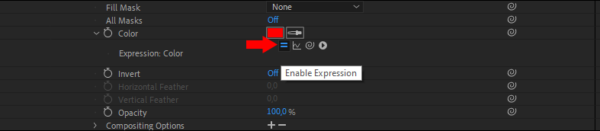
Fabrice Leconte 3 COW Coins @fabriceleconte • Joined May 2020 • Active 2 years ago Remove Connection Are you sure you want to remove from your connections? Timeline Profile Connections 4 Photos Forums Points Leader Badges Discussions Replies Favorites Discussions Replies Favorites Forum Replies Created Page 4 of 7 ← 1 … 3 4 5 … 7 → Fabrice Leconte April 1, 2021 at 6:31 pm in reply to: Is possible to combine style font and source text in expressions? You can use setText() style.setFont('Arial-BoldMT').setText(forcetext); Fabrice Leconte March 27, 2021 at 12:35 pm in reply to: Expression request – Line break if “. ” found in source text Simply use: text.sourceText.split('. ').join('\r'); Fabrice Leconte March 15, 2021 at 9:15 pm in reply to: can’t adjust color controller expression? Try to select the layer and press E key twice to see expressions. Then you can edit or remove expressions Or you can click on this icon to enable/disable expression screenshot.png 15 KB Image File - Click to view Copy Download Link Fabrice Leconte March 15, 2021 at 2:26 am in reply to: Conditional RegEx Match or test should work. thisComp.layer("YEAR").text.sourceText.match(/^\d{4}$/g)?0:100// OR(/^\d{4}$/g).test(thisComp.layer("YEAR").text.sourceText)?0:100 https://imgur.com/a/34ldDxE View post on imgur.com Fabrice Leconte March 12, 2021 at 11:32 am in reply to: Right to left, top to bottom opacity animator I forgot to join the project file. arab-animator.aep 262 KB After Effects Project Files - Click to view Copy Download Link Fabrice Leconte March 12, 2021 at 10:59 am in reply to: Right to left, top to bottom opacity animator I made this using mask and expressions https://imgur.com/a/hxMZtsi View post on imgur.com Fabrice Leconte March 10, 2021 at 5:06 pm in reply to: ExtendScript index You can change the index of a layer using: Layer.moveAfter(),Layer.moveBefore(),Layer.moveToBeginning() or Layer.moveToEnd() https://ae-scripting.docsforadobe.dev/layers/layer/#layer-moveafter Fabrice Leconte March 10, 2021 at 2:53 pm in reply to: Highlighting multiple words in a text Hello, try this: indexes = thisComp.layer("FIELD 1").text.sourceText.split(' ');indexes.indexOf(textIndex.toString())!==-1?100:0 jamel-ghabbara.aep 85 KB After Effects Project Files - Click to view Copy Download Link Fabrice Leconte March 3, 2021 at 11:58 pm in reply to: Reverse Strock path on auto-traced mask I think you just need to change the starting point (right click on a point => Mask and Shape Path => Set First Vertex ) and play with Start and End values. https://imgur.com/a/90bbiGH View post on imgur.com Fabrice Leconte March 3, 2021 at 3:50 am in reply to: Highlight custom words (for MOGRT) https://imgur.com/a/bHW3zIe Probably not perfect but the idea is: duplicate your text layer add an opacity animator and an expression selector to extract the word to highlight then, the most funny part is too find a way to convert the word into a rectangle… I combined fill,gaussian blur,mosaic and shift channel ? View post on imgur.com highlight_word.aep 165 KB After Effects Project Files - Click to view Copy Download Link Page 4 of 7 ← 1 … 3 4 5 … 7 →