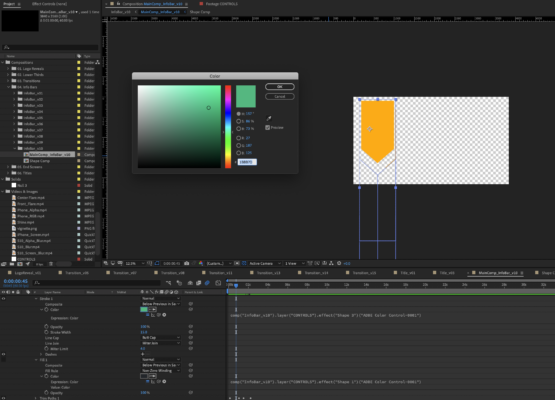
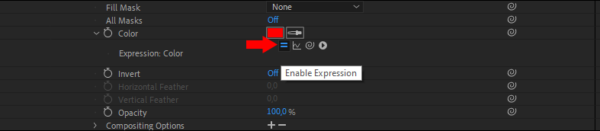
Activity › Forums › Adobe After Effects Expressions › can’t adjust color controller expression? Adobe After Effects Expressions can’t adjust color controller expression? Posted by Don Mick on March 15, 2021 at 9:08 pm i have a youtube template pack where i’m trying to change the color. however, when i adjust it, the color doesn’t actually change. i suspect it has something to do with the expression. can anyone please help? Thanks! Don Mick replied 5 years, 2 months ago 3 Members · 3 Replies 3 Replies Fabrice Leconte March 15, 2021 at 9:15 pm Try to select the layer and press E key twice to see expressions. Then you can edit or remove expressions Or you can click on this icon to enable/disable expression screenshot.png 15 KB Image File - Click to view Copy Download Link Dan Ebberts March 15, 2021 at 9:17 pm The expression indicates the color is coming from layer “CONTROLS” in comp “InfoBar_v10”. It looks like the comp you’re in is “MainComp_InfoBar_v10”. Don Mick March 15, 2021 at 9:44 pm thanks, everyone! this helped me find out that i was in the wrong comp when making the changes. Reply to this Discussion! Login or Sign Up Public All Members My Connections Only Me PublicAll MembersMy ConnectionsOnly Me Public All Members My Connections Only Me Reply to this Discussion! Login or Sign Up