

Activity › Forums › Adobe After Effects Expressions › ExtendScript index
-
ExtendScript index
Posted by Baqer Asad on March 10, 2021 at 4:05 pmHi, is there anyway to change the index of the layer after adding it from a script ?
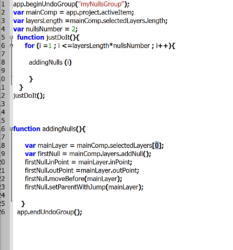
I tried this way as it’s shown on line 6 ,but it doesn’t work.
Baqer Asad replied 5 years, 6 months ago 2 Members · 2 Replies -
2 Replies
-

Fabrice Leconte
March 10, 2021 at 5:06 pmYou can change the index of a layer using:
Layer.moveAfter(),Layer.moveBefore(),Layer.moveToBeginning() or Layer.moveToEnd()
https://ae-scripting.docsforadobe.dev/layers/layer/#layer-moveafter
-

Baqer Asad
March 10, 2021 at 6:28 pmThank you so much!
I would ask 2 more things and I woulf be greatfull if you can answer them.
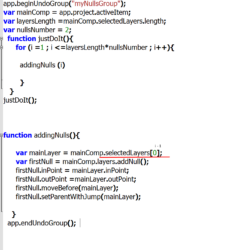
now I made the inPoint and outPoint the same as the selected layer and it works,but if I selected multiple layers and do the changes in photo2, it will give me an error,I think I can’t change the inPoint value even if I declared it as a variable so how can I get around it ?
and the second problem is the parenting , I parented it as shown in the picture but it’s working backward ,I want to make the layer parented to the new null and the new null to the newer one if possible.
sorry if that was a lot to ask but thank you very much. 🙂
Reply to this Discussion! Login or Sign Up