Forum Replies Created

Page 1 of 3
  • So this scene file contains a blank alembic file with a tag. The tag has python code that you can save as a preset or whatever.

    Just import the first file in an alembic file sequence and move the tag onto the object.

    MAKE SURE that the file sequence has absolutely no padding for the numbers. The number must start at 0.abc and not 00.abc or 000.abc, or else it will not work.

    Click on the tag and in the File Setup tab there is fpath where you put the folder path for the files.

    fname where you put the first part of the filename itself exluding the numbers, eg. TestFile_ but not the numbers or the .abc.

    file extension is where you put .abc

    And that should work.

    https://www.youtube.com/watch?v=SaI1xrQyWu4&t=1023s

    this is the tutorial that the guy shows it, and he sent me his tag file because the link for the file no longer works.

    Some contents or functionalities here are not available due to your cookie preferences!

    This happens because the functionality/content marked as “Google Youtube” uses cookies that you choosed to keep disabled. In order to view this content or use this functionality, please enable cookies: click here to open your cookie preferences.

  • I actually found a python script to make a tag that allows C4D to recognize alembic sequences and display them properly.

    Let me know if you need it, too. It is fairly easy to use.

  • Thank you for that.

    The only thing is, if my sequence is like 200 frames, then I don’t want to have to keyframe all frames to appear at the appropriate frame in the timeline.

    I thought there would be a way to import the sequence and have it run as one file.

    For Arnold in C4D, there is a Arnold Procedural object that can load the alembic sequence by simply adding #### in place of the file sequence number and it loads the whole sequence. The only problem is I still cannot find out how to render anything using that system yet.

    It shows a point cloud in the viewport, but nothing renders.

  • Ok, so apparently I can just use vdb if I use the c4d volume loader and mesher to create a mesh.

    I really thought I needed to use Arnold Volume for Arnold render, but this works just fine.,

    I don’t need alembic or USD or anything.,

  • https://mega.nz/file/cFgTFQLS#K8Vkqbbnqw41orQjguLzFQySROhDm_5SnbCnzaCiCU8

    Here are the first 50 frames because it is a bit large.

    I have tried using apps to stitch them, because I read that it needs to be imported as a single abc file, but I haven’t found a way that works.

    I tried exporting as USD, which I can’t get to work with Arnold Procedural yet, and VDB, which I cannot get the surface channel to render out either.

    Storm is free for the beta, so you could also try yourself. It is quite good at realtime fluids, as long as I can get it to import and render.

  • Eric Pereira

    September 29, 2025 at 1:33 am in reply to: Surface deformer doesn't work on mixamo characters (gap)

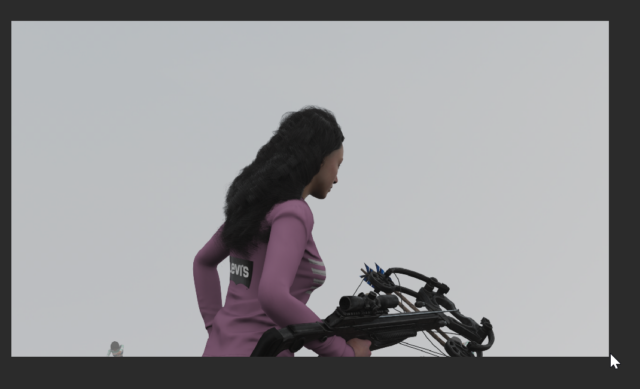
    I am trying to get this logo to stick to the character geometry.

    It is a mixamo character with a skin tag on the geometry.

    When I use the surface deformer, it floats about an inch or more above the actual surface, with no way to adjust it in the deformer settings.

    I used the shrink wrap deformer to achieve this in the photo.

    It is not perfect, as the folds in the clothes mesh create artifacts sometimes that requires adjustments.

    The surface deformer as seen in the tutorial by Maxon should have been the perfect solution.

    I even tried making the mesh a cloth object, but nothing would make the plane mesh with the logo attach like the video did.

    I always just had a big gap between polygons.

  • Eric Pereira

    September 27, 2025 at 7:10 pm in reply to: Surface deformer doesn't work on mixamo characters (gap)

    Does anyone have a way that works?
    Just take any mixamo character, put a plane object next to the back of them, and try to do a surface deformer.

    If yours attaches and moves with the character with NO huge gap between the geometries, I would appreciate sharing the scene or which version you have.

    It does not work under any circumstances for me.

    2025.3.3

    I followed the latest Maxon Training Team youtube video about doing this with a cape.

    I cannot make it work.

  • Eric Pereira

    September 25, 2025 at 4:44 pm in reply to: Surface deformer doesn't work on mixamo characters (gap)

    I understand that, but that can be tricky to lineup with uv coordinates.

    I have seen tutorials that have it work perfectly onto cloth objects. The mixamo character is not cloth, but it shouls work the same.

    Maybe ill just make it a cloth object with mix animation to pins and see if that works.

  • No. Setting it to 3D layer doesn’t help, either.

    You can see what happens to my cursor when I mouse over the layer.

    It can’t be selected.

    It is inside a composition that is an AEC file from C4D. So all the other layers are 3D, however, nothing like this happened with the other 5 AEC file compositions I have already used. I just tried the next AEC comp I have, and it works just fine. Only this one does this.

    I compensated for the error by not using a precomp, but it’s very annoying.

  • Ok, what I just realized is that even though it might still be a weird bug, the workaround is to put my layer into the timeline and THEN shift drag it beside the layer.

    What I was doing was dragging it straight onto the timeline and trying to shift drag it directly beside a layer, which wasn’t working.

    I found that if I just put it somewhere beyond the layer and then try it, it works.

Page 1 of 3

We use anonymous cookies to give you the best experience we can.
Our Privacy policy | GDPR Policy