

Activity › Forums › Maxon Cinema 4D › Surface deformer doesn't work on mixamo characters (gap)
-
Surface deformer doesn't work on mixamo characters (gap)
Posted by Eric Pereira on September 25, 2025 at 1:52 amI am trying to get an image on a plane object to surface deformer into a jacket of a mixamo character.
It almost works, except there is a perpetual 1 inch gap between the plane and character geometry with no way to offset it closer.
I can’t find any other settings that could help.
Anyone have advice?
Can anyone replicate this with a simple plane object and make it work?
Eric Pereira replied 11 months, 3 weeks ago 2 Members · 5 Replies -
5 Replies
-

Kouraib Abdmalek
September 25, 2025 at 8:32 amHi Eric,
it’s supposed that you could place an image on any surface, even if it’s animated, by using the image in a material, then controlling the projection. Other methods are used for 3D images, such as 3D letters or logos in Spline.
-

Eric Pereira
September 25, 2025 at 4:44 pmI understand that, but that can be tricky to lineup with uv coordinates.
I have seen tutorials that have it work perfectly onto cloth objects. The mixamo character is not cloth, but it shouls work the same.
Maybe ill just make it a cloth object with mix animation to pins and see if that works.
-
Eric Pereira
September 27, 2025 at 7:10 pmDoes anyone have a way that works?
Just take any mixamo character, put a plane object next to the back of them, and try to do a surface deformer.If yours attaches and moves with the character with NO huge gap between the geometries, I would appreciate sharing the scene or which version you have.
It does not work under any circumstances for me.
2025.3.3
I followed the latest Maxon Training Team youtube video about doing this with a cape.
I cannot make it work.
-
Kouraib Abdmalek
September 28, 2025 at 9:45 amIn the tutorial you are talking about I think they used the cloth built tool, also do you want to connect the surface with the character at specific snap points as is the case with the cape or do you want to connect all the points, if the first then it should work for you and there is a feature to control the gap in the cloth built but if the second (this is what I understood from your previous post) then I have never seen the built tool using in this way so I am not sure of its succes, rather than that if you want to achieve that using surface deformer I think you will face the problem of making the character behaving like a cloth.
-
Eric Pereira
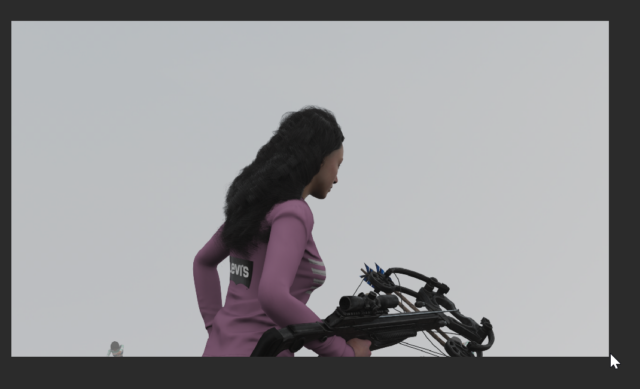
September 29, 2025 at 1:33 amI am trying to get this logo to stick to the character geometry.
It is a mixamo character with a skin tag on the geometry.
When I use the surface deformer, it floats about an inch or more above the actual surface, with no way to adjust it in the deformer settings.
I used the shrink wrap deformer to achieve this in the photo.
It is not perfect, as the folds in the clothes mesh create artifacts sometimes that requires adjustments.
The surface deformer as seen in the tutorial by Maxon should have been the perfect solution.
I even tried making the mesh a cloth object, but nothing would make the plane mesh with the logo attach like the video did.
I always just had a big gap between polygons.

Reply to this Discussion! Login or Sign Up