Don Smith
Forum Replies Created
-

I spoke too soon when I said I could open a new project once Motion is open by double-clicking on an existing project. Even though Motion is open (from double-clicking on an existing project), it crashes when trying to create a New project. That seems to indicate that it’s the dialog allowing you to choose what kind of project that makes Motion crash for me.
-
Update. I cannot get Apple Motion to launch, but on double-clicking a Motion project, Motion opens immediately. From there, I can open other projects and also start a new project. But, from the Desktop, Motion crashes on launch.
-
I’ve narrowed it down to corrupted Projects. Not the media inside the projects, but the Projects themselves. After completing one, I make a snapshot of it to make the next version with much of the elements filled in. I can create a fresh Project and copy an edit from a corrupt project into the new Project, and, on Export, I don’t get the ‘Live Free Yoga 480’ phantom title filling in the Title part of the Export dialog. But, where in the Project file can you hide that dialog? I’ve even stepped into the Library in the menu to look with no luck. I had a number of Projects to do and once I completed.
-
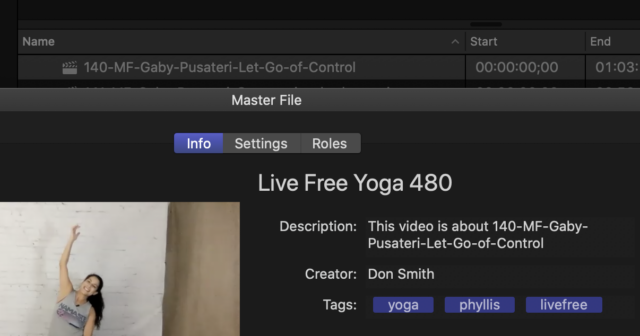
More information… As you can see from the screen grab, on export to a Master File, it fills in with the phantom ‘Live Free Yoga 480’ and the next line, the Description, it fills in the title of the Project. You can see the Project just above the export window. I have searched everywhere for where the ‘Live Free Yoga 480’ comes from and cannot find anything. I have deleted preferences for Final Cut as well.

-
More accurately, the alert after every CMD-S after the title was named is ‘Share successful. Sharing untitled was successful.’ It takes close to a minute after CMD-S for the alert to appear. I just started a new project and this is not happening. My problematic project is one where I follow a tutorial and has no third-party plug-ins. It’s just a path with a motion path and a flare and some paths that copy the edges of a font and then the font is removed.
-
You’re a genius Gump! ☺
Thank you BRAD!
I had heard of some things in Catalina that were problematic and I think I had a bias when I saw that I couldn’t see files on a removable media.
But now, I’m so glad that it was a short between the headphones and not a problem with Catalina.
I really appreciate your help.
Don Smith
TexasTwoLane.com
DonSmith.meNewsVideo.com
-
Thank you, Bret. I worked around the problem by brining the video clip into Motion and keyframing each end of a double-headed arrow so that each arrow following a moving target. Incredible that something like that won’t work on the FCPX timeline.
Don Smith
ShooterSmith.comNewsVideo.com
-
You went to a lot of trouble for all of to see the effect this Motion bug has.
Yes, that’s my result as well.
Thank you. I’m efforting a change to allow normal upper/lower display.
NewsVideo.com
-
Thank you, again, Simon. Your input is most valuable.
The font is Helvetica Neue LT Std / 75 Bold
This is the font chosen by corporate when they created the AE comp to give an animated title to Premiere users.That same font used in the AE comp, on the same computer (mine), looks perfect. I was the driving force to get everyone in my shop to switch to FCPX when it was introduced but other editors here now are trying to effect a conversion to Premiere by saying it’s as fast as Final Cut Pro X. Of course it isn’t, but the editors here never asked for instruction from me beyond getting started and so they went further with their learning on their own by using the point-and-click method and all of them are now using FCPX the way that they are familiar with; track-based editing. Thus, they think Premiere is as fast as X.
I’m tasked with making the AE comp into a Motion text object and it would be embarrassing, a defeat actually, that Motion can’t handle the same font as AE on the same computer.
That brings me to trying your suggestion. The short version is I can’t get it to work as an editable text object in Final Cut. I can get the default text in Motion to look right, but once on the X timeline and edited, it turns to garbage.
I’ve tried every combination I can think of to include checking or not checking the All Caps box and then trying the transformations of All Upper Case and then Capitalization and playing with the All Caps Size slider.
The default text should be all caps, but the first letter of each word is higher then the letters of the rest of the word. I can get it to fill out that way in the X timeline but the kerning goes to garbage.
Rats.
NewsVideo.com
-
Thank you Simon. It means a lot that someone with your high level of expertise has responded.
I have to use all caps because that’s the way corporate designed the AE comp to make the text graphic for Premier users and I’m trying to convert it for use as a text graphic for Final Cut.
I’m away from my computer but can’t wait to get back after the weekend to try your suggestion.
Thank you.
NewsVideo.com