Creative Communities of the World Forums

The peer to peer support community for media production professionals.

Activity Forums Apple Final Cut Pro Two Filenames Saved with Export! Sometimes!

  • Two Filenames Saved with Export! Sometimes!

    Posted by Don Smith on October 12, 2020 at 8:50 pm

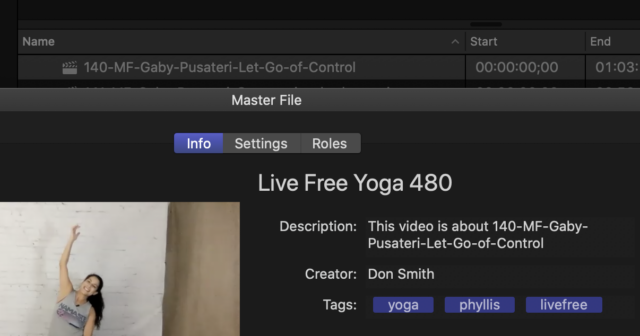
    When I export (to a Master File in this case), the export dialog normally picks up the title of the project. But it picks up ‘Live Free Yoga 480’ instead. Every time. Although ‘Live Free Yoga 480’ is something I would type somewhere in a project about Yoga, the title of the project is completely different. In the graphic below, I didn’t bother to change the Live Free Yoga 480 project name and instead continued the share and, for the last step, I pointed it to the project to be replace so the export would adopt the name. Then I’m asked if I want to replace a title of the same name. Yes. Then I’m asked if I want to replace a title of the same name. Yes. Then I’m asked if I want to replace a title of the same name. Yes. Then it replaces the file of the same name. Open the project in a quicktime window and, as you can see in the attached screen capture, the title at the top is ‘Live Free Yoga 480’ and the dropdown box contains the name of the project. I’m accomplished with Final Cut and Motion but I’m stumped here. New iMac Pro. Latest Catalina. Plenty of RAM. I even zeroed my boot drive and re-installed the OS and brought back my files from my Time Machine drive. I cannot batch export files anymore as well. Clues? Anyone?


    Don Smith replied 5 years, 6 months ago 1 Member · 2 Replies
  • 2 Replies
  • Don Smith

    October 12, 2020 at 10:49 pm

    More information… As you can see from the screen grab, on export to a Master File, it fills in with the phantom ‘Live Free Yoga 480’ and the next line, the Description, it fills in the title of the Project. You can see the Project just above the export window. I have searched everywhere for where the ‘Live Free Yoga 480’ comes from and cannot find anything. I have deleted preferences for Final Cut as well.

  • Don Smith

    October 13, 2020 at 12:47 am

    I’ve narrowed it down to corrupted Projects. Not the media inside the projects, but the Projects themselves. After completing one, I make a snapshot of it to make the next version with much of the elements filled in. I can create a fresh Project and copy an edit from a corrupt project into the new Project, and, on Export, I don’t get the ‘Live Free Yoga 480’ phantom title filling in the Title part of the Export dialog. But, where in the Project file can you hide that dialog? I’ve even stepped into the Library in the menu to look with no luck. I had a number of Projects to do and once I completed.

We use anonymous cookies to give you the best experience we can.
Our Privacy policy | GDPR Policy