Hi Dave
I have no experience with importing DJI video into VEGAS Pro, however I can guess as to what is causing the problem.
Firstly, which version of VEGAS Pro are you using, because VP has changed a lot over the last couple of years?
A good overview of your problem, has already being discussed on the official VEGAS Pro forums here.
https://www.vegascreativesoftware.info/us/forum/my-drone-footage-does-not-import–135236/
There are two or three settings you need to look at:
1. If your video was encoded using HEVC, you will need to turn on HEVC decoding in the Vegas Preferences.
2. You may also have to switch Hardware decoding from Intel to Nvidia or AMD, if you have an Intel CPU and an Nvidia or AMD graphics card.
3. You may also have to install HEVC codec in Windows, to allow playback of HVEC files on Windows.
These screen shots are from VEGAS Pro 21 (press images to see full screenshot).
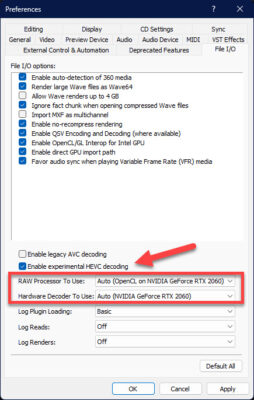
1. Go to Options / Preferences / File I/O
Turn on Enable experimental HEVC decoding.
2. If you have an Intel CPU and Nvidia/AMD GPU, set RAW processor = Nvidia or AMD and Hardware Decoder = Nvidia or AMD. Apply settings and re-boot VEGAS Pro.
Regards
Derek
vegascreativesoftware.info
My drone footage does not import
Hello everyone,I have a DJI FPV drone in my possession, the videos I shoot with do not import into Vegas, I only have the sound.But if I watch them in...