Forum Replies Created

Page 1 of 25
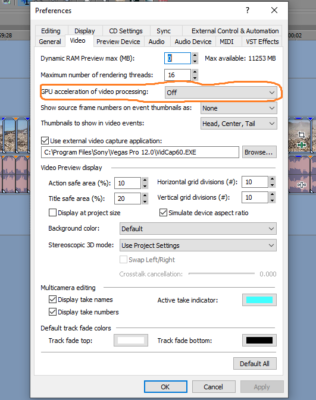
  • I seem to have figured out the problem. Once I turned “GPU acceleration of video processing” to “Off” things started working fairly normally again. Hopefully, this may help someone else in the future.

  • Since my original post, Vegas 12 has gotten really buggy and only responded better after rebooting the computer.

    I also re-installed Vegas 12, but I’m having the same issues.

    Sorry, but I couldn’t figure out how to edit my post.

  • Dave Petteruto

    January 16, 2019 at 12:42 am in reply to: Show only one color range in video

    Gentlemen, thanks so much for your help. I was able to get it done the way I wanted it.

    Thanks
    Dave P.

    Intel I7 950, 12GB RAM, NVIDIA GeForce GTX 460 SE, Vegas Pro 12 (32bit/64bit), Windows 7 Pro 64bit, LG WH10LS30 10X Bluray Burner.

  • Thank you Francois I’ll give that a try.

    Thanks
    Dave P.

    Intel I7 950, 12GB RAM, NVIDIA GeForce GTX 460 SE, Vegas Pro 12 (32bit/64bit), Windows 7 Pro 64bit, LG WH10LS30 10X Bluray Burner.

  • Dave Petteruto

    September 7, 2015 at 7:20 pm in reply to: Type jagged on render using Video4YouTube Ext.

    Thanks for the information, it’s very much appreciated. Lengthy installations is an understatement! LOL

    Thanks
    Dave P.

    Intel I7 950, 12GB RAM, NVIDIA GeForce GTX 460 SE, Vegas Pro 12 (32bit/64bit), Windows 7 Pro 64bit, LG WH10LS30 10X Bluray Burner.

  • Thanks for the help guys. I like Steve’s answer the best, much easier to implement!

    Thanks
    Dave P.

    Intel I7 950, 12GB RAM, NVIDIA GeForce GTX 460 SE, Vegas Pro 12 (32bit/64bit), Windows 7 Pro 64bit, LG WH10LS30 10X Bluray Burner.

  • Dave Petteruto

    April 3, 2014 at 12:06 am in reply to: Copy one affect to another event

    Thanks John–that’s exactly what I needed to know. To bad you can’t copy just one effect, but at least your suggested workaround will help.

    Thanks
    Dave P.

    Intel I7 950, 12GB RAM, NVIDIA GeForce GTX 460 SE, Vegas Pro 12 (32bit/64bit), Windows 7 Pro 64bit, LG WH10LS30 10X Bluray Burner.

  • Dave Petteruto

    October 25, 2013 at 6:27 pm in reply to: Audio suggestions needed-Church audio not so good!

    [Scott Francis] “For future reference, if you are videotaping anything in a church try to pull a line from the board so you can reduce reverb. I know it can be hard, and not always possible, but it can save a ton of headache!”

    Thanks for that info Scott–thankfully I did not shoot this video and I rarely shoot any video inside churches as I do pretty much do sports exclusively.

    Thanks
    Dave P.

    Intel I7 950, 12GB RAM, NVIDIA GeForce GTX 460 SE, Vegas Pro 10 (32bit/64bit), Windows 7 Pro 64bit, LG WH10LS30 10X Bluray Burner.

  • Dave Petteruto

    October 25, 2013 at 6:24 pm in reply to: Audio suggestions needed-Church audio not so good!

    Thanks Graham-Hopefully I did this correctly!

    Here is the link to the sample audio clip:
    6672_testclipaudio01.mp3.zip

    Thanks everyone for the suggestions you’ve given so far. I will note that I do not have any other sound tools other than what comes with Vegas 12.

    Thanks
    Dave P.

    Intel I7 950, 12GB RAM, NVIDIA GeForce GTX 460 SE, Vegas Pro 10 (32bit/64bit), Windows 7 Pro 64bit, LG WH10LS30 10X Bluray Burner.

  • Dave Petteruto

    September 10, 2013 at 3:16 am in reply to: Vegas 12 Explorer not working

    De-installed and re-installed Vegas including the new Vegas 12 (Build 710) update all to no avail. Funny thing is that explorer works in my Vegas 10. Very frustrating.

    Thanks
    Dave P.

    Intel I7 950, 12GB RAM, NVIDIA GeForce GTX 460 SE, Vegas Pro 10 (32bit/64bit), Windows 7 Pro 64bit, LG WH10LS30 10X Bluray Burner.

Page 1 of 25

We use anonymous cookies to give you the best experience we can.
Our Privacy policy | GDPR Policy