Chris Taylor
Forum Replies Created
-

Chris Taylor
February 21, 2023 at 8:10 pm in reply to: Needing to reset prefs with Premiere every day nowThanks Todd. I usually have AE in the background but trashing prefs solves any issues with AE still running. Rebooting and clearing the cache does not help, the pref reset is the only thing so far that prevents a hangup.
I haven’t tried creating a new project yet I guess that would be my next attempt to get rid of it.
-
Ugh, I hate workarounds. But I guess I’ll have to since Adobe doesn’t know how to fix their own software. Thanks for your help.
-
Thanks for the reply. No it gives me a generic error when I try to relink.
I also tried re-saving the media in an updated 2021 AE, that doesn’t work either. Also tried copying the AE media/project files to a new external drive and importing – no dice.
The other strange thing is it will work at first then after a few minutes, bounce back to the dreaded, red “media offline” and when I try to re-link it will again give me the generic error.
-
Chris Taylor
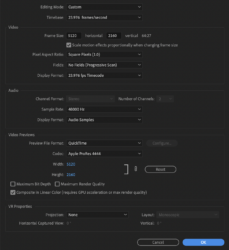
November 22, 2020 at 10:40 pm in reply to: Adobe Premiere/Media Encoder 2020 export process may outlive meRegarding the sequence settings window, you have to click on the link to see the full un-cropped image. It’s all there.
Yeah there are 4 mask layers (dead pixel killers) using opacity’s mask and Transform to shift it over dead pixels. The other 2 adjustment layers are Lumetri Color only.
And yes it’s re-rendered previews in PPro and I’m checking the “use previews” box before queuing to AME.
-
Chris Taylor
November 18, 2020 at 2:04 am in reply to: Adobe Premiere/Media Encoder 2020 export process may outlive meHi Bret,
The footage is R3D 5k widescreen on a matched sequence (attached). I’m currently on 14.3.2 build 42. The cache is on a separate 5 TB HDD drive. I clear the cache pretty often and I’m pretty sure the Adobe tech did that before anything else. I just cleared it again just in case.
Thx for your help so far.
-
Chris Taylor
June 16, 2013 at 8:16 pm in reply to: Premiere CS6 crashes consistently with GPU Acceleration enabledAs for the card list, it is a compatible card – if that’s what you were inferring.
– Chris
-
Chris Taylor
June 16, 2013 at 8:13 pm in reply to: Premiere CS6 crashes consistently with GPU Acceleration enabledSure, my pleasure:
Process: Adobe Premiere Pro CS6 [470]
Path: /Applications/Adobe Premiere Pro CS6/Adobe Premiere Pro CS6.app/Contents/MacOS/Adobe Premiere Pro CS6
Identifier: com.adobe.AdobePremierePro
Version: 6.0.2 (6.0.2)
Code Type: X86-64 (Native)
Parent Process: launchd [127]
User ID: 501Date/Time: 2013-06-16 13:05:13.423 -0700
OS Version: Mac OS X 10.8.4 (12E55)
Report Version: 10Crashed Thread: 0 Dispatch queue: com.apple.main-thread
Exception Type: EXC_BAD_ACCESS (SIGSEGV)
Exception Codes: KERN_INVALID_ADDRESS at 0x0000000000000000VM Regions Near 0:
VM Region Summary:
ReadOnly portion of Libraries: Total=463.6M resident=323.0M(70%) swapped_out_or_unallocated=140.6M(30%)
Writable regions: Total=1.5G written=1.2G(81%) resident=1.4G(89%) swapped_out=0K(0%) unallocated=167.6M(11%)REGION TYPE VIRTUAL
=========== =======
(null) (reserved) 40K reserved VM address space (unallocated)
ATS (font support) 31.9M
ATS (font support) (reserved) 4K reserved VM address space (unallocated)
CG backing stores 13.6M
CG image 320K
CG shared images 192K
CoreImage 8K
CoreServices 2404K
IOKit 44.2M
IOKit (reserved) 1536K reserved VM address space (unallocated)
MALLOC 370.7M
MALLOC guard page 64K
Memory tag=240 4K
Memory tag=242 12K
Memory tag=249 156K
Memory tag=251 28K
OpenCL 52K
OpenGL GLSL 1808K
OpenGL GLSL (reserved) 128K reserved VM address space (unallocated)
STACK GUARD 56.1M
Stack 23.7M
VM_ALLOCATE 1.0G
__DATA 34.9M
__IMAGE 528K
__LINKEDIT 158.1M
__TEXT 305.5M
__UNICODE 544K
mapped file 147.3M
shared memory 14.9M
=========== =======
TOTAL 2.2G
TOTAL, minus reserved VM space 2.2G -
Chris Taylor
June 9, 2013 at 6:22 am in reply to: Premiere CS6 crashes consistently with GPU Acceleration enabledIf it’s in their menu options, I’d say they’ve officially decided to support it. They wouldn’t include it to cater exclusively to their hacking customers. Plus that was a default setting. It took me several hours of forum searching to even find where and what it was.
-
UPDATE: I just bought a new splitter.
VERDICT: Exact same issue.Another thing I noticed is the input display when connected directly to the monitor reads “1920x1080i” and when routed through the splitter, it reads “720x480p”. So why does it switch from interlaced to progressive when routed through the switcher?
-
I don’t own another device that has an HDMI out. I know that’s pathetic, but besides my camera gear, I’m living in the stone age. Anyway, it seems really weird that it would do that! To make matters even more confusing, when it happened a couple times on set, I’d have to disconnect all the cables and reconnect, and it was hit or miss on whether it would monitor properly in the right aspect. Now it’s constant no matter what I do. Furthermore, the signal seems to be slightly, comparatively degraded, just enough to make focusing difficult.
I’m at a complete loss guys. I need your help!
– Chris