Creative Communities of the World Forums

The peer to peer support community for media production professionals.

Activity Forums Adobe Premiere Pro Adobe Premiere/Media Encoder 2020 export process may outlive me

  • Adobe Premiere/Media Encoder 2020 export process may outlive me

    Posted by Chris Taylor on November 16, 2020 at 8:22 pm

    I started this 14-minute, pre-rendered, 5k clip Saturday morning and as of Monday morning, it’s only 40% complete. I’m using Apple ProRes4444 and although I realize 6 adjustment layers is excessive, I also feel 5+ days to export a 14-minute clip is as well. 4 of those layers are transformed, mask adjustments to obscure dead pixels. Adobe’s suggestion was to just start deleting stuff…. so yeah, no.

    Is this issue exclusively tied to my timeline layers or are there other culprits at play? If the former, are there other ways to do this that are less taxing on the export process?

    Thanks in advance.

    Chris Taylor replied 5 years, 5 months ago 3 Members · 4 Replies
  • 4 Replies
  • Bret Hampton

    November 17, 2020 at 1:29 am

    Hi Chris

    There’s a lot more at play than what you’ve listed so far.

    What was your source codecs, sequence settings? Which PP build (and don’t say “latest” be specific. Did you clear your cache? In fact is your cache on a separate drive? I have SSD solely for cache for example.

    I’m on PC, so if you don’t get your answer here, try FB Adobe Premiere Pro Editors. Kyle and other pros there should be able to help.

    https://www.facebook.com/groups/adobepremierepro/

  • Chris Taylor

    November 18, 2020 at 2:04 am

    Hi Bret,

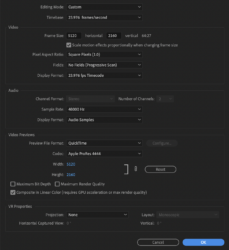
    The footage is R3D 5k widescreen on a matched sequence (attached). I’m currently on 14.3.2 build 42. The cache is on a separate 5 TB HDD drive. I clear the cache pretty often and I’m pretty sure the Adobe tech did that before anything else. I just cleared it again just in case.

    Thx for your help so far.

  • Todd Perchert

    November 19, 2020 at 8:27 pm

    You crop all other possibly relevant info. A screen shot of AME that had your sequence settings and export settings would be helpful. I’d be interested in what your export settings are.

    Those “dead pixel killer” layers are only masks? And what are on the other adjustment layers? 5k ProRes4444 has a lot of data to work with (including alpha channel data), so some effects may take longer. You do say “pre-rendered”, are you talking about preview renders in PPro? If so, did you select to use those on export?

    TC

  • Chris Taylor

    November 22, 2020 at 10:40 pm

    Regarding the sequence settings window, you have to click on the link to see the full un-cropped image. It’s all there.

    Yeah there are 4 mask layers (dead pixel killers) using opacity’s mask and Transform to shift it over dead pixels. The other 2 adjustment layers are Lumetri Color only.

    And yes it’s re-rendered previews in PPro and I’m checking the “use previews” box before queuing to AME.

We use anonymous cookies to give you the best experience we can.
Our Privacy policy | GDPR Policy