Brian Covalt
Forum Replies Created
-

Brian Covalt
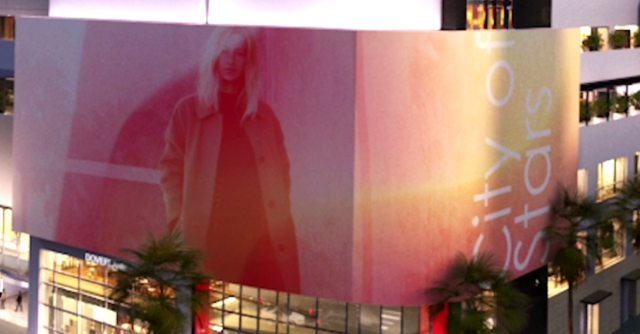
June 17, 2021 at 7:55 pm in reply to: How to bend a 3D object, or wrap image around a curved screen?Straight edge would be nice, but it needs to wrap around.

-
Brian Covalt
June 17, 2021 at 7:54 pm in reply to: How to bend a 3D object, or wrap image around a curved screen?It needs to wrap though, not have a hard edge between the west and east side.
Here’s a screenshot of the large screen I need to fill with video..It’s the wrap that’s got me puzzled on how to solve.
-
Brian Covalt
July 12, 2018 at 11:45 pm in reply to: Final Cut not seeing optimized media, though it’s there..Thanks for explaining and pointing me towards the article Jeremy – very helpful to understand!
-
Brian Covalt
July 11, 2018 at 5:55 pm in reply to: Final Cut not seeing optimized media, though it’s there..A bit of both – let me explain.
The original event and media was all on my Macbook Pro. I wanted it on my iMac Pro, so I launched FCP X on my iMac Pro and then mounted my laptop on the desktop. I was connected to it over WiFi.
In FCP X I opened my Macbook Pro library, found the event and dragged it onto my iMac Pro library.
I chose “consolidate media” and let it work. After about 8 hours, I finally gave up – it was taking forever!So then I connected a drive on my laptop and copied all the original media and optimized media to it. Then connected that drive to my iMac Pro and dragged it into the appropriate folders where my media is stored.
Now, sure enough, some clips show that they have original media and optimized media (those are probably the ones that finished transferring over Wifi), and others don’t show they have optimized media (those are probably the ones that didn’t finish, and now the media is in the media folder, but I don’t know how to tell FCP X that it’s there).
Thanks!
-
Brian Covalt
May 31, 2018 at 11:23 pm in reply to: Broadcast delivery kicked back due to chroma and compression rate.That app is helpful, thanks for suggesting it!
-
[Bob Zelin] “buy a QNAP. They are cheap, they have 10G ports, they work great. “
Thanks for pointing me towards QNAP. I had never seen or heard of them (not saying much), but it looks like it could be a great solution.
Now the only thing, which of the many many products would fit me best!I can narrow down a few things – I’d rather a desktop solution over a rack.
I don’t need the best, most awesome speed available, but an improvement over what we’re getting now will be wonderful.
Do I need Thunderbolt? I guess I don’t understand why you’d get a Thunderbolt option or how that’d be connected (to what?). Seems in my situation at least, getting a 10GbE solution connected to my 10GbE switch would be right.I know more drives is faster, but again I don’t know that I’ll take advantage of the FASTEST solution, do I really need a 16 bay (12 HHD + 4 SSD)?
Maybe at this point I should just call QNAP, but if you have a product in mind that you’ve used and think works well I wouldn’t mind the tip!
Thanks,
Brian -
Hi Bob,
Thanks for taking the time to explain that all; helpful to get a better picture of all the variables.
After your suggestion to configure SMB properly (as AFP will eventually be phased out), I’ve disabled SMB signing on both the server and client ends. I then connected via SMB and found that the Mac Pro was now doing better than the iMac Pro! haha. Who woulda guessed.
I’ve gotten about 540 MB/sec READ and WRITE, which is almost the same speeds I’ll get when running the AJA test locally on the server; meaning there’s now little-to-no slowdown from the ethernet connection!I am finding that I’ll get dramatically different speeds depending on where I place the target location on the server. Could this be a permissions issue, or do I just need to optimize the RAID storage?
Finally – regarding that damn Mac Mini – I don’t disagree.. it’s old and should be replaced since it’s the primary source that all our client machines are connecting to.
I’m curious what your opinion would be in this case –
I could use the Mac Pro (Late 2013) now as the server, but with its upgraded graphics card (D700) and memory (32GB), it feels like that machine would be better utilized by an artists (we do animation) than for only file sharing.
With that in mind, do you hate the idea of replacing my 2012 Mac Mini with a 2014 Mac Mini that would have Thunderbolt 2 and 16GB of ram? And if you hate the Mini route, what should I be looking for in a server that’ll help it perform with file sharing? When I look at the stats in the Server app, the Processor Usage is always below 25% and Memory Usage is never very high either; obviously the graphics card doesn’t really matter.Thanks again for helping!
-Brian -
Hi Bob,
Thanks for your reply. I understand I’ll get significantly better speeds with an upgraded server, but I think you got hung up on my Mac Mini Server.
Let’s say I’m happy with the speeds I’m getting from my iMac Pro connected to the crappy Mac Mini Server.I’m not asking how to get overall better speeds, but why is the Mac Pro so much slower than the iMac Pro, connected to the same Mac Mini Server?
For my purposes, the connection speeds I’m getting with the iMac Pro connected to Mac Mini Server are sufficient. I’m wondering why the Mac Pro isn’t getting the same speeds with the SANLink2 adapter.
By the way, my RAID is configured 0, using 4x 6TB drives (yes, I know I won’t get top performance compared to an Pegasus3 R8 but I don’t need it / can’t afford it).
Thanks again for taking the time to share your thoughts – I do appreciate it – I know you’re the guy to ask!
-
Brian Covalt
November 14, 2017 at 9:52 pm in reply to: Looking for an alternative way to add texture to vector lineHere’s the character before the effect is applied:

And here’s the character with the effect applied:

-
Brian Covalt
February 23, 2017 at 12:16 am in reply to: How to view 4K project on my HD broadcast monitor via BlackMagic Mini Monitor?hmm.. still can’t get it to show.
Thanks for testing on your end though; that’s somewhat encouraging that you can get it to work.
Here are my settings in the Blackmagic Desktop Video Setup app:
Under Video tab I have Output Format as 1080p24.
1080PsF On is checked, as is Remove Field Jitter On Pause.
Under the Conversion tab, Output conversion is set to: HD to SD, and Display As “Letterbox”.
The driver version is 10.8.3.In the FCP X preferences, under Playback, A/V Output is set to:
Blackmagic UltraStudio Mini Monitor 1920×1080@24Are any of my settings incorrect?