

Forum Replies Created
-

Brendon Murphy
October 19, 2020 at 8:52 pm in reply to: Check if comp exists before running rest of scriptFew things here:
-I believe your “for” loop should start with i=1 in this case, not 0.
-You are missing the curly braces that should follow your for conditions: for (var i=1 ; i<app.project.numItems.length; i ++)
– “!=” means “does not equal”. So you are currently looking for a comp that is NOT named “Final 2”. You will probably want to use ==
-“break” tells AE to leave the loop and do nothing else. You would not want this in front of any code that should be run when the condition is met.
-While you could theoretically place all of this code inside another loop that runs forever, that sounds like a recipe for disaster! After effects essentially freezes while a script is running – you could never do any action outside of the running script to create a comp. An endless loop might even cause your computer to freeze up and crash.
-
Brendon Murphy
October 19, 2020 at 3:01 pm in reply to: Stabilize phone screen and keep flat in shotThat’s the issue with stabilizing the screen – the rest of the image inherits the movement, resulting in your jitter. Most of the time, you do not want to stabilize a shot around a phone screen – you want the phone to move naturally, and your graphics to move with it. You can do this by just tracking the graphics to it, or by stabilizing the screen and then reverse-stabilizing it to restore the natural movement. If you need everything perfectly static for some reason (camera and hand) why not use a freeze-frame?
To answer your question about the lower screen portion, just manually keyframe those bottom corners. I like to use mesh warp – change it to 1X1 and quality to 10, and you basically have a corner pin with bezier handles.
-
Gary,
Sorry I wasn’t able to respond sooner. Glad you found a workaround!
I wonder if your issue has something to do with misinterpretation of an embedded alpha channel – I’ve seen something similar in video files. Next time you run into this, take a look under “channels”… if there’s an unintended alpha channel, you might try deleting it before saving out the new tiff.
-
-To make the person disappear, use a clean plate to cover the person, or create one in photoshop. Or you can follow your example and use a jump cut.
-For the flashing outline, create a new solid that’s the color you want. Draw a mask in the shape of your person . Duplicate the mask. Set the first copy to “add” and expand it a bit. Feather it. Set the second one to subtract. Set the blend mode for the layer to “Add”, maybe put a glow effect on it. Animate the opacity as the layer pops on and then fades away.
-For the flare in the center, you can draw the core shape using a mask on a solid, then set the blend mode for the layer to “add”. Apply a glow.
-
Brendon Murphy
October 16, 2020 at 2:26 pm in reply to: Original and new layer becomes transparant after using color rangeSander,
The transparent areas are there because you are only selecting some of the blue colors, not all of them. Here’s what I recommend:
-Duplicate your earth map so that there are two layers.
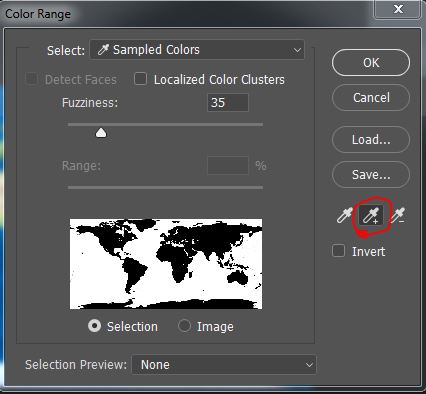
-In the color range tool, select the blue water with the eyedropper
-switch to the eyedropper with the + symbol beside it, and click+drag the dropper across more of the water area to make a better selection (see image below).
-Look at the black and white thumbnail to make sure your selection is good. Press “OK”
-Invert your selection to select the land (Shift+Cntrl+i).
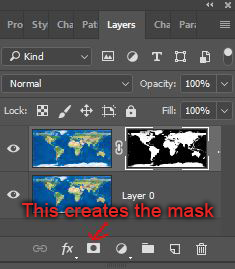
-Select the top map layer and press the mask button (see image below). This will hide the water on the top layer without actually deleting it.
This method is better than just deleting the water because you can use a levels adjustment on your mask to tweak the edges of the land (you can edit the mask by alt+clicking it). I do not recommend deleting the land from the bottom water layer, since that can create a gap between water and land. It’s hidden by the top layer anyway, so just leave it!

-
Hey, Gary! What bit depth are you working in? What format are your source images? Where are you sharing the finals (is it web or print)?
Have you tried merging all layers before saving to tiff? If you screenshot your export settings I can check that as well.
One more question – which program did you use to open the images screenshotted above?
-
Brendon Murphy
October 15, 2020 at 10:57 pm in reply to: many Brush elements are not 100% transparentAre you using a wacom pen with pressure sensitivity? If so, you may need to hold longer for the brush shape to be 100% transparent. One way to test this is to try using a mouse instead – is it 100% transparent?
If nothing else works, you could always use a levels adjustment on your mask after you are done painting the stars (alt-click the mask to edit it). Squeeze the Input black Point in a tiny bit so the brush strokes become fully black.
-
You can try making a GIF through photoshop:
-Export your animation from AE. If there’s no alpha channel, you could even try a more compressed format like h.264.
-Import>video frames to layers
-Export>Save for Web (Legacy)
-Choose GIF and then pick a quality that gets you to the right file size
-
That could certainly do it. If there’s really fast movement, you may need to skip that section in your track and just adjust that part manually in comp. I tend to do separate tracks for each “good” part, then parent the track nulls to each other in AE. Parent the Burn-in to the last parented null, then adjust it manually on top of the track as needed.
Another good trick – instead of tracking the raw footage, create a denoised hi-pass plate with enhanced details. There are a few tutorials out there for ideas on how to do this.
-
I’ve had funky issues sometimes if a bezier handle is twisted… sometimes you may not even realize it. I’d try setting up a new mocha project and draw a brand new mask. Keep the shape as simple as possible – a single rectangle if you can.