The banding is definitely there, not a software problem.
I believe this is down to the shutter speed setting on your camera. If the settings are the same then it could be that something changed about the lighting on location and that’s what caused this. This really is something you should correct on location, but there are some things you can do to fix this issue in post. At least a bit.
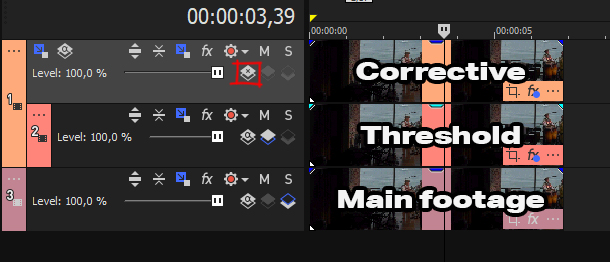
1) Apply Color Corrector (Secondary), click on “Select effect range” and click on one of the green bands. This will give you a reasonable starting point. In your case you might want to disable “Limit luminance” and “Limit saturation”. To better see what you’re selecting – toggle show mask. You need to fiddle with the “Limit hue” sliders until you visually see that you’re isolating the bands. I’ve attached an image where I played with the sliders a bit, might help as a reference point.
If adding it once is not enough – add another color corrector (secondary) and make further changes, select a different point, focus different areas. Stack the plugin multiple times. It likely won’t be perfect, but you can improve your footage to an extent, it will at least be less distracting.
2) Look into some “deflicker” plugins. I personally haven’t had a use case for them, so sadly there’s nothing I can recommend, but I’m sure there are some out there from multiple sources.
3) AI tools? Just throwing this out there. There might be something, might not – worth a quick check.
Option 1 will alleviate the problem somewhat.
Option 2, 3 could fix it the rest of the way. Emphasis on could. Giving it a brief look – seems like these are more focused on more obvious shutter speed flickering, not this colored bands situation.
And a side note – I picked the green band as I believe “magenta bands” to be the actual color. Could be the other way around – it’s one of the two, but I reckon green would be easier to try and fix.