

Activity › Forums › Storage & Archiving › LTO cartridge taking long time to erase new/old media
-
LTO cartridge taking long time to erase new/old media
Neil Sadwelkar replied 4 years, 12 months ago 5 Members · 23 Replies
-

Hari Krishna pune
January 26, 2021 at 5:10 amseems like the issue is getting resolved, from the time of my last post I haven’t done any changes. But, I could be able to copy 2.3TB to the tape now which is better improvement than the earlier 1.89TB.
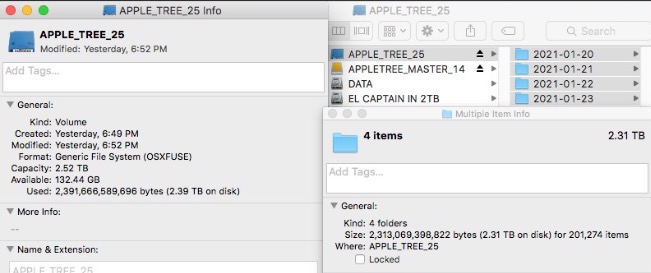
Yesterday I have put a full tape backup test with 2.31TB of arriraw footage and it’s done some what perfectly I would like to say. It still occupies 80GB extra space on tape but it’s still a relief. Please check the below attached screenshot.
Now it’s time check the restoring to check whether the data is fully copied without errors or not. So I put the same tape to restore back to my internal disk. It asked me 8hours to transfer 900gb. the restoring started at 8AM and now it 10:40 AM, 240gb copied till now and it is still showing 6hours.
Hari Krishna Pune
Archive Manager & FCP Editor

-
Hari Krishna pune
September 8, 2021 at 12:35 pmDear Folks,
Sorry for reopening the same old post again. It’s an update of my hardware. As many of the folks advised me to change my ATTO R680 cause it’s not have TLR for error correction, while I am getting errors again from a month I have replaced my R680 with H1280. I am still getting the same issue again even after the replacement. While doing the backup there is some size mismatch with the file and size on tape. Ex: 6.5gb of data copied to tape and the occupied space on tape is 10gb, even have the issue while restoring an old tape, it is taking days to copy a file with size of 19GB. Smaller files like arriraw is getting copied faster but alexa mini mxf and prores files with bigger file sizes are taking longer.
Hardware Info:
MBP 2012
sonnet echo express seIIAtto H1280
HP storever 6250 hh6
HPE LTFS version 3.4.0
-

Neil Sadwelkar
September 9, 2021 at 4:02 amThe Atto H1280 works fine with Bru, Toyota, and Canister. And it works with a MBP via a Sonnet Echo Express SEL. I have the exact same config and have written many petabytes of data using Bru, Yoyotta and Canister. They are all rock solid.
With LTO-7 and 8, the write or restore speed I see, is completely dependent on the drives I read from. So, for example, if I backup a client’s data off a Lacie Rugged or a Seagate slim portable drive, then it gets backed up at a steady 90-110 MB/sec. If I backup off SSD or 4 or 8-bay RAID, then I can backup to LTO at as high as 300 MB/sec. 1 TB gets written to LTO-8 in under an hour. Same for restore from LTO-8 to RAID.
It looks like you are not using any purpose built software too write your LTOs but you’re doing a drag-drop or copy-paste from hard drive to LTO tapes with the free HPE Storeopen LTFS software.
Way back in Jan, Martin of Toyota offered to let you use a trial version of Yoyotta and create logs for them to troubleshoot? Did you try that? Or have you tried, with your config, to write to LTO tape using software like Yoyotta, or Canister, or Bru or any other software apart from Storeopen?
My feeling is that you have a combination of issues from software, and from old or partially working LTO drives. And since you’re doing this sporadically, and changing things around from system to system, drive to drive, to find a solution, you’re going around in circles.

Reply to this Discussion! Login or Sign Up