Steve Jacobs
Forum Replies Created
-

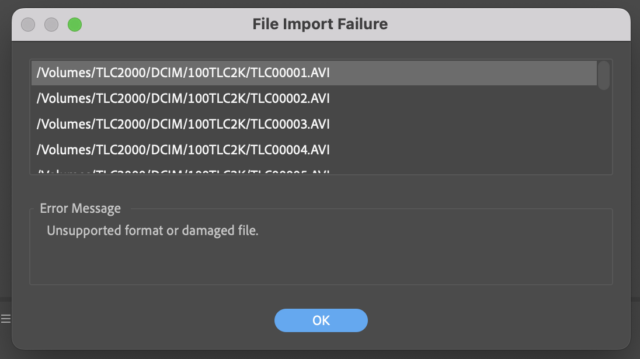
PP 2022. It’s my understanding Adobe Premiere Pro has never supported importing .AVI files. These files are from a Brinno time lapse camera and I believe the AVIs are encoded H.264. This is the error screen I get on multiple different AVIs.

-
Frankly, Graham, I’m mad at both. It’s 2022 and I’ve been dealing with this crap from Adobe, Microsoft and Apple since the early 90s. Figure it out! Unfortunately, this is the kind of chaos that happens every time I upgrade. Thankfully, my wife’s MAC is still on Mohave, so I was able to finish my edit. But still, it’s maddening.
-
Thanks Rodrigo. I think I posted this in the wrong forum. But anything you can tell me helps. Here is the project.
Steve
-
So that fix lasted about a year. I’m still on OS Yosemite, and the other day had yet another hard drive failure on the Hitachi drives in the Pegasus R6. So I did the same as last time and installed a 2TB drive to replace. Ran the migration and all went well. But this morning I got a warning message saying OS X couldn’t repair the drive. Well I never use the MAC disc utility because Promise has its own.
So I can see /move/copy files from my 5 TB raid5 drive, but it won’t let me delete files. Anyone else get this prompt? I tried Safe Mode, but still couldn’t save or delete files.
Thanks.
Steve
-
Hi Noah,
I read the link you sent, and while it does explain how to burn a DVD, I still see no option to add additional content on the disc. In Encore, as part of the DVD burning process, it prompts you if you want to add ROM content like the original .mov or mp4 files, that way it will play on both a computer and in a DVD player.
-
Steve Jacobs
November 14, 2016 at 2:21 pm in reply to: Upgrading to El Capitan for Latest Final Cut Pro X (10.3)My only warning is that certain software might not work. I have a Mac Book Pro (2011) and as soon as I upgraded to the latest version of El Capitan 10.11.6, all of my Adobe CS5.5 software stopped working.
Also, I have a Pegasus R6 RAID array, and after I had a drive failure a few weeks ago, I tried to run the Promise Utility to rebuild a new drive, and it wouldn’t work with El Capitan 10.11.6. My wife has a newer iMac, but she was still on El Capitan 10.11.3, and thankfully it worked on hers so I was able to fix my hard drive array.
And last, I noticed that with El Capitan, you now cannot use Disk Utility to stripe a RAID array. For all these reasons, I can understand why another Creative Cow guy told me “we’re still on Mountain Lion for our editing computer.
-
Strange update to this problem. So after FCP X 10.3 updated, now all my CS5.5 software works. I don’t understand how or why, but it does. Will make a Time Machine backup and stay on El Capitan 10.11.6 for now.
-
A strange update to this whole mess. I am still on El Capitan 10.11.6 and have not gone back to Mavericks because I’m in the middle of a large video project and just need to get it done.
So apparently I have automatic updates checked on my App preferences and Final Cut X updated to 10.3 two nights ago. I boot my computer and realize that FCP looked different. Whatever. I’m was able to finish my video project and when I finished, I decided to check my CS5.5 programs that previously had not opened. Suddenly, now all my CS5.5 software works again. What???? So what I thought was an operating system problem, is somehow related to my FCP software. The only other update that was installed in the last few weeks was iTunes.
So I’m making a Time Machine backup right now and will stop upgrading my OS from now on.
The Promise Utility software still doesn’t work on my laptop, but at least I know I can run it from my wife’s MAC, which is still on El Capitan 10.11.2.
-
I’m not sure why I switched other than to get rid of the prompt that kept appearing in the upper right corner. I do have a Time Machine backup, so I’m going to try and revert on my laptop to see if I can go back to at least Yosemite on my laptop.