Creative Communities of the World Forums

The peer to peer support community for media production professionals.

Activity Forums Adobe Premiere Pro Importing .AVI files in Premiere Pro

  • Importing .AVI files in Premiere Pro

    Posted by Steve Jacobs on July 16, 2022 at 7:13 pm

    Trying to import .AVI time lapse files into Premiere Pro. I know PP doesn’t like .AVI files, so I was using Quick Time Player to convert them to .MOV files. That used to work until I upgraded to OS Monterey the other day. Now QT won’t open the files. I tried VLC, but I hate their conversion interface and it was 21 separate .AVI files, so it’s a pain. I pay Adobe a lot of money each year for their Creative Suite. Is it too much to ask that they support a friggin .AVI file? Come on Adobe! Is there another solution for this? Thank you.

    Diogo Ribeiro replied 3 years, 10 months ago 7 Members · 8 Replies
  • 8 Replies
  • Graham Tees

    July 16, 2022 at 7:22 pm

    Don’t blame Adobe. Apple dropped all support for Quick Time several versions ago – I think when Catalina was released.

  • Steve Jacobs

    July 16, 2022 at 8:40 pm

    Frankly, Graham, I’m mad at both. It’s 2022 and I’ve been dealing with this crap from Adobe, Microsoft and Apple since the early 90s. Figure it out! Unfortunately, this is the kind of chaos that happens every time I upgrade. Thankfully, my wife’s MAC is still on Mohave, so I was able to finish my edit. But still, it’s maddening.

  • Robert Withers

    July 16, 2022 at 8:54 pm

    What version of PP? There’s a contact for Adobe . . .

  • Steve Jacobs

    July 16, 2022 at 9:03 pm

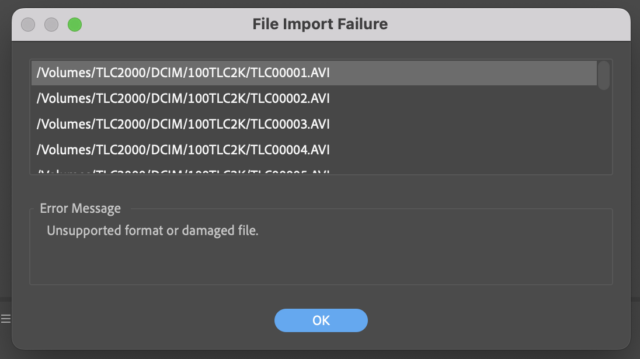
    PP 2022. It’s my understanding Adobe Premiere Pro has never supported importing .AVI files. These files are from a Brinno time lapse camera and I believe the AVIs are encoded H.264. This is the error screen I get on multiple different AVIs.

  • Mads Nybo jørgensen

    July 16, 2022 at 10:04 pm

    Hey Steve,

    Out of interest, have you tried to take the AVI’s into PPro via After Effects?
    I have not tried it on my Mac (I run mainly PC for Adobe), but as AVI is still present inside After Effects (the slightly older version I use), I can’t see why it would not be possible.

  • Dennis Dean

    July 16, 2022 at 10:30 pm

    I have used MPEG Streamclip to convert AVI files to to ProResLT (Just converted one to make sure) as well as the formats. I currently have it on a MacBook Pro running Hi Sierra (10.13.6).

    Here’s the current link: http://www.squared5.com

    I’m using version 1.9.3b7

    Looks like there is a 1.9.3b8 beta available… It’s free. And there are other converters that could probably help.

    Good luck!

  • Steve Brame

    July 17, 2022 at 12:30 am

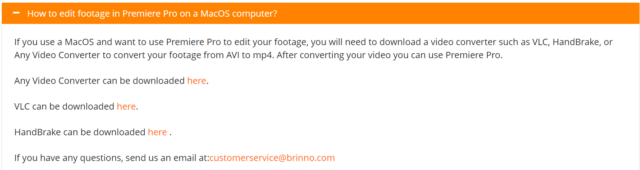
    Take a look at the very last entry on Brinno’s FAQ page.

  • Diogo Ribeiro

    July 19, 2022 at 1:02 pm

    Hey Steve


    I’m the main dev of Autokroma Influx, and I’m interested in supporting these files with our plugin, so that you can open them in Premiere or After Effects without transcoding.


    Do you mind sharing one of these files with me, so I can look into it? Thanks!


    Meanwhile, you can try to install Influx and see if it works (it might). It’s a paid plugin but there is a free demo version you can use to test.


    Kind regards,

    Diogo

We use anonymous cookies to give you the best experience we can.
Our Privacy policy | GDPR Policy