Forum Replies Created

  • Stefano Malerba

    April 18, 2024 at 9:52 pm in reply to: Rope-ish Dynamics Expression

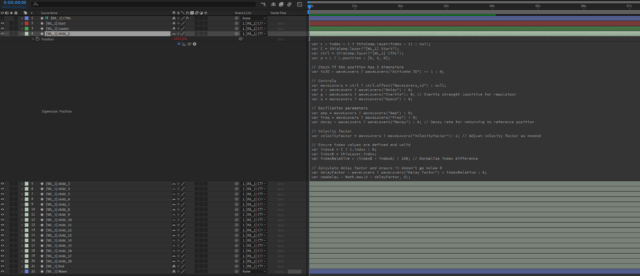
    Hey Russell! Here the screen grab of the timeline.
    I’m writing a UI Script that involves this expression.
    Right now, I’m still developing the script, but if you want, I could share a beta version and you could test it.

  • Thank you for answering.

    I figured out the problem. The issue appears to be caused by the separation of position values on nulls.😅

  • Stefano Malerba

    April 2, 2024 at 12:51 pm in reply to: Rope-ish Dynamics Expression

    Hey Dan! Thanks so much again for your help.

    In the end the expression I used is this:

    var L = index > 1 ? thisComp.layer(index - 1) : null; var C = thisComp.layer("Start");

    var ctrl = thisComp.layer("CTRL");

    var p = L ? L.position : [0, 0];

    // Controls

    var d = ctrl ? ctrl.effect("WaveLovers")("Delay") : 0;

    var g = ctrl ? ctrl.effect("WaveLovers")("Inertia") * -1 : 0;

    var s = ctrl ? ctrl.effect("WaveLovers")("Space") : 0;

    // Oscillation parameters

    var amp = ctrl ? ctrl.effect("WaveLovers")("Amp") : 0;

    var freq = ctrl ? ctrl.effect("WaveLovers")("Freq") : 0;

    var decay = ctrl ? ctrl.effect("WaveLovers")("Decay") : 0;

    // Ensure index values are defined and valid

    var indexA = C ? C.index : 0;

    var indexB = thisLayer.index;

    var indexRelative = indexA - indexB;

    // Adjusted offset calculation

    var offset = L ? L.index - index : 0;

    // Calculate delay factor and ensure it doesn't go below 0

    var delayFactor = ctrl ? ctrl.effect("WaveLovers")("Delay Factor") * offset : 0;

    var newDelay = Math.max(d - delayFactor, 0);

    // Calculate deltaX and deltaY with delay

    var deltaY = p.valueAtTime(time - newDelay)[1] - p.valueAtTime(0)[1];

    var deltaX = p.valueAtTime(time - newDelay)[0] - p.valueAtTime(0)[0];

    // Apply delay and oscillation effect to position

    var pos = value + [(deltaX * (1 + offset * g)) - (s * indexRelative * -1), deltaY * (1 + offset * g)];

    // Handle keyframes and oscillation

    var n = 0;

    if (p.numKeys > 0) {

    n = p.nearestKey(time).index;

    if (p.key(n).time > time) {

    n--;

    }

    }

    if (n > 0) {

    var t = time - p.key(n).time;

    if (t < 1) {

    var v = p.velocityAtTime(p.key(n).time - thisComp.frameDuration);

    pos += v * (amp / 100) * Math.sin(freq * t * 2 * Math.PI) / Math.exp(decay * t);

    }

    }

    pos; // Return the final position

  • Stefano Malerba

    March 22, 2024 at 11:36 am in reply to: Rope-ish Dynamics Expression

    Thank you so much Dan!

    Your expression inspired me to achieve the desired result while requiring far less CPU processing power.

    I’m using this expression on the first NULL that follows the Leader to calculate the movement and speed, resulting in the precise animation I’m looking for:

    rapidity=thisComp.layer("Leader").effect("Rapidity")("Slider"); //following speed
    inertia=thisComp.layer("Leader").effect("Inertia")("Slider"); //how dull the following will be (0-1)
    leader=thisComp.layer(index-1);
    xyz = position.valueAtTime(0) - thisComp.layer(index-1).position.valueAtTime(0);
    pos1=leader.position;
    pos2=leader.position;
    v=0; i=0;
    while (i<=time)
    {
    pos1=leader.position.valueAtTime(i);
    delta=sub(pos1,pos2);
    a=delta*rapidity*thisComp.frameDuration;
    v=(v+a)*(1-inertia);
    pos2 += v;
    i += thisComp.frameDuration;
    }
    pos2 + xyz

    And your expression on all the other Nulls, so I’ll keep the increasing overshoot factor avoiding the heavy calculation on each Null.

    Thank you, I really appreciated the time you gave me!

  • Stefano Malerba

    March 20, 2024 at 10:35 pm in reply to: Rope-ish Dynamics Expression

    Thanks so much Dan! But I can’t achieve the results I want. That expression do exactly what I need but it is way too heavy on the CPU.

    Can I ask for help with that? A hint for writing an expression that does something similar?

  • Stefano Malerba

    March 19, 2024 at 4:21 pm in reply to: Rope-ish Dynamics Expression

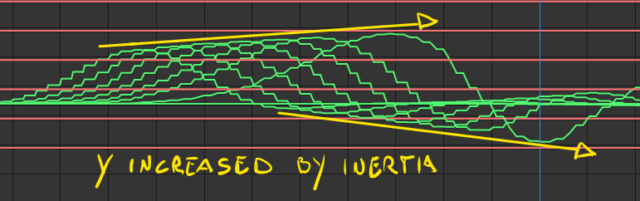
    Yeah, this was my starting point. I just want to add to the delay an inertia effects to each layer based on the velocity of the previous layer.

    For example, if the leader moves from 0 to 10 at an “X” velocity, Child_01 will move from 0 to 11 ( 10 + “X” velocity ), Child_02 from 0 to 12, and so on until the End layer.

    Sorry, I’m doing my best to explain.

  • Stefano Malerba

    March 19, 2024 at 9:38 am in reply to: Rope-ish Dynamics Expression

    I’d like to provide more context so that you may better comprehend what I intend to do.

    The goal is to achieve a result similar to Ordinary Folk’s Wave Rig.

    Their Wave, however, is formed using controls.

    I’d like everything to be built on and driven by a Leader layer.

    So my expression will be applied to an X-series of nulls that fall between the first Null “Leader” and the last Null “End”.

    I hope I have explained myself clearly.

  • Stefano Malerba

    March 19, 2024 at 9:26 am in reply to: Rope-ish Dynamics Expression

    Dan, thank you very much for your helpfulness!

    The first expression works fine, and it does not freeze after effects 😛 , but it doesn’t have the increasing inertia that I would like to have. Also, when the speed of the animation is slow, it does that jump in the value graph.

    I’m trying to make the first expression have a result as similar as possible to the second expression.
    But I’m completely stuck.

    Here is some screen-recoding.

    FIRST EXPRESSION

    SECOND EXPRESSION

    Again, thank you very much for your help.

  • Stefano Malerba

    March 19, 2024 at 12:19 am in reply to: Rope-ish Dynamics Expression

    Thank you for your reply, Dan!

    Unfortunately, I have overwritten the project. But there were 3 keyframes, the last one ended there where you see the jump in the graph.

    The sliders were set with very low values, but even changing them I still got the same result.

    I have found another expression here in another forum that does what I need, but it seems to be a bit too heavy.

    Is there any way to make it lighter?
    I will use this expression on something between 10 and 50 layers in the same comp.

    rapidity=thisComp.layer("Leader").effect("Rapidity")("Slider"); //following speed

    inertia=thisComp.layer("Leader").effect("Inertia")("Slider"); //how dull the following will be (0-1)

    leader=thisComp.layer(index-1);

    xyz = position.valueAtTime(0) - thisComp.layer(index-1).position.valueAtTime(0);

    pos1=leader.position;

    pos2=leader.position;

    v=0; i=0;

    while (i<=time)

    {

    pos1=leader.position.valueAtTime(i);

    delta=sub(pos1,pos2);

    a=delta*rapidity*thisComp.frameDuration;

    v=(v+a)*(1-inertia);

    pos2 += v;

    i += thisComp.frameDuration;

    }

    pos2 + xyz

We use anonymous cookies to give you the best experience we can.
Our Privacy policy | GDPR Policy