Creative Communities of the World Forums

The peer to peer support community for media production professionals.

Activity Forums Adobe After Effects Rope-ish Dynamics Expression

  • Rope-ish Dynamics Expression

    Posted by Stefano Malerba on March 17, 2024 at 12:09 pm

    Hello folks!

    I’m applying this expression to the position property of 10 nulls.

    P = thisComp.layer("leader").position;
    delay = thisComp.layer("leader").effect("delay")("Slider"); // link to a slider for easy tweaking
    de = delay*thisComp.frameDuration*(index-thisComp.layer("leader").index);
    F = thisComp.layer(index-1).position.valueAtTime(time-de);
    xyz = position.valueAtTime(0) - thisComp.layer(index-1).position.valueAtTime(0);
    n = 0;
    if (P.numKeys > 0){
    n = P.nearestKey(time).index;
    if (P.key(n).time > time){
    n--;
    }
    }
    if (n == 0){
    t = 0;
    }else{
    t = time - P.key(n).time;
    }
    if (n > 0){
    v = P.velocityAtTime(P.key(n).time - thisComp.frameDuration/10);
    amp = thisComp.layer("leader").effect("amp")("Slider") // link to a slider for easy tweaking
    freq = thisComp.layer("leader").effect("freq")("Slider"); // link to a slider for easy tweaking
    decay = thisComp.layer("leader").effect("decay")("Slider") // link to a slider for easy tweaking
    F + v*amp*Math.sin(freq*t*2*Math.PI)/Math.exp(decay*t) + xyz;
    }else{
    F + xyz;
    }

    I’m getting close to what I’m looking for, which is similar to the dynamic of a rope.

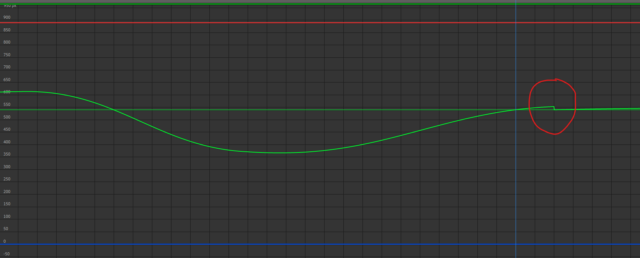
    My issue is with what happens to the nulls after the final keyframe of the leader layer.
    Everything works properly until the animation reaches the last keyframe, at which point the expression appears to stop the inertia movement.

    It is difficult to explain, but I have attached an image of the mofraph to help you understand.

    Can someone help me with this?:D

    Stefano Malerba replied 2 years ago 3 Members · 14 Replies
  • 14 Replies
  • Dan Ebberts

    March 18, 2024 at 11:14 pm

    It would help to see the keyframes and the slider settings.

  • Stefano Malerba

    March 19, 2024 at 12:19 am

    Thank you for your reply, Dan!

    Unfortunately, I have overwritten the project. But there were 3 keyframes, the last one ended there where you see the jump in the graph.

    The sliders were set with very low values, but even changing them I still got the same result.

    I have found another expression here in another forum that does what I need, but it seems to be a bit too heavy.

    Is there any way to make it lighter?
    I will use this expression on something between 10 and 50 layers in the same comp.

    rapidity=thisComp.layer("Leader").effect("Rapidity")("Slider"); //following speed

    inertia=thisComp.layer("Leader").effect("Inertia")("Slider"); //how dull the following will be (0-1)

    leader=thisComp.layer(index-1);

    xyz = position.valueAtTime(0) - thisComp.layer(index-1).position.valueAtTime(0);

    pos1=leader.position;

    pos2=leader.position;

    v=0; i=0;

    while (i<=time)

    {

    pos1=leader.position.valueAtTime(i);

    delta=sub(pos1,pos2);

    a=delta*rapidity*thisComp.frameDuration;

    v=(v+a)*(1-inertia);

    pos2 += v;

    i += thisComp.frameDuration;

    }

    pos2 + xyz

  • Dan Ebberts

    March 19, 2024 at 6:11 am

    Your new expression is doing calculations for each previous frame, which can be a significant computational load, especially if your comp is long and/or you apply it to a lot of layers. Your previous expression was only looking at the most recent keyframe, so it was much more cpu-friendly.

  • Stefano Malerba

    March 19, 2024 at 9:26 am

    Dan, thank you very much for your helpfulness!

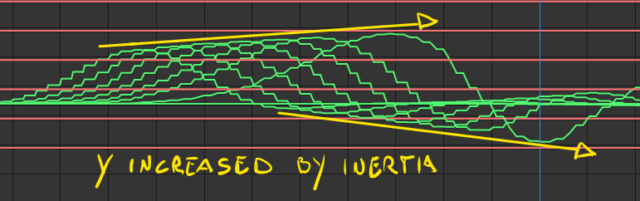
    The first expression works fine, and it does not freeze after effects 😛 , but it doesn’t have the increasing inertia that I would like to have. Also, when the speed of the animation is slow, it does that jump in the value graph.

    I’m trying to make the first expression have a result as similar as possible to the second expression.
    But I’m completely stuck.

    Here is some screen-recoding.

    FIRST EXPRESSION

    SECOND EXPRESSION

    Again, thank you very much for your help.

  • Stefano Malerba

    March 19, 2024 at 9:38 am

    I’d like to provide more context so that you may better comprehend what I intend to do.

    The goal is to achieve a result similar to Ordinary Folk’s Wave Rig.

    Their Wave, however, is formed using controls.

    I’d like everything to be built on and driven by a Leader layer.

    So my expression will be applied to an X-series of nulls that fall between the first Null “Leader” and the last Null “End”.

    I hope I have explained myself clearly.

  • Dan Ebberts

    March 19, 2024 at 3:56 pm

    I’m not sure, but it seems like you just need to get the animation right for the leader and then just have a time-delayed version of that for each of the followers with a simple follow expression like this:

    L = thisComp.layer("leader");
    d = L.effect("delay")("Slider");
    y = L.transform.position.valueAtTime(time - d*(index - L.index))[1];
    [value[0],y]
  • Stefano Malerba

    March 19, 2024 at 4:21 pm

    Yeah, this was my starting point. I just want to add to the delay an inertia effects to each layer based on the velocity of the previous layer.

    For example, if the leader moves from 0 to 10 at an “X” velocity, Child_01 will move from 0 to 11 ( 10 + “X” velocity ), Child_02 from 0 to 12, and so on until the End layer.

    Sorry, I’m doing my best to explain.

  • Dan Ebberts

    March 19, 2024 at 7:53 pm

    Just in general, I think I’d base the increase on a calculation based on the layer index (relative to the leader), not on the animation of the previous layer, because cascading expressions like that in a long chain of layers can really cause a performance hit.

  • Stefano Malerba

    March 20, 2024 at 10:35 pm

    Thanks so much Dan! But I can’t achieve the results I want. That expression do exactly what I need but it is way too heavy on the CPU.

    Can I ask for help with that? A hint for writing an expression that does something similar?

  • Dan Ebberts

    March 20, 2024 at 11:43 pm

    If you have the leader set up with your desired overshoot animation, then this on each of the followers should give a progressively amplified version of the leader’s animation (I set the delay and gain sliders to 0.1 for testing):

    L = thisComp.layer("leader");
    p = L.position;
    d = L.effect("delay")("Slider");
    g = L.effect("gain")("Slider");
    offset = index - L.index;
    deltaY = p.valueAtTime(time - d*offset)[1]-p.valueAtTime(0)[1];
    value + [0,deltaY*(1 + offset*g)];
Page 1 of 2

We use anonymous cookies to give you the best experience we can.
Our Privacy policy | GDPR Policy