

Activity › Forums › Adobe After Effects › Rope-ish Dynamics Expression
-

Stefano Malerba
March 22, 2024 at 11:36 amThank you so much Dan!
Your expression inspired me to achieve the desired result while requiring far less CPU processing power.
I’m using this expression on the first NULL that follows the Leader to calculate the movement and speed, resulting in the precise animation I’m looking for:
rapidity=thisComp.layer("Leader").effect("Rapidity")("Slider"); //following speed
inertia=thisComp.layer("Leader").effect("Inertia")("Slider"); //how dull the following will be (0-1)
leader=thisComp.layer(index-1);
xyz = position.valueAtTime(0) - thisComp.layer(index-1).position.valueAtTime(0);
pos1=leader.position;
pos2=leader.position;
v=0; i=0;
while (i<=time)
 {
  pos1=leader.position.valueAtTime(i);
  delta=sub(pos1,pos2);
  a=delta*rapidity*thisComp.frameDuration;
  v=(v+a)*(1-inertia);
  pos2 += v;
  i += thisComp.frameDuration;
 }
pos2 + xyz
And your expression on all the other Nulls, so I’ll keep the increasing overshoot factor avoiding the heavy calculation on each Null.
Thank you, I really appreciated the time you gave me!
-
Stefano Malerba
April 2, 2024 at 12:51 pmHey Dan! Thanks so much again for your help.
In the end the expression I used is this:
var L = index > 1 ? thisComp.layer(index - 1) : null; var C = thisComp.layer("Start");
var ctrl = thisComp.layer("CTRL");
var p = L ? L.position : [0, 0];
// Controls
var d = ctrl ? ctrl.effect("WaveLovers")("Delay") : 0;
var g = ctrl ? ctrl.effect("WaveLovers")("Inertia") * -1 : 0;
var s = ctrl ? ctrl.effect("WaveLovers")("Space") : 0;
// Oscillation parameters
var amp = ctrl ? ctrl.effect("WaveLovers")("Amp") : 0;
var freq = ctrl ? ctrl.effect("WaveLovers")("Freq") : 0;
var decay = ctrl ? ctrl.effect("WaveLovers")("Decay") : 0;
// Ensure index values are defined and valid
var indexA = C ? C.index : 0;
var indexB = thisLayer.index;
var indexRelative = indexA - indexB;
// Adjusted offset calculation
var offset = L ? L.index - index : 0;
// Calculate delay factor and ensure it doesn't go below 0
var delayFactor = ctrl ? ctrl.effect("WaveLovers")("Delay Factor") * offset : 0;
var newDelay = Math.max(d - delayFactor, 0);
// Calculate deltaX and deltaY with delay
var deltaY = p.valueAtTime(time - newDelay)[1] - p.valueAtTime(0)[1];
var deltaX = p.valueAtTime(time - newDelay)[0] - p.valueAtTime(0)[0];
// Apply delay and oscillation effect to position
var pos = value + [(deltaX * (1 + offset * g)) - (s * indexRelative * -1), deltaY * (1 + offset * g)];
// Handle keyframes and oscillation
var n = 0;
if (p.numKeys > 0) {
n = p.nearestKey(time).index;
if (p.key(n).time > time) {
n--;
}
}
if (n > 0) {
var t = time - p.key(n).time;
if (t < 1) {
var v = p.velocityAtTime(p.key(n).time - thisComp.frameDuration);
pos += v * (amp / 100) * Math.sin(freq * t * 2 * Math.PI) / Math.exp(decay * t);
}
}
pos; // Return the final position
-

Russell Belleret
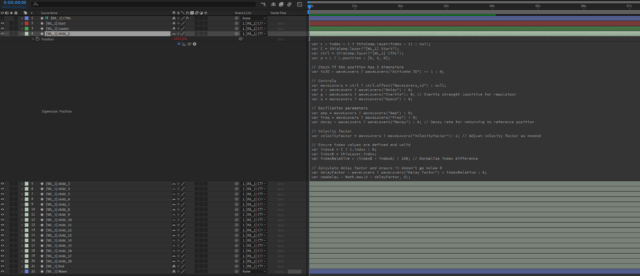
April 15, 2024 at 9:27 pmGreat work on figuring this out!! Was working on something similar to this a few months ago but hit a block. Curious how you setup the project to input this expression. Anyway chance I can get a screen grab of your project? Or a project file. Thanks!
-
Stefano Malerba
April 18, 2024 at 9:52 pmHey Russell! Here the screen grab of the timeline.
I’m writing a UI Script that involves this expression.
Right now, I’m still developing the script, but if you want, I could share a beta version and you could test it.
Reply to this Discussion! Login or Sign Up