Creative Communities of the World Forums

The peer to peer support community for media production professionals.

Activity Forums Adobe After Effects Path follows Nulls Issue – the stroke dosen’t match the path

  • Path follows Nulls Issue – the stroke dosen’t match the path

    Posted by Stefano Malerba on April 2, 2024 at 12:58 pm

    Hello folks!

    I’m working on a simple animation made with some expressions and a Path follows Nulls function.

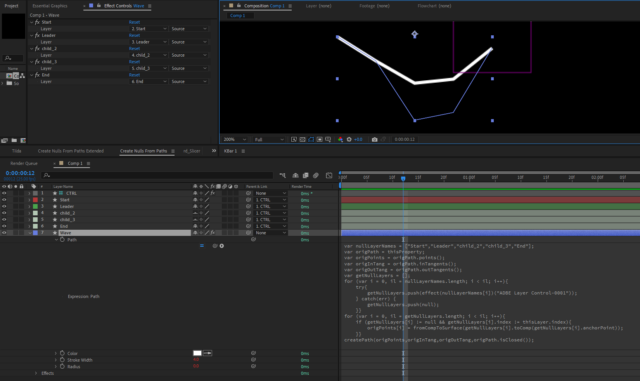
    In my case the path follow the nulls but the stroke doesn’t match the path.
    Here is a screen to better understand.

    Anyone know how I can fix this and why this happens?

    The expression used in the path property is this one:

    var nullLayerNames = ["Start","Leader","child_2","child_3","End"];var origPath = thisProperty;

    var origPoints = origPath.points();

    var origInTang = origPath.inTangents();

    var origOutTang = origPath.outTangents();

    var getNullLayers = [];

    for (var i = 0, il = nullLayerNames.length; i < il; i++){

    try{

    getNullLayers.push(effect(nullLayerNames[i])("ADBE Layer Control-0001"));

    } catch(err) {

    getNullLayers.push(null);

    }}

    for (var i = 0, il = getNullLayers.length; i < il; i++){

    if (getNullLayers[i] != null && getNullLayers[i].index != thisLayer.index){

    origPoints[i] = fromCompToSurface(getNullLayers[i].toComp(getNullLayers[i].anchorPoint));

    }}

    createPath(origPoints,origInTang,origOutTang,origPath.isClosed());

    Stefano Malerba replied 2 years, 1 month ago 2 Members · 2 Replies
  • 2 Replies
  • Hector Vera

    April 2, 2024 at 7:13 pm

    It seems that you are facing an issue where the stroke of the animation does not match the path being followed by the nulls. This can be caused by a few things, including:

    1. The path is not closed properly, which can cause weird behavior with the stroke.
    2. The animation is scaled in some way, which can affect the way the stroke is rendered.
    3. The nulls are not correctly positioned along the path.

    To troubleshoot the issue, the client can try these steps:

    1. Make sure the path is closed properly. A closed path means that it forms a complete shape. If the path is not closed, it will have a start and end point, which can cause issues with the stroke.
    2. Check the scale of the animation and make sure it is not affecting the stroke. If the scale is not uniform, this can cause the stroke to be stretched or compressed in strange ways.
    3. Make sure the nulls are positioned correctly along the path. If the nulls are not positioned correctly, they may not be aligned with the path, which can cause the stroke to be off-center or not follow the path properly.

    I hope this helps! Let me know if you have any further questions just incase. Good luck!

  • Stefano Malerba

    April 2, 2024 at 8:22 pm

    Thank you for answering.

    I figured out the problem. The issue appears to be caused by the separation of position values on nulls.😅

We use anonymous cookies to give you the best experience we can.
Our Privacy policy | GDPR Policy