Forum Replies Created

  • Scott Depace

    March 28, 2024 at 1:12 pm in reply to: Camera raw lens correction

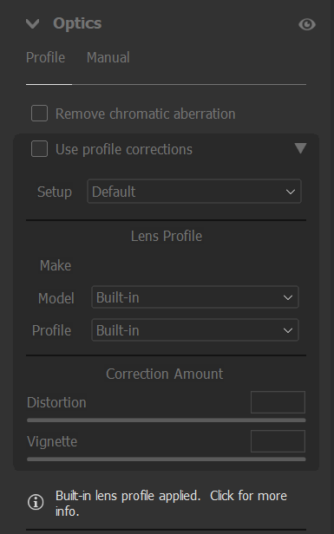
    Thats not what I see. Even if I choose to use no profile, there is a message that an auto setting has been applied. Here is a screen shot of that and another of a side by side showing a dng opened in camera raw with no profile selected on the left and another opened and saved through photomatix with no lens correction. Notice the corners of the photomatix showing the image of the complete sensor.

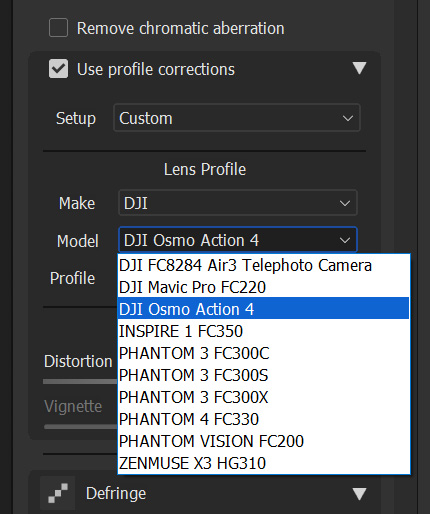
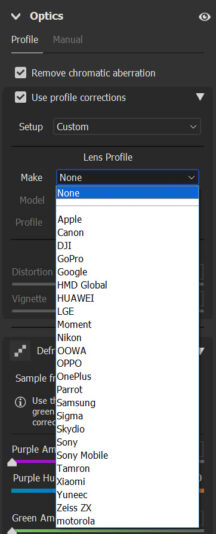
    Lastly, I noticed when I open the photomatix JPG in Camera raw to try to apply the same DJI lens correction that Raw uses on the DNG files, the mavic 3 lens profile isn’t an option in the DJI category and Hasselblad isn’t even listed in the Make selector pull down. I’ve attached screen grabs.

    Thanks for your help.

  • Scott Depace

    March 6, 2012 at 3:53 pm in reply to: Files won’t playback in Hyperdeck Studio

    Ouch. Update. My operator had switched the capture to a different format making the file not show up. Sorry.

  • Scott Depace

    November 17, 2011 at 9:47 pm in reply to: Hyperdeck Studio won’t playback QT files

    Nothing?

  • Scott Depace

    November 16, 2011 at 11:02 am in reply to: Hyperdeck Studio won’t playback QT files

    I tried the “Uncompressed YUV” codec and it still didn’t work. Can anyone confirm that they have been able to create a file in AE, move it to a drive and play it back on their Hyperdeck Studio? At this point I wonder if anyone at Blackmagic has been able to do so either.

  • Scott Depace

    November 15, 2011 at 10:31 pm in reply to: Hyperdeck Studio won’t playback QT files

    Yes I have installed the BlackMagic Drivers. I’m choosing “Blackmagic RGB 10 bit” from the Quicktime codec pulldown. That doesn’t work. I will try the “Uncompressed YUV 10 bit 4:2:2” tomorrow and see if that works. Either way the documentation should be updated to address this issue.

  • Scott Depace

    November 14, 2011 at 3:09 pm in reply to: Hyperdeck Studio – an expensive paperweight?

    I purchased two of these and am having trouble as well. It records and plays back fine, but I can’t seem to find the right codec for imported file playback. I have tried both AVI and Quicktime uncompressed but neither files will playback or even show up. Any thoughts?

We use anonymous cookies to give you the best experience we can.
Our Privacy policy | GDPR Policy