Forum Replies Created

Page 1 of 2
  • Sander Van pelt

    November 25, 2025 at 12:28 pm in reply to: Combine multiple paths into 1 path

    Thank you!

  • Sander Van pelt

    November 25, 2025 at 12:13 pm in reply to: Combine multiple paths into 1 path

    Hi John,

    Thank you for your time/4sander video and explanation.
    Do you perhaps have your merger3 script for me so I can use it?

    Greets Sander

  • Sander Van pelt

    March 7, 2025 at 9:23 am in reply to: “Set Channels” problem

    Hi Graham,

    Thanks for your response.

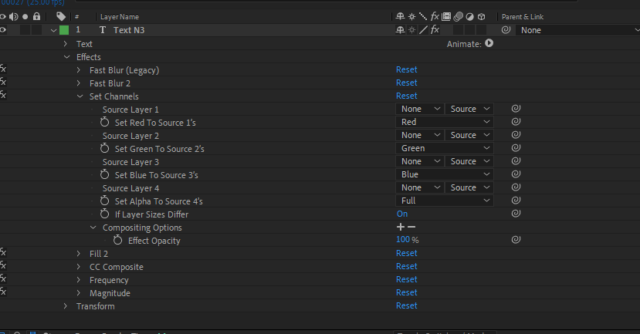
    Here you can see how the “set channels” effect is set on the text layer.

    I can indeed solve it simply by removing the “set channels” effect and placing a mask in the text layer. But then I still don’t understand why the “set channels” function doesn’t work as it should.
    And I would like to know that.

  • Hello Eric,

    I added my project to this post. You may laugh your head off at how difficult I have made this, but as I mentioned in my 1st post, I am an AE beginner/my AE knowledge is not yet great. and I am also going through the Creative Cloud Learn themes to increase my knowledge

    I cannot say with 100% certainty what a null object is. Let alone how to use it.
    So what steps would I have to adjust to make this logo revolve around the building?

    Thank you for your help.

    For info, I use AE 2024 (24.1.0)

  • Hello again Filip,

    I’ve solved the problem with the overlap. I found another Ink movie with a completly white background.
    And, after creating a new movie first with a couple of this Ink movies with different sizes and rotations, I’d put this into my composition.

    But there is one thing that will not succeed.
    How do I make sure that I first see the logo in the colors of the film and that it changes to the real colors of the logo when that ink is over it?

  • Thank you for your reply Filip,

    Your sollution helped me but I could not get what I want.

    I was thinking about a text but instead of the text, I want a logo (with multiple colors) that appears in my intro.

    I want to start with a white solid on which only this logo, with the colors of the film, is visible.
    (To create this, isn’t a problem (logo and movie as an Alpha matte))

    Now it is the intention that the ink shows both the film and the logo.

    I made 2 pre-compositions; one with the main movie and the ink movie as Luma matte and another with the logo and the ink movie as Luma matte.

    Now the entire logo and film are already slightly visible already before the ink becomes visible. Changing the transparency for a few seconds does not help because, after those x seconds, the logo and film next to the ink are visible again.

    How can I make sure that only the part with the ink is visible? That the opacity of the other part is 100%.

    Because I want to use multiple ink films at different positions, I also see an overlap between these ink films. This is because the background colors of these videos are slightly different from each other:

    Is there a sollution to solve this problem?

    And, at the beginning of my main composition, I can’t manage to see only the logo in the background colors/ movie colors before the precompositions start.
    I’ve add the logo and the movie to the main composition. And the movie is an Alpha matte which only shows the logo in the background movie colors. But this doesn’t help.

    Thank you for your help.

  • Sorry I forgot; the intro starts @1:13

    Sander

    Sorry for my English grammar, but English is not my main language.

  • Sander Van pelt

    March 18, 2019 at 6:19 am in reply to: Import photos for multiple comps

    Hello Tomas,

    Thank you for your reply and script.
    I shall use your script for creating my slideshow.

    Thanks

    ps. I apologize that something was unclear, but the 100 photo’s I want to use, all have the same resolution (1920×1080 pixels). Also all the placeholder comps have got this resolution.

    I do not have to scale anything for making a photo fits to his placeholder

    Sander

    Sorry for my English grammar, but English is not my main language.

  • Sander Van pelt

    March 15, 2019 at 10:47 am in reply to: Import photos for multiple comps

    Hello Tomas,

    First thanks for your reply.

    1. The images/ photo’s are all identical in resolution?
    2. Are placeholder comps do have the same identical resolution?
    3. Every placeholder comp contains only 1 solid background layer.

    Are those solids maybe a problem?

    Sander

    Sorry for my English grammar, but English is not my main language.

  • Sander Van pelt

    March 15, 2019 at 6:49 am in reply to: Import photos for multiple comps

    No, I have got 1 template with 100 compositions. 1 comp for each photo. (VH 7266788).
    Maybe is “sub-composition” a better word.

    Can I import 100 photo’s and place them with only a few actions into these (sub)comps instead of placing them one by one into these comps of this template.

    Sander

    Sorry for my English grammar, but English is not my main language.

Page 1 of 2

We use anonymous cookies to give you the best experience we can.
Our Privacy policy | GDPR Policy