Ryan Hauser
 8
AE Expressions Coins
8
AE Expressions Coins
 14
COW Coins
14
COW Coins
Forum Replies Created
-

Ryan Hauser
May 27, 2024 at 1:08 am in reply to: Combing Loops, If/thens, indexes, and list ordering….I’ve gotten it figured out! Here’s my code…
largerThan = 0;
myRoll = essentialProperty("Initiative Roll");
loopCount = thisComp.layer("LoopCount Index").effect("LoopCount")("Slider")-1;
myIndex = index;
loopCountTrueIndex = thisComp.layer("LoopCount Index").effect("LoopCount")("Slider");
distanceToController = loopCountTrueIndex - myIndex;
distanceToTop = myIndex -1;
for(i = 0; i < loopCount; i++){
if (myRoll < thisComp.layer(index-distanceToTop).essentialProperty("Initiative Roll"))
{largerThan = largerThan + 1}
else
{}
distanceToTop = distanceToTop -1;
}
[largerThan];
I haven’t yet added that error condition when two initiative rolls are the same, but functionally it works as it should! If anyone knows how I’d add that I’d still appreciate it.

-
Ryan Hauser
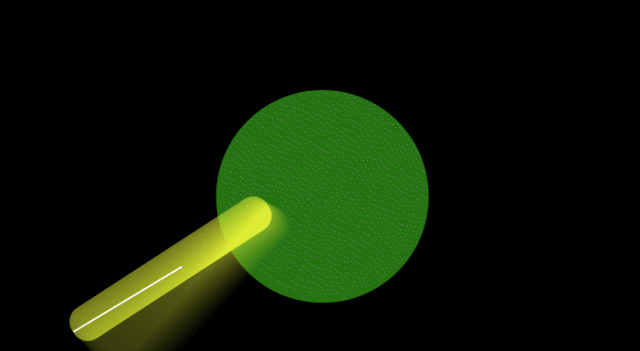
January 14, 2023 at 2:19 am in reply to: Creating visual smears using expressions. Help me put it all together!Ebberts, you’ve done it again. I’ve attached a gif below, of the arc script in action. Maybe it’ll play here, I’m not sure.
I’m happy to have the script working, but do you think you can explain to me why your script (with minor edits) works flawlessly:
var topArcPos = effect("Top Arc Position")("Point");
var botArcPos = effect("Bottom Arc Position")("Point");
var pts = effect("Arc resolution")("Slider");
var timeMult = effect("Timescale")("Slider");
//Create containers; set base values
var myArray = [];
var myArray2 = [];
var myNewArray = [];
var i;
var i2;
//Add values to Arrays
for (i=0;i<pts;i++){
myArray[i] = topArcPos.valueAtTime(time-i*timeMult);
myArray2[i] = botArcPos.valueAtTime(time-i*timeMult);
}
//Flip myArray2
myArray2.reverse();
//Join myArray2, now reversed, to the end of myArray
myNewArray = myArray.concat(myArray2);
createPath(points = myNewArray, inTangents = [], outTangents = [], isClosed = true)
And mine, when I try to build the same thing, returns an error that says “Error: Error: createPath requires the points, inTangents, and outTangents to contain at least 1 point, and all be the same size”? I’ve also made the array dead-simple in my attempt to rule out weird stuff with the more complicated things in the working version. It kicked back the same error regardless.
var arcTop = effect("Arc Top toComp")("Point");
var arcBot = effect("Arc Bottom toComp")("Point");
var pts = effect("Points")("Slider");
var timeMult = effect("timeMult")("Slider");
//Create containers; set base values
var myArray1 = [];
var myArray2 = [];
var myNewArray = [];
var i;
//Run loop to build both arrays
for (i=0;i<pts;i++) {
myArray1[i] = [i,i];
myArray2[i] = [i,i];
}
myNewArray = myArray1.concat(myArray2)
createPath(points = myNewArray, inTangents = [], outTangents = [], isClosed = true)
I feel like Creed in The Office being presented two identical pictures and then being asked to find the difference. Clearly there is one, but I can’t for the life of me find it.
Again Ebberts, you’re a life-saver.
-
Ryan Hauser
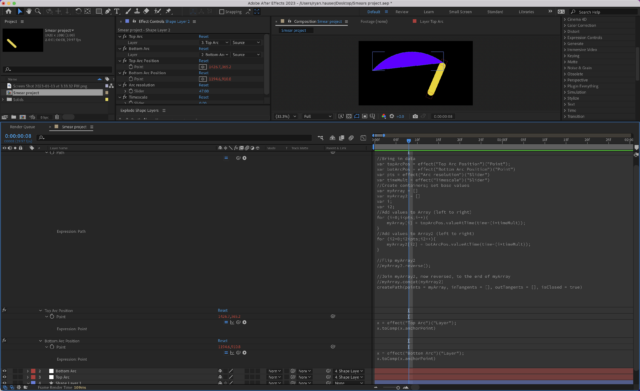
January 13, 2023 at 11:45 pm in reply to: Creating visual smears using expressions. Help me put it all together!I’m so mad right now. After I had made the above post, I had figured out that I DID have it right like you demonstrated just now. So the top arc worked, and I also got the bottom arc working. I was just having an issue; I needed the bottom arc to be read backwards otherwise the shape made an “X” shape in the middle since the bottom row was also read “left to right”. While attempting to fix it, I accidentally crashed AE and as it turns out I hadn’t saved the project. I started over. I got the top arc working again, and now I can’t get the bottom arc working anymore. I cannot for the life of my figure out what’s wrong with this, or why I was able to get it working the first time. I don’t even know anymore. Here’s a screenshot with everything relevant to the project, and here’s a copy-paste of the main code. I appreciate the help, Dan. Lifesaver as always.
//Bring in data
var topArcPos = effect("Top Arc Position")("Point");
var botArcPos = effect("Bottom Arc Position")("Point");
var pts = effect("Arc resolution")("Slider");
var timeMult = effect("Timescale")("Slider");
//Create containers; set base values
var myArray = [];
var myArray2 = [];
var i;
var i2;
//Add values to Array (left to right)
for (i=0;i<pts;i++){
	myArray[i] = topArcPos.valueAtTime(time-(i*timeMult));
}
//Add values to Array2 (left to right)
for (i2=0;i2<pts;i2++){
	myArray2[i2] = botArcPos.valueAtTime(time-(i*timeMult));
}
//Flip myArray2
myArray2.reverse();
//Join myArray2, now reversed, to the end of myArray
myArray.concat(myArray2);
createPath(points = myArray, inTangents = [], outTangents = [], isClosed = true)
-
Ryan Hauser
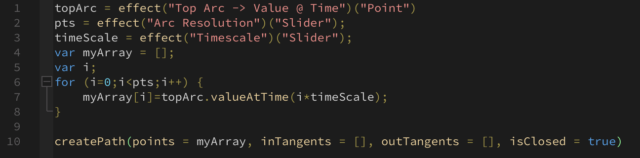
January 13, 2023 at 9:24 pm in reply to: Creating visual smears using expressions. Help me put it all together!I’ve been at this still… I’m currently just trying to get the top arc to appear using the createPath function. From everything I’ve read, this looks like it should at least do SOMETHING, but no matter what I change nothing appears on screen. I feel as though my loop isn’t actually adding anything to myArray. If I set a value to myArray manually, I see a line appear proving to me that there’s at least 2 values in the myArray array. but the moment I get rid of the manually coded value, the line disappears which suggests there aren’t any values actually stored within the array. Thoughts?
-
Ryan Hauser
September 7, 2021 at 1:09 am in reply to: Accessing a single part of a text layer to create highlights using expressionsThanks Dan. I’ll look into animators, I hadn’t thought about using those but I bet I can get something working with them. Seriously, you’re a gift to the AE community!
-
Ryan Hauser
May 20, 2021 at 7:20 pm in reply to: Is it possible to LoopOut("cycle") if the layer already has an expression? How?Huh, interesting way to get that to work. I mean, it makes sense!
I guess the loopOut expressions just don’t play well with others?
-
Ryan Hauser
November 19, 2020 at 8:54 pm in reply to: Sampling colors outside of AE ignores everything but desktop BGI’m running macOS Catalina Version 10.15.7
-
Continual rasterization can be a pain in the neck at times. There’s lots of stuff it doesn’t like to play well with, so it’s hard to pin down exactly what your issue might be based on the description. My first guess would be that you have a layer-style based stroke on the ornament, but that’s just a guess. Can you post a screenshot of the visual error you’re describing?
-
Ryan Hauser
November 12, 2020 at 6:49 pm in reply to: Sampling colors outside of AE ignores everything but desktop BGGOOD NEWS!!!
I fixed it. So, this is one of the weirdest fixes I’ve had to do. Apparently it is a security issue. After Effects doesn’t have permission to “record this screen”. So here’s how I fixed it:
System Preferences > Security & Privacy > Privacy
On the right hand side of the window there will be a list of applications with checkboxes next to them with the text “Allow the apps below to record the contents of your screen, even while using other apps.” Check the box next to After Effects (And any other adobe applications that you want to sample external colors with), and you’re set. You should be able to sample outside colors once again.
-
Ryan Hauser
November 10, 2020 at 11:55 pm in reply to: Sampling colors outside of AE ignores everything but desktop BGYep, I’m fairly sure it’s up to date. I also updated my mac to the most recent updates and the problem still persists.
There’s also a primal fear in the back of my mind whenever I hear someone saying it might be a driver issue. Drivers are the computer problem that is most likely to make me want to tear my hair out.