


Randy Wheeler
 3
COW Coins
3
COW Coins
Forum Replies Created
-

Link to website with owner’s manual, service manual and brochure.
https://crtdatabase.com/crts/sony/sony-pvm-20l5

crtdatabase.com
A database of CRT-related information including specifications, common issues, repairs, service manuals, and more.
-
Your monitor only has SD analog inputs if there are no optional input boards installed on the left side slots. The single BNC connector is for analog SD composite video. Here is a pic from the brochure that shows the optional input boards needed for HD input.
-
Randy Wheeler
August 23, 2015 at 5:30 pm in reply to: A Comparison of Premiere Shadow / Highlight Alternatives (for those experiencing the flicker bug)I’ve been using the Shadow/Highlight filter for many years without any flicker on 1000’s of hours of film transfers that need details lifted out of the crushed shadows and some minor to major highlight recovery. In the timeline, you need to make sure to not have any video on the tracks above or below when using this filter. I do use a title (for masking borders with black rectangles on the left/right sides of the film edges) above the video without issue.
So, for a test, put one video on the timeline and use the Shadow/Highlight filter in Manual mode since Auto will cause flicker. Don’t nest anything and put in a new timeline with video above or below as this will probably cause flicker. Also don’t make a transition between 2 video clips when using this filter since the clip with this filter applied will flicker.
If you need to stack tracks of video clips then your best option is to export at a high quality format to burn in the filter effect and reimport to put in a timeline with those stacked video clips.
Here is a video example that used the Shadow/Highlight filter:
https://www.youtube.com/watch?v=LVwtouKIJWs
Some contents or functionalities here are not available due to your cookie preferences!This happens because the functionality/content marked as “Google Youtube” uses cookies that you choosed to keep disabled. In order to view this content or use this functionality, please enable cookies: click here to open your cookie preferences.
-
Figured out why I wasn’t seeing anything. I was using HD video clips in a SD timeline and for some reason even though the HD clips are downsized to fit in the SD project full frame, I think Pixel Fixer’s positioning sliders still thinks it’s HD. I had rendered the HD clips already in the timeline so I imported the preview files and put them on the timeline and was able to use Pixel Fixer on those SD clips without a problem.
I was using it to remove dust specs on the camera lens from a film transfer I did and it worked great.
Randy
-
Would it be a good idea to give a copy of the “Grinder” article to each new client before you start any work for them? Possibly include it with the contract you give them?
I’m half joking here but with some potentially risky clients I might be tempted to do it.
Randy
-
Different DSLR, same problem and solution.
DSLR’s have what I call a need for double attenuation. First you need to get it to the typical mic level then you need to attenuate it another 25 to 40dB below that mic level to get decent audio. My opinion is that none of the DSLR’s out there have AGC, they have a limiter that is being way overdriven and thus acts like an AGC. Over driving these DSLR limiters also color/reducer the audio and that’s why you have to attenuate them another 25-40dB so that none of the audio hits the DSLR limiter.
Among many other audio tests I’ve done with DSLR’s, I’ve recently been testing out how to get a clean audio signal from the Line Out of the Sony PCM-M10 audio recorder to the GH1 Mic Input while shooting. Here are the test results and setup.
I connected a Shure SM58 handheld mic to the Sony PCM-M10 Mic Input. After much testing, I ended up having to attenuate the Line Out of the Sony M10 by 70dB, that’s Seven Zero, going into the GH1’s Mic Input so that it wouldn’t hit the GH1’s audio limiter and reduce/alter the sound quality. The room had background noise from 2 computers, a fan and a central AC was on and blowing from above. This made easier to check for any rise in background noise between words and any difference in overall background noise between the GH1 and PCM-M10.
The audio levels were not changed in either WAV file, they are at their original levels. Coincidently, the Sony PCM-M10 audio ended up being only a couple dB’s louder than the GH1’s audio so if you want to do a better comparison load the audio files into your audio/video editor and raise the GH1 audio by a couple dB’s to even them out and then compare.
Panasonic GH1 audio from original MTS file. I put the MTS file in the timeline of Edius and exported it as a 16bit 48K WAV file:
https://dl.dropbox.com/u/2204694/Panasonic_GH1_audio.wav (11MB)
Sony PCM-M10 audio from original WAV file. Simply copied the 16bit 48K WAV file off the recorder’s built-in memory. Here it is:
https://dl.dropbox.com/u/2204694/Sony_PCM-M10_audio.wav (11MB)
I’d say after comparing them myself that it’s pretty close considering the GH1 audio file was recorded at 192Khz 48K AC-3 compared to the uncompressed 48K WAV recorded with the Sony PCM-M10. The GH1 audio is certainly usable for an initial edit without having to sync all the audio from the Sony recorder to the GH1 video and should provide a much more accurate sync once you do that since the audio waveforms will line up perfectly.
Let me know what you think,
Randy
Here is an audio waveform comparison screen grab

-
Watch this video from that website. He was talking about rates ($50) at the 13 minute mark into the video:
Randy
-
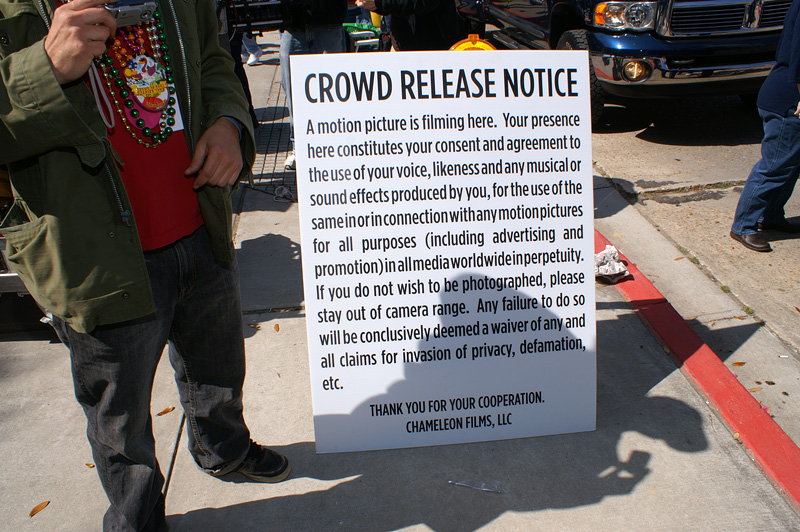
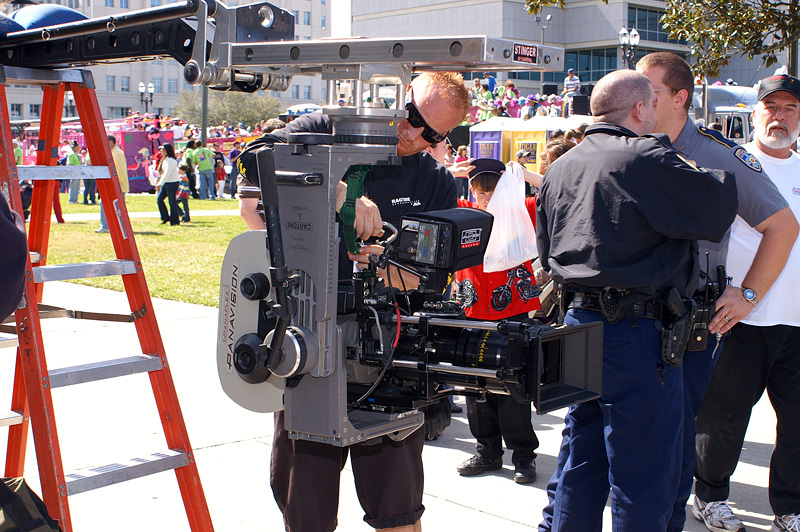
This was the release sign that was put out next to the camera for the motion picture “The Chameleon” (starring Ellen Barkin and Famke Janssen) being filmed on location at the 2009 Spanish Town Mardi Gras Parade in Baton Rouge, Louisiana.
Randy
-
Geico and the huge TV ad campaign to make sure you knew how to pronounce it by using a talking Gecko.
Randy
-
Connecting to the Firewire Port the Wrong Way
Some people make a common mistake of plugging in their firewire the wrong way, which can damage the firewire connection. This can be a very expensive repair, so it is very important to be cautious of how you plug in your Firewire. Always read warnings with regards to connecting. There have been occurrences of smoking laptops when the firewire is connected the wrong way. Consequences can include burning and damaging your circuits. Another important thing to avoid when installing your Firewire card is a kink on the cable
Randy
