Forum Replies Created

Page 1 of 4
  • Thank you. My grader actually has that so we’ll give it a try. As long as I am squeezing out everything from the 4K video my end which it sounds like I am doing.

  • Thank you Tod and Riccardo – that’s really helpful clarification. I kind of figured that video had no dpi but wasn’t sure whether I was grabbing these stills at the highest possible resoultion from within Resolve. I guess if my timeline resolution matches my source material resolution and I am exporting as TIFFs then I am? There is no better way to grab stills from this video footage?

  • Thank you Riccardo

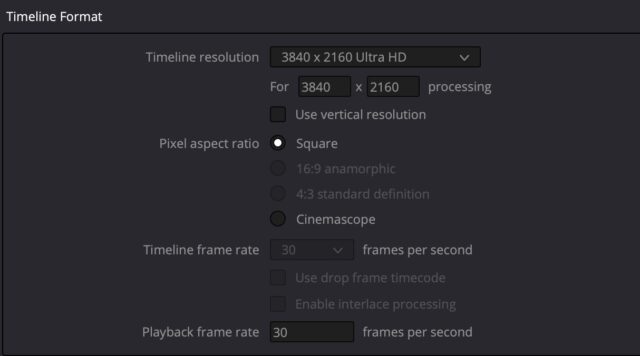
    I have checked the Timeline resolution and it matches the footage – 3840 x 2160 Ultra HD – see grab. The person doing the grading of these stills, prior to printing, says that the TIFFs that I am sending her are 72 dpi (based on 135×75 cm) and 300 dpi would be much better for printing. I am not used to setting dpi for video grabs. I don’t even know the dpi of 4k video. There doesn’t seem to be any way of increasing that resolution within timeline settings. Hmmm.

    Thanks.

  • Philip James

    September 1, 2022 at 7:30 pm in reply to: morphing advice

    Thank you Michael

  • Philip James

    August 31, 2022 at 3:20 pm in reply to: morphing advice

    Thanks. I don’t have After Effects but could use it for a month or so, I guess. I was hoping there might be something in Da Vinci Resolve Fusion.

  • Philip James

    October 19, 2019 at 7:50 pm in reply to: 96k audio export possible?

    Am I understanding Resolve correctly that Timeline resolution settings are project-wide? In my current project some of my sequences are 4k and others are HD. I have set the project to 4K and it seems that this setting is set for all my timelines – I can’t change between 4k and HD for each of my sequences, depending on the resolution. So do I leave Timeline settings at 4k and just adjust the delivery resolution for the HD or 4k sequences?

  • Philip James

    October 19, 2019 at 5:55 pm in reply to: 96k audio export possible?

    Aha! It looks like I can get round this by creating a new project and then setting 96k as the timeline audio sample rate. I’ll work with that and see how I get on.

  • Philip James

    October 19, 2019 at 5:50 pm in reply to: 96k audio export possible?

    Thank you Michael

    I looked at the Timeline settings for one of my current timelines and under ‘Fairlight’ it stated that the audio sample rate was 48000. It was greyed out so there was no way to change it. I then went to create a new timeline and I could not see any option to set the audio sample rate. So it appears that Resolve is defaulting to 48k.

    But the big question for me is that if I use 96k audio in a sequence and then export that sequence at 96k will the audio remain unconverted or will it go through a conversion to 48k (project or timeline rate) before being converted back to 96k. This is crucial and I can’t work out how to find out.

    Phil

  • Philip James

    October 18, 2019 at 5:31 pm in reply to: 96k audio export possible?

    ps – can’t upload grab

  • Philip James

    October 18, 2019 at 5:27 pm in reply to: 96k audio export possible?

    You are right. Resolve does now support 96k audio export. Thanks for letting me know.

    In Render Settings I now have the option of exporting as ‘same as project’, 48k, 96k or 192k (see grab). That’s great but I’m confused about what ‘same as project’ means. Where do I set the project audio sample rate? I can’t find where to do that. So is Resolve setting its own sample rate for the project? – I guess 48k And if so, is there any conversion of audio going on prior to output at my selected sample rate? My audio was imported at 96k and is stated as such in the bins but is the project audio sample rate having any bearing on what happens next or will the integrity of my audio be kept throughout?

    I had this issue with Avid Media Composer where I imported 96k audio sucessfully and then selected 96k for my sequence export. All sounded good but the project audio sample rate could not be set above 48k and the audio would be converted to project rate prior to up-resing at export. How do I know that Resolve is not doing the same thing? I want to keep 96k throughout.

    Thanks, Phil

Page 1 of 4

We use anonymous cookies to give you the best experience we can.
Our Privacy policy | GDPR Policy