

Activity › Forums › DaVinci Resolve › Best way to grab high res stills from 4k video for printing
-
Best way to grab high res stills from 4k video for printing
Posted by Philip James on March 8, 2023 at 10:54 amI have some 4k infrared footage, shot on a modified A7SMKII. I need to grab some stills from this footage and these will ultimately be used to create prints. I want the highest resolution grabs I can possibly get. I have used the ‘Grab still’ option in Resolve and then exported as TIFF. Is this going to extract the maximum possible resolution out of the original footage? Is there a better way to create stills from 4k footage? Should I use another programme?
Thank you.
Don Connors replied 3 years, 5 months ago 5 Members · 8 Replies -
8 Replies
-

Riccardo Luppi
March 8, 2023 at 11:22 amHey Phil,
The resolution of the stills you grab is dictated by the resolution of your timeline. Thus, the best solution is to set your timeline to the same resolution of your footage. Tiff is a pretty good choice. Png is also a solid choice as it is lossless.
Hope this helps!
-

Philip James
March 8, 2023 at 11:53 amThank you Riccardo
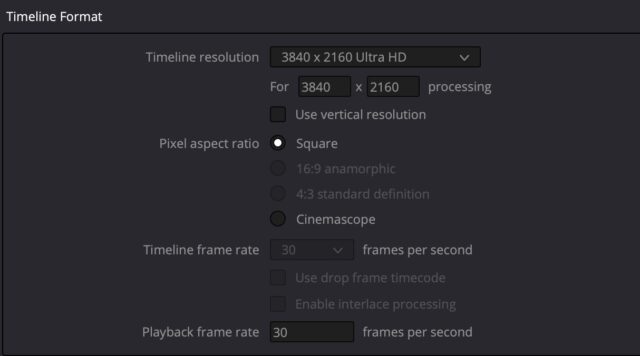
I have checked the Timeline resolution and it matches the footage – 3840 x 2160 Ultra HD – see grab. The person doing the grading of these stills, prior to printing, says that the TIFFs that I am sending her are 72 dpi (based on 135×75 cm) and 300 dpi would be much better for printing. I am not used to setting dpi for video grabs. I don’t even know the dpi of 4k video. There doesn’t seem to be any way of increasing that resolution within timeline settings. Hmmm.
Thanks.

-

Tod Hopkins
March 8, 2023 at 12:54 pmApparently, they do not understand how dpi works. This is surprisingly common with graphic artists. They can (and should) change the dpi to whatever they want. It is an arbitrary setting that determines printing size, not resolution. Video has no dpi.
-
Riccardo Luppi
March 8, 2023 at 3:08 pmAs Tom said, video has no dpi. On the other end, though, given a resolution, increasing dpi will reduce the print size. To counter that, I would suggest using Photoshop’s upscale function. This way, you can easily double the size keeping the same dpi value.
-
Philip James
March 8, 2023 at 4:45 pmThank you Tod and Riccardo – that’s really helpful clarification. I kind of figured that video had no dpi but wasn’t sure whether I was grabbing these stills at the highest possible resoultion from within Resolve. I guess if my timeline resolution matches my source material resolution and I am exporting as TIFFs then I am? There is no better way to grab stills from this video footage?
-

John Fishback
March 8, 2023 at 6:20 pmAnother option for upscaling up to 6X is Topaz Labs’ Gigapixel. There’s a free trial.
-
Philip James
March 8, 2023 at 7:22 pmThank you. My grader actually has that so we’ll give it a try. As long as I am squeezing out everything from the 4K video my end which it sounds like I am doing.
-

Don Connors
March 10, 2023 at 1:57 pmI use Gigapixel AI quite a bit for stills – but, depending on the content of the image, enlarging in Photoshop can be better – I use Smooth as the blowup scheme, then sharpen with Topaz Sharpen AI…works pretty well…
Reply to this Discussion! Login or Sign Up