Peter Heap
Forum Replies Created
-

Hi Dave
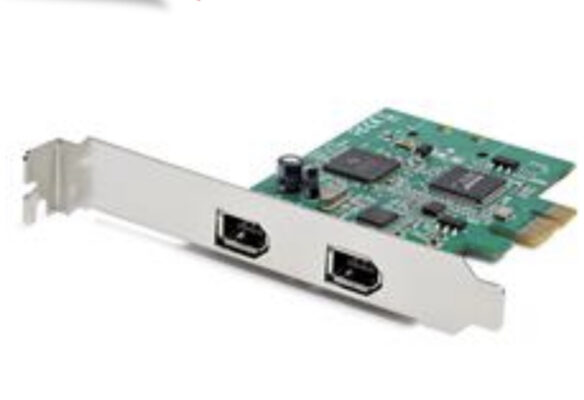
I’ve captured many tapes using Vegas Capture on my PC. Definitely the best way. Google “FireWire card” and something like this will come up. As long as it’s compatible with your PC you should be good to go.
Cheers
Pete
PS if the tapes were recorded on a Canon camera make sure you’re playing out of a Canon camera. Otherwise you’ll get missing audio and visual instability.

-
Thanks for the replies everyone. Looks like I’ll be getting that new computer smell sooner than I expected:)
cheers
Peter Heap
Sydney -
Peter Heap
March 18, 2012 at 8:39 am in reply to: Transferring XDCAM files from PDW-700 via EthernetLooks like I replied too soon. I just pressed the Import Disc button in Vegas and it started working.
Thanks Mark, you’re a genius!!
Peter Heap
Sydney -
Peter Heap
March 18, 2012 at 8:36 am in reply to: Transferring XDCAM files from PDW-700 via EthernetHi Mark
Thanks for your reply.
I’ve already got the IPv6 boxed unchecked and the IPv4 box checked.“In Sony Vegas in the XDCAM Explorer, you need to provide the IP address and the username and password for the FTP transfer.” Yep, done all that too.
I just tried connecting through my wireless router but can’t even see the camera on it… Maybe my router doesn’t support DHCP.
As I mentioned in my original post, I can transfer files from the camera to the computer via FTP but only by using a workaround. So I’m not sure that using a router is the answer… I’ll get one that can manage DHCP and see if that works.
thanks again
Peter Heap
Sydney -
John Rofrano Check your memory usage in the Task Manager and if you are getting close to the limit on physical memory, then more RAM should help.
The Task Manager says that I’m only using 60 to 70% of memory and 2% of cpu. So adding RAM doesn’t sound like the answer.
John Rofrano if your project is set to 1920×1080 then Vegas is rescaling the 352 x 228 to 1920 x 1080 for playback.Following your advice, I’ve changed the project from 1920×1080 to 352 x 228 and while I’m not out of the woods yet, (if I may mix my metaphors) there’s light at the end of the tunnel. Playback is improved but still far from ideal.
2 Hours Later…
Well I finally installed Vegas on my other (faster) computer and it fared no better. So I decided that the common denominator was the USB drive. It looked fine in Device Manager and it wasn’t until I did a bit more testing that it failed a “Random Seek Test”. I’ve copied all the material to another USB drive and everything’s back to normal. My mid-level laptop computer is editing just fine, playing 352 x 228 mpeg-4 files in a 1920 x 1080 project with no difficulty at all.
Phew, I can’t tell you how happy I am after wasting a whole day trying to figure out what was wrong.
Thanks again for your help John. I know how difficult it is to diagnose computer problems from afar and I appreciate your suggestions and help.
Peter Heap
Sydney -
Hi John
Thanks for your reply. I have done as you suggest and you are correct. The computer is getting bogged down by too much material.
However, (and it always amazes me that I don’t include enough information in my original post to make myself clear:)) what I should have said was that I have only loaded the lo-res (MPEG-4) Proxy files into the project with the idea of conforming to HD at the last moment. So I have 3 hours (actually a little less) of lo-res footage, no HD footage at all. I shot the project on XDCAM HD discs.
I’ve just compared one of the proxy files with it’s HD equivalent and it’s only 5.62MB vs 146MB for the HD version of exactly the same shot. The files are 352 x 288 rather than 1080 x 1920. Could it be that Vegas doesn’t like MPEG-4 files?
Do you think that installing more RAM could be the answer?
Thanks again for your help.
Peter Heap
Sydney -
Hi Erik
I didn’t explain too clearly. Yes that was exactly what I was trying to do so that I could conform to the HD files later on. As it is, it looks like I’ll have to manually change each file for it’s HD version.
cheers
Pete
Peter Heap
Sydney -
I’ve also tried a Cat 5 crossover cable. No success:(
Peter Heap
Sydney -
Since I first posted I’ve updated my Vegas Pro 11 to Build 595 which is the latest version. Hasn’t helped though…
Peter Heap
Sydney