


Olly Lawer
Forum Replies Created
-

Thank you so much for your replies!
Hunted down local animator, so going to get him to design the illustrator files for AE.
Thank you tho! This knowledge will really help with future animations when we are not up against it so much!
Olly Lawer
-
Thank you!
So what other questions do I need to ask / consider apart from resolution?
And what impact (what settings do I need to adjust) in light of their feedback?
Olly Lawer
-
Olly Lawer
March 6, 2012 at 11:07 am in reply to: FCPX and Compressor 4 – where are the detailed settings?Thanks. Found a solution. I select YouTube as the preset (interestingly it was already using settings of 8000kbps so I was along the right lines!) and changed to 1080 and download then saved as a custom setting. Worked a treat. I can now select the setting straight from FCPX.
I must say I am liking FCPX better and better.
Olly Lawer
-
OK, great, thanks.
Seems to be working OK now, so lets hope issue doesn’t arise again.
Thanks for your help.
Olly Lawer
-
Hmm, strange. There was definitly an issue with excessive stutter. Maybe another issue on my machine.
I’m using an EX1 and SxS cards using an express card slot, so from the sounds of your post I need the XDCAM Driver.
Upon load up it says that I haven’t got this, although I did download it from the sony website and restarted my machine.
See pic:
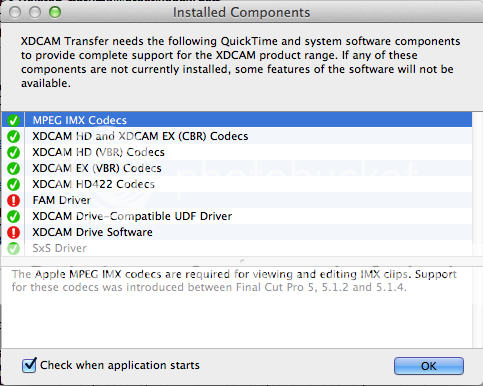
What would you recommend?
Olly Lawer
-
Just a thought on managing larger projects.
I see that FCPX creates and pulls in Events and Projects from two designated folders in the Movie folder (in Lion at least anyway).
After playing around with it for a bit and following some tutorials with some pre-made Events and Projects, I noticed that FCPX slowed down somewhat.
I couldn’t see any easy way to load up FCPX without bringing in all the Events and Projects in that folder, so I created two new folders and pulled in the unwanted Events and Projects in finder.
Now when FCPX boots it is much quicker and only brings in the Events and Projects that remain in the two designated folders.
I’m thinking that, for larger projects at least, it could be an idea to create several Events and Projects as I think has been alluded to in this thread, and then pull them out of the default Event and Project folders essentially segmenting them off into different projects as I would with FCP 6.
Of course if all these Events and Projects need to come together to form a final edit, then it would simply be a case of pulling them back into the default folders so FCPX see’s them when it loads up.
This seems like a slightly messy method of managing a large project, but one at least that may yield a better performance on FCPX.
Happy to hear other methods tho.
Olly Lawer
-
Thank you!
Olly Lawer
-
Olly Lawer
February 29, 2012 at 10:27 pm in reply to: New machine – stick with CS4 or worth upgrading?Hey,
Just thought I’d update you on a recent test I performed with the new MacBook Pro comparing CS4 and CS5.5
With the same project, a RAM preview of the below, took the following amount of time:
CS4 – 1:52 seconds
CS5.5 – 1:20 secondsOld macbook with CS4 – 3:40 seconds
Some contents or functionalities here are not available due to your cookie preferences!This happens because the functionality/content marked as “Google Youtube” uses cookies that you choosed to keep disabled. In order to view this content or use this functionality, please enable cookies: click here to open your cookie preferences.
Olly Lawer
-
Brill.
Thanks for your input!
Olly Lawer
-
Interesting.
So is it the lack of compounding or creating multiple events that bog down FCPX?
What I mean is, when you come to compose the entire edit, does it then slow down? Thus by managing each section by events, your delaying this process until right at the end?
Or would you render out each event/section as prores or uncompressed then bring back into FCPX? Or is that just samantics and it has the same bogging down effect?
Olly Lawer
