Forum Replies Created

Page 2 of 6
  • Nick Hill

    November 30, 2022 at 2:39 pm in reply to: Weird sourceRectAtTime bug… or is it?

    Had to do it manually for the deadline – only just come back and had the time to play around with it. Yes, that fixes it. I was thinking the inPoint was enough, but I realise the layer was offset in time (I’d moved it forward in the timeline, then pulled the start of the layer back to 0, so the startTime was >0). Thanks again!

  • Nick Hill

    November 25, 2022 at 10:01 pm in reply to: Weird sourceRectAtTime bug… or is it?

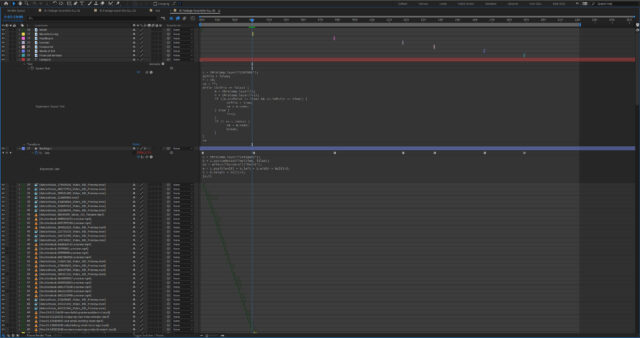
    Thanks so much Dan. That did change how the backing (not the text) behaves, although it didn’t fix things… here’s how the layers are set up, with the titles up top, the text layer and shape layer backing in the middle, and all the layers (stock) going off the screen at the bottom. Changing to …

    if ((m.inPoint <= time) && (n.inPoint >= time)

    still caused the backing layer to change size 5 seconds before it should, but now it was changing to the size it should have been *after* the new title has come in. So I then tried this

    if ((m.outPoint <= time) && (n.outPoint > time)) {

    which works (the backing layer changes size as soon as the title layer appears, which is fine as it covers the other text and its backing).

    I’m not quite sure why sourceRectAtTime was seemingly being thrown by dynamically generated text, but in any case it does work. Thank you again!

  • Nick Hill

    November 25, 2022 at 7:10 pm in reply to: Weird sourceRectAtTime bug… or is it?

    Thanks Dan. Not in front of it now so I can’t check – but it’s weird the text is doing what I’d expect, while the backing layer which is getting the text layer’s dimensions isn’t!

  • Nick Hill

    September 22, 2022 at 4:04 pm in reply to: Scripting question about shape layers

    don’t worry, this works:

    function createPath(group) {

    return group.property(“Contents”).addProperty(“ADBE Vector Shape – Group”);

    }

    thanks for your help!

  • Nick Hill

    September 22, 2022 at 1:11 pm in reply to: Scripting question about shape layers

    If I change createPath to this, it works. So what’s the difference between a parametric path and a freeform one, in terms of how AE references them?

    function createPath(group) {

    return group.property(“Contents”).addProperty(“ADBE Vector Shape – Star”);

    }

  • Nick Hill

    September 22, 2022 at 12:53 pm in reply to: Scripting question about shape layers

    Thanks Filip. So that’s an extra step after adding the ADBE Vector Group?

    Would this work for the createPath function:

    group.property(“Contents”).addProperty(“ADBE Vector Shape – Group”);

    return group.property(“Contents”).addProperty(“ADBE Vector Shape”);

    …or does the ADBE Vector Shape have to sit within the ADBE Vector Shape – Group?

  • Press Ctrl+K which will open up the composition settings window. You can now set the duration of the comp to something that’s long enough to fit in the entire clip.

  • Nick Hill

    June 28, 2022 at 2:51 pm in reply to: Zoom in on image but keeping text the same size

    Here’s an alternative way that may be simpler:

    1) Create your master layer that you’ll put your scale / position keyframes onto

    2) Make your text layer(s) and parent them to the master layer

    3) Alt/Option-click each text layer’s scale property to add this expression:

    s = thisLayer.parent.scale[0]/100;
    scale / s

    This will keep the text layer’s scale at 100% but it will take its rotation & position from its parent.

  • Nick Hill

    June 12, 2019 at 12:33 pm in reply to: Partially hiding geometry in C4D
  • Nick Hill

    June 11, 2019 at 4:56 pm in reply to: Partially hiding geometry in C4D

    The project’s moved on a bit, and I’ve ditched the booleans (as they seemed to slow things down a lot). I’m now hiding things mainly with transparent objects, then using compositing tags on the stuff that needs to be hidden with “seen by transparency” unticked.

    However…. there are some objects that pass *behind* one of these transparent primitives. These need to be occluded by their *own* transparent objects, but *not* by any others. Here’s a quick mockup example…

    https://drive.google.com/open?id=1iI_jKtAphZJoYlYI4o6riz1NWS5NCNEt

    Currently, the blue cube’s compositing tag has “seen by transparency” unticked. This means that both the transparent objects in front of it matte it out:

    https://drive.google.com/open?id=10PxflUBwRa57N5ZGTLSo9A75hUpYeCz5

    I want to stop the foreground transparent cylinder from matting out the blue cube. I’d have thought that the way to do this would be to drag this into the “exclude” box on the cube’s compositing tag, but that doesn’t seem to do anything.

    https://drive.google.com/open?id=1WeC3vJeZywFTDJTveeJ3ItlyskXOGOmc

    Nor does dragging the blue cube’s transparent box into the compositing tag on “include”:

    https://drive.google.com/open?id=1ATlVm0acwTDXrghJYEHR0JlMZYKnM7_i

    Anyone know how to do this? Or is there a better way? (I’d rather avoid multi-pass renders as that might become a bit of a headache for a project like this!)

Page 2 of 6

We use anonymous cookies to give you the best experience we can.
Our Privacy policy | GDPR Policy