Forum Replies Created
-

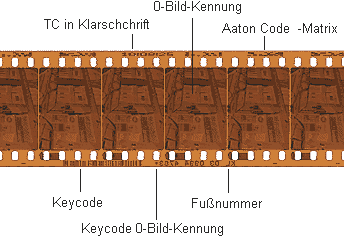
Historically speaking on the Film TC/Sound TC syncing. It was the only method by which AutoSync could sync from two different metadata columns. This was to support a very specific workflow back in the film production/transfer days for productions using Arri or Aaton systems to record timecode on film when shooting. The film camera and audio devices would sync to a master clock, and when the camera started rolling, it would expose an encoded timecode at the film’s edge. Something that looked like an elongated QR code.
During telecine, the Aaton or Arri readers would decode the timecode and drive the audio syncing process during the transfer. The metadata was mapped to the Film TC columns (since it was the timecode on the film) and Sound TC. Capturing from analog or DAT devices at the time, the timecode from the audio would be placed in the SoundTC column.
The goal was to minimize the amount of column manipulation and allow AutoSync to sync across two different columns: Film TC on video sources, and Sound TC on audio sources. The request to be able to sync across different columns was part of the original plan but stopped at the Film TC/Sound TC columns. There are several features in MC that could be expanded to better fit today’s workflows, and some, like AutoSequence did find additional uses beyond its original design concept for MOS film transfers and audio layback from sync in Media Composer. Another great feature that languishes is stereo-3D’s ability to sync the Left eye from one bin, and the right eye from another bin and put the result into yet a different bin. Something I have been asking since it was added in v6 to apply for AutoSync and even grouping might find some uses.
While film is still being used, the use of timecode on film has faded away and the overall usefulness of FilmTC has as well but still exists as an available column. It behaves like 24TC in the sense that is hardcoded to count at 24fps unlike the aux TC columns which will inherit the frame rate from the project rate. And as Job teBurg mentions, it functions as described in a film project.

-
-
If it is the motion look for some of those scenes, it was shot at a high shutter speed in production. The same for scenes in The Gladiator.
Michael
-
Michael Phillips
October 31, 2020 at 10:01 am in reply to: AI driven auto-transcription/shot detection metadata and importing into AVIDAn old but still has some value whitepaper. The last section describes an ALE format.
Michael
-
Avid Media Composer does adjust the audio when you change the source settings of a VA master clip to project rate – in this case, a 23.976p source in 25fps project timeline. It will not adjust for the .7 semitone in pitch though.
Michael
-
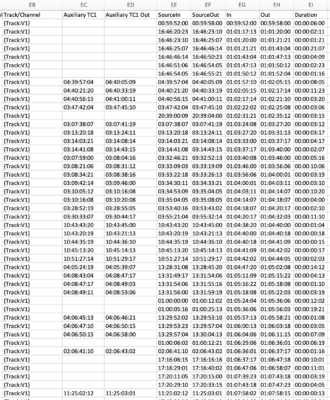
I have a Cloud-based AAF to Excel ready file conversion that will break down the AAF by track and a duration calculated for each event along with all or any subset of source metadata you want to track. Here is a screenshot of just the timecode columns associated with each event on a per track basis but the spreadsheet includes all related source metadata on a per-event basis as swell.
Michael
-
Sandwiched between IBC and Interbee, I see no real reason for many non-north American attendees to attend NAB resulting in a much smaller show than previous years. It will also be interesting to see how manufacturers choose to deal with this as well based on resources, budgets etc, and if they choose to not attend one of those three.
-
See here on page 27:
http://resources.avid.com/SupportFiles/attach/README_Avid_Editor_v20.6.pdfIt does not appear that 2020 Macbook Pros are supported. Doesn’t mean it won’t work, but should you run into issues, it is not supported. I am on a 15″ mid-2015 with 16GB of RAM and I feel that is right on the bubble performance-wise, mainly memory issues. I wish I could add more RAM… but I can’t. I hear Cataline OS uses more memory than past OS’s so I would opt for at least 32GB if not 64 these days.
Michael
-
It’s part of the original Universal Mastering feature set. 1080p/24 can be used in both PAL and NTSC based countries and all this is doing is setting a flag as to what the base format to consider when invoking the mastering outputs via digital cut and desired output frame rate. Part of the original functionality was creating multiple versions of the same title in the background (PAL 4:3, PAL 16:9, NTSC 4:3, NTSC 16:9) so that the wouldn’t get resized and ending up looking softer on graphics. In a world of file-based media and deliverables, it does not have much value for tape-based outputs so you can pick PAL if you’re in PAL based country, NTSC if in an NTSC based country then forget all about it.
Michael
-
And have you tried any of the Nablet Sony AMA plug-in to work directly with these files in Media composer and transcode there as needed? Depending on camera/format, it may be free or at a cost.
http://www.nablet.com/product-category/plugins/avid-media-composer/
Michael