Mark Suszko
 12
Apple Final Cut Pro X Coins
12
Apple Final Cut Pro X Coins
 15
COW Coins
15
COW Coins
 2
Premiere Pro Coins
2
Premiere Pro Coins
 4
Apple Motion Coins
4
Apple Motion Coins
Forum Replies Created
-

Your posts sounds like you own more than one. First step then is to go thru both units side-by-side, step thru every menu setting and compare them for differences. You want them identical.
Did you try swapping the lav cable part to the other unit? That is a way to narrow it down to the fault either being the mic and cable vs. the base unit. The noise you describe seems like it could be a loose shield connection inside the connector or in the plug, or a break in the wire where the ground is intermittent.
I’d first swap the components and try to narrow it down to that cable or the connectors. If the first cable sounds clean on the second recorder body, then it might be the connection at the body of the first recorder. Carefully open up the unit and inspect for any damaged or loose components, any bad solder joints around the pins of the connector socket. if you have time to order up a duplicate connector and cables, you could connect other mics to the unit for testing as well.
-
I did something vaguely similar a (long) while back in Apple’s DVDStudioPro (pauses, sheds a single tear, resumes story). The hardcore producers used to make this kind of stuff in Macromedia Director back then, but they became hard to find and I didn’t have time for a learning curve, so I built the interactive training in DVDSP, and to get to my point, yes, branching narratives mean you have to create a lot more program than the typical person will ever see, taking every combination into consideration and running actual tests trying to “break” the flow. And consider how the looping will occur, and where it loops back to… Some people only watched Bandersnatch once thru. But, a lot of people with OCD apparently ran it a bajillion times, to explore literally every combination of paths.
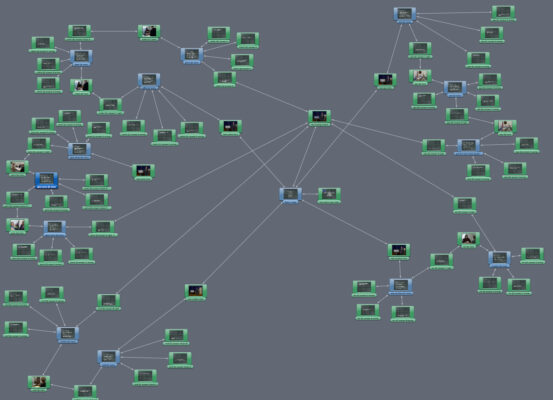
I keep this screen cap of the object view for my DVD project to remind me how even a very basic interactive quiz with 13 questions, 3 possible answers each, can get big in a hurry. You start in the center. Each track has an intro, a dramatic vignette, the question posed, three choices to make. Wrong choices loop to a message saying sorry, wrong, try again. Correct choice goes to a “congrats, you got it” message, then the menu options are go to next question, go to main menu, or quit. The menus won’t allow you to go forward unless each level has been answered correctly; your only choices are to keep trying until you get it right, or quit.
Shooting the material for this with local amateur and semi-pro actors was like the kitchen of a fast food joint; move, shoot, re-set, change costumes, do again, fast, fast, fast. The actors were great at improvising characters and keeping them different thru many short changes, it was in a way very much like an improv competition. The host of the show had the most work in terms of recording every possible variation of question and response. His separate studio green screen session took about three hours, I recall. I pre-composed each track before bringing them into DVDSP, even adding menu choices to their outros… I literally learned DVDSP’s every function, from zero, by doing this project, which took me a month. The menu building was the tedious part. Then, 48 hours before delivery, Friday night, clients found a glitch in one path of the game logic and I had to rebuild an entire branch of this map, then burn 200 DVD dubs by Monday morning. The spindles full of disks were literally still warm when the client picked it up.

-
Mark Suszko
November 4, 2020 at 8:36 pm in reply to: Do you charge your returning customers for archiving their data for ever?I’ve said it many times; if you haven’t heard from a presumed dead-and-gone client in a long time, you will… … about 24 to 48 hours after you’ve erased their old files and masters. Every. Darned. Time.
My experience with clients over the years has been that very few of them are careful and consistent about preserving their materials. They may keep a convenience copy locally for weeks, maybe a year; after that, if they haven’t used it recently, they forget about it, assuming someone else (me) has a backup. Then they forget there -was- a backup.
Other clients are not tech-savvy and even though they have a file of the product in their network, it’s just easier to ring us up and ask for another FTP. Lol, had one client that didn’t understand FTP vs streaming and had to have it explained to them they already had the work product in their downloads folder… having downloaded it something like a dozen times, fresh, in a week, instead of looking for it on their own C drive.
Some of that casual attitude is because many of the materials are ephemera that have a short shelf-life anyway. Not everything needs to be immortal. But other stuff they generate sometimes has historical value or internal institutional knowledge value, beyond the immediate utility it was created for. And there are comparatively few long-term thinkers and visionaries in the client sphere that appreciate what they potentially have in that regard. Some people are just very short-term thinkers… living in the moment, without thought about the past or the future, if they don’t expect to be a part of that future…
I’m a pack rat; I’ll keep every darned thing, just because I’ve been bitten enough times over the years (see paragraph 1) and you never know what might become valuable later. Storage is cheap and getting cheaper every day. Some tech breakthroughs in cloud storage, inspired by the storage needs of the Human Brain Project and the Square Kilometer Array Project, as well as initiatives at AWS, are eventually going to hit the market and become available generally, and that will drop the cost per gig even lower. Ridiculously lower. What I recommend is that you budget for the storage up-front, even if you don’t mention it to the client, and add it to your markup as one of the costs of doing business.
I think another poster up-thread was very smart to suggest your formal contract name a concrete limit to the time you will be responsible for the masters and elements, and what the cut-off date for that is. My own sense of things is to never actually delete the materials, but put language in the deal memo to make your stewardship of them optional and no longer contractually obligatory and enforceable after a certain deadline. That covers you against eventual storage failure and the costs of migrating the data, and puts the onus for preservation on the client.
Charging them for the storage when they return? That’s like fining them for being loyal. You saving their bacon by having the backups is part of the “Added Value” in your Value Proposition, the advantage they get for sticking with you for all their business. You could mark it down on their invoice as a “no-charge” bonus… which makes you look generous. They don’t know it’s “no charge” because it was already baked into the original deal.
You could look on the situation as a motivator to up-sell a client or encourage them to do some more business. “Hi, I was just going thru our accounts regarding the last time we worked together, and we noticed we still had footage from your XYZ project in short-term storage here. We were wondering if you were thinking about re-purposing any of that material in a new project; many folks are finding that to be a cost-effective strategy these days… but if you don’t have any plans for the footage, we can either dispose of it or retain it in our long-term archives for you to use again later…” (if they want to save it, you then have the rate card for archival retention handy – you DID do some calculations ahead of time to figure the cost and a mark-up for that, right? :-).
Lastly, the comment on charging extra if they want to take it all away to work with someone else, is just good business. They’ve told you they’re done with you and there’s no more money to be made after this, so it is your last chance, not to punish them, but to recoup any outstanding money you laid out as expenses in serving them, plus, the machine and personnel time they are taking away from your other clients as you offload.
Is charging quadruple rate over-doing it? Not for me to say, depends on a lot of factors, and if they are leaving on relatively good terms. My sense of things is that, the circles we work in are relatively small, and it’s a person-to-person business. Reputation is currency. Word gets around regarding how good of a sport you are, how classy you are in your deals, if your handshake means something. Staying classy with even a departing client can have benefits down the road you never considered, in terms of your reputation. And it’s not impossible that a client that dumped you could re-consider, at some point, because times and people change. The ones that made the decision to dump you move on, new people come in without that baggage, and maybe they re-assess… And if they ask around to an old hand, they will remember how you left things the last time they dealt with you. iI you stayed classy, it becomes a potential opening to re-capture the business. If you burned bridges, you’ll never get the next chance with that client again, and never know you became a coffee-break story somewhere where you can’t correct the narrative.
-
Mark Suszko
November 2, 2020 at 10:06 pm in reply to: Recommendation needed for Screen Capture SoftwareThose are all good methods. They do however leverage system resources on the computer. This is why some of us older folks still like to grab the screen externally thru a physical scan converter, to a stand-alone device like a hard disk recorder.
-
I’m not a fashion expert by any means, but when you pick your clothing colors, color as well as brightness/saturation needs to be considered. You can find simple color wheels online, check your background color, look across the wheel for the opposite color range, pick a shirt in that color.
For years, whenever checking a shot, to verify the contrast is good, I would flip the monitor output to “monochrome grayscale”, as if being viewed by a color-blind person. This shows that colors you *think* contrast well, sometimes actually don’t. You probably already do this when picking colors in a web page creation, so the text stands out from the background. Same principles apply to TV clothing.
-
You left out what I think is an important service; oral history interviews. This is not flashy work, but it has lasting value; getting people’s memories and thoughts captured, before they’re gone. And you don’t need a huge gear investment or a lot of talent to get started. One soft light, a lav and a shotgun, and some patience in asking leading questions are the fundamentals. With elderly folks, indirect lighting is easiest on their eyes, and a soft box is also more flattering to the face.
-
I think your lighting could be improved, but also your dark blue background choice is unflattering, especially if you’re wearing a dark shirt. You might also bring the mic down a little bit more out of frame, or consider using a shotgun mic, or a lavaliere, to take the mic out of the shot altogether.
Regarding lighting, add more backlight, slightly offset to one side, let it hit your shoulder as well as the back of your head. This creates better separation from the background and adds a sense of shape and dimension. Flat lighting makes for easy green screening, however, it is visually boring to the eye. In FCPX. I can fix that flatness by adding a spotlight effect on the face and offsetting it to suggest another key light. PPRo probably can do that as well.
Next, try a lighter background in the green screen comp. A lighter blue is good, add a subtle gradient to it, shading from lighter at the top to darker below. Add a subtle vignette effect to it as well. Add a cast drop-shadow to your matte, make it soft and diffuse so it looks like you are casting your shadow onto wall… a little goes a long way here. The point of this is to again, suggest a 3-d volume you are standing in. Gradients are not your only option. You could pick a real-life textured wall from a stock photo place, you could take a photo of a tech workspace and add enough gaussian blur to it so that it simulates a tight depth of field situation and is not too distracting. The overall brightness ratio between your matte and any background has to be considered, and usually you want the foreground a little lighter by comparison.
Your lens settings are creating a slight fisheye effect; explore a more telephoto setting, which might require backing the camera off a tad, then zooming-in a bit. Camera position should put the lens level with, or only slightly below, a line drawn between your pupils. Bring the lens too low, and you are looking down on your audience, not good. Lens too high, and you’re looking up at them; also psychologically not good.
How you sit or stand when presenting in the full-screen shots can be tweaked. If standing, one simple trick is to point both shoes 45 degrees off from the lens, and rotate from your hips; your body need not always be square-on to the camera, especially in head and shoulders shots. This pose is a little more visually dynamic, especially in full-body wide shots, but it has subtle effect in closeups as well.
Editing tip; If you are shooting 4K, you will be able to do digital zooms and re-framings/scalings to imitate cuts from wide to tight and back again. If you can shoot in 4k and output in 2k, then shoot all the green screen in a slightly wider framing in 4k, then go back into your timeline, blade it up, picking sections where a closeup for emphasis would be useful, then scale up that section by about 20 percent and re-frame it, so your eye line remains the same in both the wide and tight shots. A trick to doing this faster is, once you get that tighter shot the way you like it in the first close-up segment, you can highlight that section and hit “copy” in the NLE, go to another bladed section, highlight that one, and select “paste attributes”, and bam, each shot treated that way will automatically look like the first one you did, in just three keystrokes.
-
Mark Suszko
October 29, 2020 at 3:13 pm in reply to: How do I chromakey an object in a video to change colour but preserve luminance?I’m by no means a Premiere pro expert, but I think, once the thing is keyed, I’d make a compound clip of the keyed element and then lumetri should be able to change the colors of it independently in that “container” while maintaining the shadow and details and leaving the original green screen matte unaffected. Second way to go would be to duplicate the track, colorize the underlying one, draw a feathered circle mask around the ball on the top layer and match-move it, or, third way, using the color tools, try the “Pleasantville” effect of sorts by using the color picker tool to change only the specific color used on the ball.
-
I had a further idea about this piano problem and it occurs to me that the Deep Learning, AKA “Deepfake” technology would be great to use on this. Many MIDI music making programs featuring an animated piano keyboard that plays back visually as the music plays back. I know Garage Band does. Take that animated piano keyboard and apply it to the Deep fake program, re-mapping it to the real piano, and now you have the ghostly piano keys effect you really want.
-
Taking the dog out is harder than putting new human in over the top of it. If you are the speaker in the video, and you don’t have a lot of money to throw at Izotope, ( and though Izotope has a lot of automation in it, you still need some skill and knowledge of what you’re doing to maximize its effectivemess) then there’s an old-school film audio technique you can use called ADR or “looping”.
To do this, have the marked-up script at hand, pay someone to take the dog to the park for a couple of hours. Next, re-create the original sonic environment of the live recording as closely to the the original as possible. Looping involves taking a short piece of the bad audio and playing it in a loop, over and over, while you try to speak the line or lines in as close to a match as you can. It can be done audio-only, but sometimes it helps to see the visual, to get the lip-synch better and see the micro-expressions that communicate timing cues. Both methods can work. You record that new audio over and over, until you like the match, then drop it into the audio track of the original program and adjust the other parameters like EQ to match the original. The most seamless way to do the edit is to pick a spot in the timeline where the camera angle changes, there’s a transition, or there’s a significant quiet pause or a music or sound effects cue that can help motivate a change in aural quality and hide the “seams” where you bring in the new piece. That means the looped part might have to be longe than the second or so of barking, more like an entire sentence or two, even a paragraph, depends on the material.
Looping means you only fix relatively small parts of the narrative, instead of having to completely re-do it end to end from scratch, which also cannot help but change all your timings. That’s what I’d try if this was my gig.
Just for fun, try looping Roy Batty’s “Like-Tears-In-Rain” speech from Blade Runner; it’s short and very memorable. Learning the timing and watching his breathing gets you there pretty quickly.