Forum Replies Created

Page 1 of 3
  • Mackie John

    September 7, 2022 at 2:56 pm in reply to: Changing Position keyframes but keeping the speed graph

    This also works. Im grateful for the response

  • Mackie John

    September 7, 2022 at 6:35 am in reply to: Changing Position keyframes but keeping the speed graph

    This surely works thank you.

  • Mackie John

    March 10, 2022 at 4:46 am in reply to: SOURCERECTATTIME FOR STRING

    Many thanks for your response Tomas. That is not an option for me. Is there any alternative to sourcerectattime. I want be able to acheive with expressions within the same layer

  • Mackie John

    February 11, 2021 at 1:20 pm in reply to: Expression behaving differently on two PCs

    Excellent dear. Thanks for your help. This was the issue.

  • Mackie John

    December 21, 2020 at 3:33 pm in reply to: TEXT ALIGNMENT IN A BOX USING EXPRESSIONS

    Sorry kindly please ignore this, this is fixed. I was using the wrong rectangle. Just need to understand something, why is Parent and LINK used

  • Mackie John

    December 21, 2020 at 3:30 pm in reply to: TEXT ALIGNMENT IN A BOX USING EXPRESSIONS

    There was a parent link, I removed that now below is the result, still there is offset.

  • Mackie John

    December 21, 2020 at 3:20 pm in reply to: TEXT ALIGNMENT IN A BOX USING EXPRESSIONS

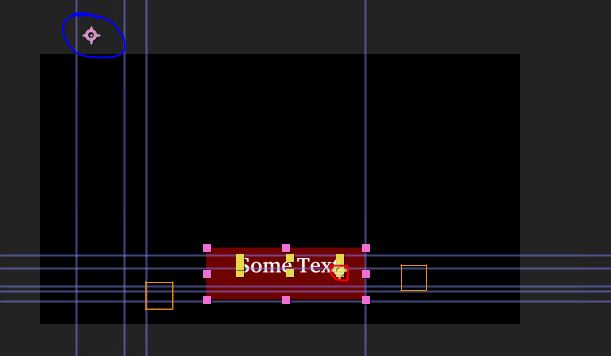
    I’m having a problem with another project and tried your suggestion above, it give me a huge offset or difference between the anchorpoint of the rectangle and the position of the Text. I can see the Text is attached to the anchor point of the Rectangle by moving the anchor point of the rectangle and the text moves along, but what I don’t understand is why is there a huge difference in this project an the same thing works in another project which I tested earlier. Confused.

    D = thisComp.layer(“TEXT BOX”)

    fullPosition = D.toComp(D.anchorPoint);

    Attached is the file showing the offset between the anchorpoints of the textbox and text. Marked in red is the text anchorpoint and marked in blue is the rect anchor point

  • Mackie John

    December 6, 2020 at 3:48 am in reply to: TEXT ALIGNMENT IN A BOX USING EXPRESSIONS

    Thank you Dan,

    This works just fine.

  • Mackie John

    November 22, 2020 at 11:57 am in reply to: TimeRemap Using a Marker

    I got this working with the following script (had to point to the right action var)

    action = comp(“Comp 1”).layer(“Marker”);
    n = 0;
    //test = action.marker.numKeys;
    if (action.marker.numKeys > 0){
    n = action.marker.nearestKey(time).index;

    if (action.marker.key(n).time > time){
    n–;

    }
    }

    if (n == 0){
    0
    }else{
    m = action.marker.key(n);
    myComment = m.comment;
    test = myComment;
    t = time – m.time;
    }

    try{
    actMarker = action.marker.key(myComment);
    if (action.marker.numKeys > actMarker.index){
    tMax = action.marker.key(actMarker.index + 1).time – actMarker.time;
    }else{
    tMax = action.outPoint – actMarker.time;
    }
    t = Math.min(t, tMax);
    actMarker.time + t;

    }catch (err){
    0
    }

  • Mackie John

    January 8, 2020 at 7:26 am in reply to: Updating Audio Markers

    Thanks Andrei,

    This works.

    Another question as I’m just new to ExtendedScript. How do I write in the script to target the application. I know this can be done from the dropdown box in the ExtendScriptToolkit. But if I forget that or I need to run the script from within AfterEffects (where I include it as part of the footage), it gives me an undefined error on the below line

    app.project.activeItem.layer("Audio").selected = true;

Page 1 of 3

We use anonymous cookies to give you the best experience we can.
Our Privacy policy | GDPR Policy