Forum Replies Created

Page 1 of 3
  • Laurie Pepper

    October 27, 2023 at 7:24 pm in reply to: Best resolution for stills to be used in a movie

    Thanks so much. I have no control over how the digitized film is handled or what format is used to edit in, etc. I’ve been asked to edit in HD. So when I import my stills into the footage, that’s what happens to them. I’m also supplying the filmmaker with the best quality stills, so I’ll follow your advice and go high, whether that means upscaling digital pics in Topaz or scanning negs and pics at high res.

  • Laurie Pepper

    October 27, 2023 at 1:21 am in reply to: Best resolution for stills to be used in a movie

    no, this is a feature, not youtube. It’ll probably be in 2k… I still can’t figure out what to do, and there are no good answers online. I’ll try posting in FCPX and see if any filmmakers want to chime in. Thanks.

  • Laurie Pepper

    August 31, 2023 at 12:11 am in reply to: Write on effect with existing handwritten text

    Ryan! It does sound complicated! But I’m so glad to hear you’ve done it. I would love to have a template from. you or more advice. How???

  • Laurie Pepper

    August 31, 2023 at 12:09 am in reply to: Write on effect with existing handwritten text

    Thanks so much. I’m not sure I follow, but I’ll work on it!

  • Laurie Pepper

    August 31, 2023 at 12:08 am in reply to: Write on effect with existing handwritten text

    Thanks so much. I’ll try it!

  • Laurie Pepper

    June 30, 2023 at 2:29 am in reply to: HOLD a keyframe in FCPX?

    I didn’t explain well, ben. I don’t want to hold a frame. I want to create a key frame that will hold a transformation until I want to change it. Like you can in after effects and premiere. Instead of a little diamond shaped one it’s square one in those apps. Fcp doesn’t make keyframing easy!

  • Laurie Pepper

    June 29, 2023 at 12:17 am in reply to: Can’t open compound clip

    Thanks. I think I’ve solved it. I have to open the multilayered psd so that it looks like a project with multiple layers and then I have to save those layers as a compound clip. Then I can open it, work with it, etc. Tho I repeatedly save new compound clips of my work, because I’m sick of losing everything!

  • Laurie Pepper

    January 27, 2023 at 8:04 pm in reply to: optimized media

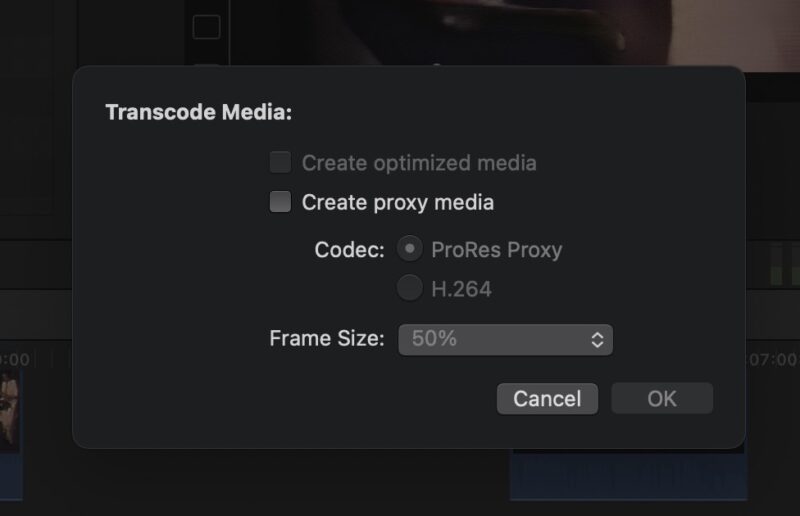
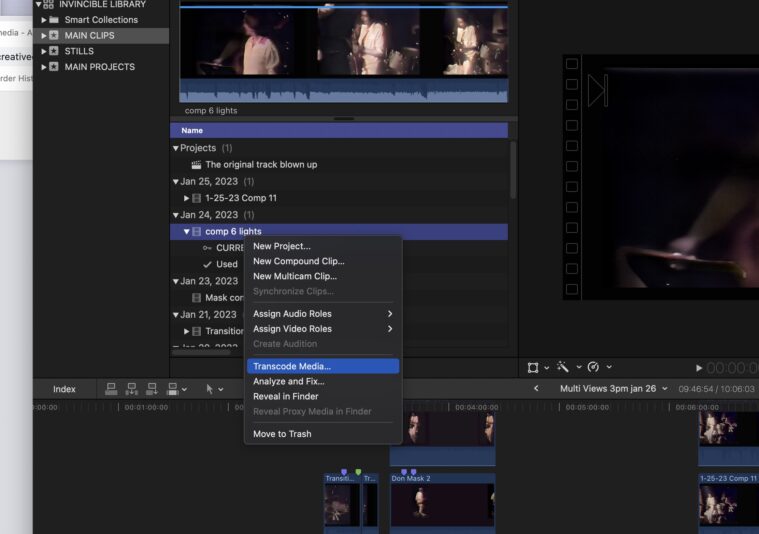
    BEN, everything is okay. I re-rendered all the clips I’m ACTUALLY USING so I could see the project as well as possible, since the quality is so bad to begin with. I will never never trash anything manually again. Promise. I will get Final Cut Library Manager. I’ve been fooling with those files manually and I’ll stop now. Thanks. There’s a function in FCP to transcode your tracks to 422 OR to proxy, but optimized is dimmed. see attached images

  • Laurie Pepper

    January 24, 2023 at 6:08 pm in reply to: keyframing in fcp all advice welcome

    Ben, I’m 82 and I notice there are crowds of people like me who just put a slug in the damned magnetic timeline. I keep trying to use it and giving up. Just checked this out. https://youtu.be/wxOoAClvgeU

    Some contents or functionalities here are not available due to your cookie preferences!

    This happens because the functionality/content marked as “Google Youtube” uses cookies that you choosed to keep disabled. In order to view this content or use this functionality, please enable cookies: click here to open your cookie preferences.

  • Laurie Pepper

    January 24, 2023 at 5:37 am in reply to: keyframing in fcp all advice welcome

    I did a search for “MODIFYING” keyframes in fcpx and found a lovely tutorial on youtube. So glad I can control keyframes and copy and paste them. When I did a search for USING keyframes I got a lot of tutorials that were too basic. So I assumed, wrongly, that there was no way. I guess reset parameters works in transform but you have to hit every option. But now that I can select keyframes easily in the timeline by opening the animation thingy I can delete a bunch (and also see which keyframes refer to which functions!) Ben, I really hate the magnetic timeline. It drives me nuts. I did study some tutorials, but it didn’t help. So my method is to AVOID the main timeline. There’s nothing in it. I use the tilde and the position thing to move things that get stuck there out. I’m sure there’s something good about it, but I’m old and too accustomed to AE and FCP7 to deal with it.

Page 1 of 3

We use anonymous cookies to give you the best experience we can.
Our Privacy policy | GDPR Policy