Kevin Camp
Forum Replies Created
-

I would think they record them reading and the add the ‘mean tweet’ graphic and keyframe the text animating on.
To set up a text layer to read on is pretty simple, on the text layer add a text animator for opacity and set the animator’s opacity to 0. then, in the animator>range selector keyframe the ‘offset’ property to reveal the words as they read.
If I were producing these, after the text and animator was set up, I would preview the audio and hit the asterisk key as they started reading, pause and restart reading until they finish. Then I’d use those markers to mark where to add keyframes for the text animator.
If you wanted to do these in Premiere, then you could just export a MoGRT adding the source text and offset properties to the Essential Graphics panel and export the MoGRT.
-
Kevin Camp
December 22, 2021 at 7:42 pm in reply to: AE – Text is offsets starting position differently per letterShould have mentioned that after you parent the shape layer to the text layer, change the shape layer’s transform>position property to 0,0 to center it on the anchor point of the text layer, then proceed : )
-
Kevin Camp
December 22, 2021 at 7:07 pm in reply to: AE – Text is offsets starting position differently per letterThe issue is that some characters are actually left of the anchor point (like T, Y, V, O, etc.) compared to more square characters (like H, D, R, etc). To fix that, you can use the sourceRectAtTime() ‘left’ attribute which can give you that left-shift value relative to the anchor point.
Here’s my typical process for these (assuming left justified text and scale is 100%, 100%):
Create a text layer and type something in it.
Then, without a layer selected, double click the rectangular mask/path button to make a comp-sized rectangular shape layer that has it’s anchor point in the center (that’s the quickest way I’ve found to do that), parent that shape layer to the text layer and move it below the text layer (set color for the shape layer as needed).
Then for the contents>rectangle>rectangle path>size property, I use this expression:
hPad = 10 ;
vPad = 10 ;
rect = parent.sourceRectAtTime() ;
[ rect.width + rect.left, rect.height] + 2 * [ hPad, vPad ]
And for contents>rectangle>rectangle path>position property, I use this expression:
rect = parent.sourceRectAtTime() ;
[ rect.width + rect.left, -rect.height] / 2
That should keep the left edge relative to the anchor point of the text layer.
I should note that I also often hardcode the height in both of those expressions to prevent issues with descenders or other character height variations… Even when fonts are all caps, there can be issues with round characters (like O vs H ), Q’s often go below the baseline and some punctuation can create problems (like commas). That can take a bit of fiddling, since the position is about 1/3 of the height… I could probably go further with the expression and use the sourceText.style to derive the baseline and fontSize…
-
Sorry, I did miss that.
It could be that AE is having an issue with cached frames… have you tried edit>purge>all memory & disk cache?
-
Whenever you apply loopOut() to the time remapping property of a nested comp the frame at the last keyframe will always be blank.
To fix this, simply goto the last keyframe, hit page-up to move the CTI one frame earlier in the comp, add a new keyframe for time remapping and then delete the lat keyframe — note, you cannot simply nudge the last keyframe up one frame.
It should now loop the way you expected.
-
Kevin Camp
December 2, 2021 at 11:03 pm in reply to: Draw parametric equations in AE, how to make them do deformation animation ?I botched the rate… this should fix it:
r = 1 ; // rate to draw each petal in seconds
n = 4 ; // number of petals
a = 300 ; // size
n2 = n / Math.abs( ( ( n % 2 ) - 2 ) ) ;
t = time * 2 * Math.PI / n2 / 2 / r ;
x = a * Math.sin( n2 * t ) * Math.cos( t ) ;
y = a * Math.sin( n2 * t ) * Math.sin( t ) ;
value + [ x, y ]
-
Kevin Camp
December 2, 2021 at 10:42 pm in reply to: Draw parametric equations in AE, how to make them do deformation animation ?If you use the Write-on effect and apply this expression to the Brush Position property it will draw a rose curve with a set number of petals:
r = 5 ; // rate in seconds
n = 3 ; // number of petals
a = 300 ; // size
t = time * Math.PI + r ;
n2 = n / Math.abs( ( ( n % 2 ) - 2 ) ) ;
x = a * Math.sin( n2 * t ) * Math.cos( t ) ;
y = a * Math.sin( n2 * t ) * Math.sin( t ) ;
value + [ x, y ]
Adjust the r, n and a as needed.
In my testing it works pretty well, except for 6 petals, which for some reason only produces 3 petals…
-
For my set up, i was thinking you’d want each text layer lined up by their y-axis (like it is on a single line of text), and then the expression would go on the Position property rather than the Source Text property.

-
I don’t think you’ll be able to do this with a text style expression, as style is applied to the whole text layer, not a partial string.
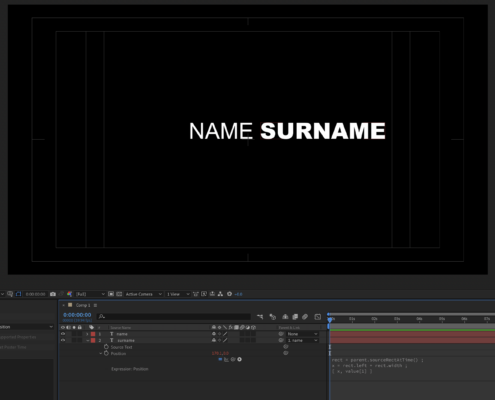
If you want one name regular (or light) and the other bold, I think you will need to make them separate text layers and then use a sourceRectAtTime() expression to make the second text layer follow the first, as if it were a single text layer.
Try this:
Create two text layers and parent layer 2 to layer 1.
Add this expression to the position property of of layer 2:
rect = parent.sourceRectAtTime() ;
x = rect.left + rect.width ;
[ x, value[1] ]
Layer 2 should now follow layer 1 as you modify layer 1’s source text as if they were both on the same text line.
-
Kevin Camp
December 2, 2021 at 12:08 am in reply to: Changing "baselineshift" value according to the biggest wordI don’t think you will be able to do what you want with a text style expression since style is applied to the entire text layer, not just a word or partial string of text.
I think to pull this off, you’d want each word on a separate text layer and use sourceRectAtTime() expressions to make them work like a single line of text.
Would you only ever have 3 words, or would the number of words vary?