Creative Communities of the World Forums

The peer to peer support community for media production professionals.

Activity Forums Adobe After Effects Expressions “Mean Tweet” Style

  • “Mean Tweet” Style

    Posted by Eva Boe on December 17, 2021 at 11:16 am

    Hi everyone,
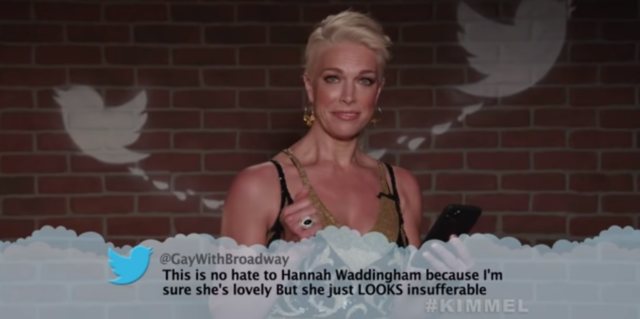
    I was wondering how Jimmy Kimmel’s Mean Tweet (YouTube) gets done, in terms of how in sync the text and how the spoken words are.
    I wanted to know how one would go about getting similar thing done…

    https://www.youtube.com/watch?v=6f4oKjlLYK0

    (was uploading a GIF but size was hefty).

    Some contents or functionalities here are not available due to your cookie preferences!

    This happens because the functionality/content marked as “Google Youtube” uses cookies that you choosed to keep disabled. In order to view this content or use this functionality, please enable cookies: click here to open your cookie preferences.
    Kevin Camp replied 4 years, 4 months ago 2 Members · 1 Reply
  • 1 Reply
  • Kevin Camp

    December 22, 2021 at 8:52 pm

    I would think they record them reading and the add the ‘mean tweet’ graphic and keyframe the text animating on.

    To set up a text layer to read on is pretty simple, on the text layer add a text animator for opacity and set the animator’s opacity to 0. then, in the animator>range selector keyframe the ‘offset’ property to reveal the words as they read.

    If I were producing these, after the text and animator was set up, I would preview the audio and hit the asterisk key as they started reading, pause and restart reading until they finish. Then I’d use those markers to mark where to add keyframes for the text animator.

    If you wanted to do these in Premiere, then you could just export a MoGRT adding the source text and offset properties to the Essential Graphics panel and export the MoGRT.

We use anonymous cookies to give you the best experience we can.
Our Privacy policy | GDPR Policy