
Jonny Cates
Forum Replies Created
-

Thanks again Ben….will do!
-Jonny
-
Thanks Ben….i know where I made the initial mistake now after your answer to me. Since Covid, I’ve been away from editing for a couple of years and some of my memory needed jogging.
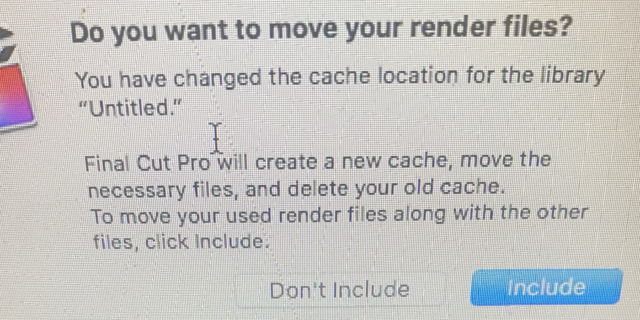
Lastly, Im getting this question after selecting my cache file to go to my external.
Do I need to include these cache files because it sounds like it’s going to copy the same files to my external.just wasn’t sure if I should click include or don’t include.
Thanks again for your reply Ben.
Jonny

-
Joe,
Thanks for the reply. No, there could not be any possibility of older libraries as you mentioned.
I’m running FCP 10.2.2 on a mac book pro. I created 3 libraries back in December and have been editing on these projects off and on for the last few weeks. Finished one project just fine. But now none of these libraries will open at all, after being opened and closed multiple times. They are all on the same 2 TB external, in which was NOT formatted before I started all this. My fault on that part.This is the message I get when I try and open one of these libraries:
The file “CurrentVersion.flexolibrary” couldn’t be opened because it isn’t in the correct format.
(The file might be corrupted, truncated, or in an unexpected format.)At this point I desperately need to save these files. The video files have to be there because the “get info” on that 2TB drive says there’s 1.22 still available.
Disc utility can’t fix this because it can’t unmount the volume of course. I don’t have Tech Tool or anything else at this point. Question: Can I just get another external, format it it Journaled and then clone the drive? Or will it clone the same problem?Thanks again….getting a little panicky right now.
Jonny Cates
-
Boy, did this ever help me too!
Thank you Greg posting the question and to Jeremy for the answer.Jonny Cates
-
Thanks Claude, I should have realized that myself…
Jonny Cates
-
Thanks again Noah!
Jonny Cates
-
Jonny Cates
January 6, 2017 at 7:20 pm in reply to: Can FCP create actual stills instead of the freeze frame mode?Thanks for you help Warren….found the answers I was looking for. Quicktime does it again….
Jonny Cates
-
Jonny Cates
January 6, 2017 at 7:18 pm in reply to: Can FCP create actual stills instead of the freeze frame mode?Yep! There it is Keith….just when you think you’ve looked everywhere in the interface to find something, it will show up. Don’t know why my searches in the manual couldn’t find this.
Another big help…
Thanks!Jonny Cates
-
Jonny Cates
January 6, 2017 at 7:13 pm in reply to: Can FCP create actual stills instead of the freeze frame mode?Mark….That helped a lot. I can set a duration on (1) still frame and it makes that the new default duration for all the rest of the images. Big help….
Thanks!
Jonny Cates
-
Jonny Cates
January 5, 2017 at 8:17 pm in reply to: Can FCP create actual stills instead of the freeze frame mode?Thanks Noah…..
What I ended up doing was to write a finished MOV file of entire project. Using Quicktime Pro to view, you can ‘drag n’ drop’ your still images in a folder on the desktop. I then used GraphicConverter to batch/modify and convert them all to PNG files. Wouldn’t be so bad if I didn’t have hundreds to do. Now Im trying to find a way to change the default duration of the PNG still image from 4 seconds to two.
I haven’t been able to find the place to change a still image default….you can change a freeze frame duration, but that has no affect. Suggestions are welcome for the next time I go through this.Thanks!
Jonny Cates