Forum Replies Created

Page 12 of 46
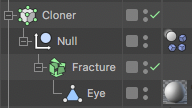
  • Try this: Make the fracture object the child of a null and place the dynamic tag on the null. Then put the null in a cloner to make as many eyes as you want. I think that should get you what you want.

  • I downloaded your file but it is extremely slow on my system. Any chance you could provide a much simplified file with just a few objects that demonstrate your setup? (I also don’t have Octane, so if you could leave out all the Octane objects and materials I won’t have to delete them myself.)

  • Jim Scott

    April 5, 2021 at 12:03 am in reply to: Round Edges – Need Help

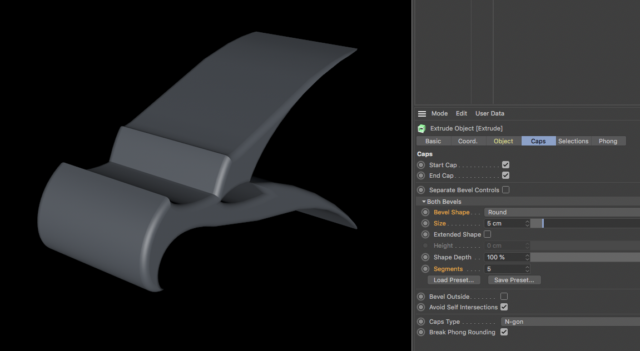
    I don’t see any image file, but you just need to use the bevel parameters to add roundness to the edges.

  • I’m not sure what you mean by “once the simulation starts it stops moving.” The eyes stop moving, or the target stops moving, or…. what? Which object(s) are you referring to? I don’t think you need to use “Follow Rotation,” but I’m having a hard time picturing exactly what you are trying to do. Could you post your project file so we could see what you have so far?

    I made a simple project to see if it is anything like what you are trying to do. Let me know if this helps:

  • Jim Scott

    April 1, 2021 at 1:09 am in reply to: Matrix the Movie – falling Letters affect

    Well, that’s weird. The tutorial comes up fine for me. Are you not in the U.S.?

    You’re right that it’s the one from Mike Udin, and it seems to work fine in R19-R22, but if you have an older version I can’t test it.

    Here’s the project file if you want to try it out.

  • Jim Scott

    March 31, 2021 at 4:42 pm in reply to: Matrix the Movie – falling Letters affect

    Here’s a link to a tutorial. It’s in Russian, but there’s a link in the description to the project files which you should be able to modify for your own use.

    https://www.youtube.com/watch?v=zaGFFoprtBI

    Some contents or functionalities here are not available due to your cookie preferences!

    This happens because the functionality/content marked as “Google Youtube” uses cookies that you choosed to keep disabled. In order to view this content or use this functionality, please enable cookies: click here to open your cookie preferences.

  • Jim Scott

    March 25, 2021 at 6:29 pm in reply to: R23 crashing with Big Sur

    The Maxon site lists 10.14.6 or higher for R23, so I would suggest contacting Maxon support since you meet their requirements but are having issues. Perhaps they don’t have full Big Sur compatibility yet.

  • Jim Scott

    March 24, 2021 at 1:37 am in reply to: C4D / Arnold missing plugins?

    You should be able to just remove all of the Arnold materials (and Arnold lights, etc.) and replace them with standard C4D versions, and also remove “Arnold Renderer” from the project’s Render Settings. You can then resave the project and the error message shouldn’t return if you’ve removed everything associated with Arnold. Arnold is only a renderer, so it should have no effect on rigging. That issue is something you’ll need to fix on its own.

  • Jim Scott

    March 21, 2021 at 10:17 pm in reply to: Sliced objects keep reverting back

    I’m curious Sam, why do you join COW to ask a question and then ignore the responses?

  • Jim Scott

    March 19, 2021 at 12:30 pm in reply to: Sliced objects keep reverting back

    Hi Sam,

    I can’t recreate your issue, at least not in R22. What version of C4D are you using? I would suggest uploading your project file so we could see your set-up and try to recreate the problem.

Page 12 of 46

We use anonymous cookies to give you the best experience we can.
Our Privacy policy | GDPR Policy