Forum Replies Created

Page 1 of 19
  • Frederic Lumiere

    September 19, 2020 at 3:24 pm in reply to: QuickTime Pro Replacement

    I see. I haven’t tried outputting keeping Set duration to 100%, but I assumed it wouldn’t honor the IN & OUT.

  • Frederic Lumiere

    September 19, 2020 at 2:32 pm in reply to: QuickTime Pro Replacement

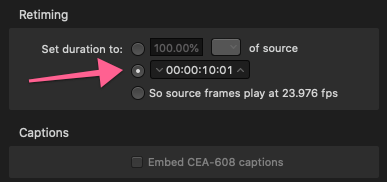
    I added a Prores HQ 422 preset. If I don’t do this, it will output the whole clip, not the clip with IN & OUT I set.

  • Frederic Lumiere

    September 19, 2020 at 2:24 pm in reply to: QuickTime Pro Replacement

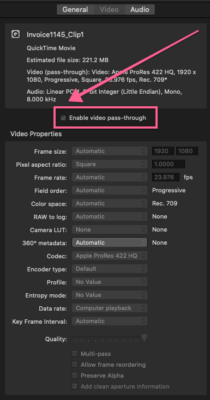
    Looks like choosing the sliced clip in Retiming has to be done before check Video Passthrough.

  • Frederic Lumiere

    September 19, 2020 at 2:14 pm in reply to: QuickTime Pro Replacement

    Thanks Jeremy! Looks like I figured it out at the same time you wrote this. Laughing Thanks so much for taking the time to explain! Very much appreciated.

  • Frederic Lumiere

    September 19, 2020 at 2:09 pm in reply to: QuickTime Pro Replacement

    Ah! Here’s the solution with Compressor. Check “Enable video pass-through”. I wonder if Adobe’s Media Encoder has a similar option.

  • Frederic Lumiere

    September 19, 2020 at 2:02 pm in reply to: QuickTime Pro Replacement

    I would need the Switch Pro ($499) to do what I need. Which is simply slice out clips and keep the timecode track. Something QuickTime Pro could do easily. I’m really trying to not have to start a project with Media Composer, FCP X or Adobe Premiere Pro (We have them all) since we have to do this often to deliver broadcast clips for our hdarchives.com offering.

    Do you know if it’s now possible to export clips without re-encoding with Adobe’s Media Encoder or Apple’s Compressor and keep timecode?

  • Frederic Lumiere

    September 19, 2020 at 1:50 pm in reply to: QuickTime Pro Replacement

    Thanks Ron! You’re a legend in my book.

  • Frederic Lumiere

    September 17, 2020 at 3:32 pm in reply to: QuickTime Pro Replacement

    I guess that’s incompatible with OS 10.15.6 as well

    https://share.getcloudapp.com/yAub5dOJ

  • Frederic Lumiere

    September 17, 2020 at 3:28 pm in reply to: QuickTime Pro Replacement

    Thanks so much Jeremy! Trying Digital Rebellion now. All I need is the ability to quickly split clips with timecode.

  • Frederic Lumiere

    August 28, 2014 at 2:12 am in reply to: Remove all color correction from a sequence

    When I’m in color correction mode somehow I’m not able to select all clips. When I remove effect, it deletes the last effect (even if it’s not color correction)

Page 1 of 19

We use anonymous cookies to give you the best experience we can.
Our Privacy policy | GDPR Policy