Forum Replies Created

Page 43 of 277
  • Damn… I spend a lot of time doing a write-up to explain the whole expression and project, posted the reply and now I see it didn’t post to the site…

    Here’s the project-link again:

    https://we.tl/t-1ZBesU9OFR

    let me know if you want some clarification on the process.

    This is something which would probably be much faster to code/render in Processing or P5 I believe, although I getr about a 2FPS render time (6 minutes for 1800 frames of build up) which is OK-ish

  • Just a quick addition:

    If you have line break characters in your string, those are not counted by the textIndex, but they are counted by the string, so then the selection of the final pipe character goes wrong.

    If you need linebreaks in the string,

    That can be fixed with:Just a quick addition:

    If you have line break characters in your string, those are not counted by the textIndex, but they are counted by the string, so then the selection of the final pipe character goes wrong.

    If you need linebreaks in the string,

    That can be fixed with:

    text.sourceText.value.replace(/\r/g,””).length;

    (It replaces all linebreak characters with nothing before measuring the length of the string)

  • Can you tell me how you will want to animate the image ?

    If you just want to slowly build up the final image, then I have a method that’ll work in after effects:

    (animated here:) https://imgur.com/a/XzEYyAp

    View post on imgur.com

  • Filip Vandueren

    March 8, 2022 at 11:27 am in reply to: Text Animator: Alternate Position

    Yes, the result can be up to 3 dimensional, to influence x/y/z or r/g/b properties differently.

    Like this:

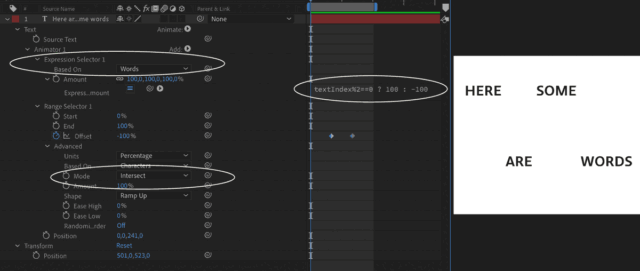
    i=textIndex%4;
    switch (i) {
    case 0:
    [-100,0,0];
    break;
    case 1:
    [0,-100,0];
    break;
    case 2:
    [100,0,0];
    break;
    default:
    [0,100,0];
    }
  • Filip Vandueren

    March 8, 2022 at 9:39 am in reply to: Text Animator: Alternate Position

    Yes, you can’t combine it with opacity. Because impacting position by -100% means opposing the coordinates, while doing the same with an opacity of 0, would mean opacity =200.

    So the opacity needs a separate animator

  • Filip Vandueren

    March 8, 2022 at 9:07 am in reply to: Text Animator: Alternate Position

    hey Darren, your image didn’t upload.

    Is this what you meant:

  • Filip Vandueren

    March 8, 2022 at 8:49 am in reply to: Apply a whitish effect on human

    Try:

    Effect -> Channel -> Calculations:

    – second layer channel: Red

    – Blending Mode: Screen

    – Second Layer Opacity: 60 – 100 % to taste

    Then a tiny bit of glow

  • Filip Vandueren

    March 8, 2022 at 7:19 am in reply to: Scripting – Centre Mask on Shape Layer

    Hi Liam, the example I posted was an expression, the syntax and methods are a bit different.

    In a script it would be like this:

    app.beginUndoGroup("Rectangle Mask");

    myLayer = app.project.activeItem.selectedLayers[0];

    newMask = myLayer.Masks.addProperty("ADBE Mask Atom");

    myProperty = newMask.property("ADBE Mask Shape");

    newMask.name = "Rectangle Mask";

    newMask.maskMode = MaskMode.ADD;

    myShape = myProperty.value;

    sr= myLayer.sourceRectAtTime(myLayer.time,true);

    myShape.vertices = [

    [sr.left, sr.top],

    [sr.left+sr.width, sr.top],

    [sr.left+sr.width, sr.top+sr.height],

    [sr.left, sr.top+sr.height],

    ];

    myShape.closed = true;

    myProperty.setValue(myShape);

    app.endUndoGroup();

  • Filip Vandueren

    March 8, 2022 at 7:00 am in reply to: Remove words from string

    Hi Jeremy.

    Here’s a quick try, but it replaces all whitespace characters with 1 space i the endresult. Also linebreaks will be gone, so it might be a too simple approach for you:

    str = "This is just an example.";
    remove = 2;
    arr = str.split(/\s+/gi); // yields an array of words
    output = arr.slice(0,-remove).join(" ");
  • In theory, yes.

    But we’re talking about hundreds (thousands ?) of layers each with an expression on position that needs to sample another layer.

    This quickly becomes unworkable, especially if you expect to also be animating it.

    It could be baked in with a script, so the expressions don’t have to keep evaluating, but I would look into a Particle System, (or maybe Motion Boutique’s Pastiche ?) to do the heavy lifting for you.

Page 43 of 277

We use anonymous cookies to give you the best experience we can.
Our Privacy policy | GDPR Policy