Forum Replies Created

Page 7 of 63
  • Hey Cathy!

    No trouble at all – these were all lightweight and opened/exported with no issues. One of the project files had no imported media and only an empty sequence, but the rest had actual stuff going on.

    I’ve exported each of the 10 projects and included a screenshot of the export dialog that shows bin/clip/sequence counts.

  • Hi Sara!

    I’d be glad to help. How might I get in touch? I thought we had a DM feature here, but apparently not…

  • Doug Metz

    May 1, 2024 at 10:44 pm in reply to: clone a full mac

    I could’ve phrased that differently – they’re now advising against it. Recent iterations of MacOS with the locked-down System partition have complicated matters… This is on Bombich’s site regarding bootable backups:

    “Copying Apple’s system is now an Apple-proprietary endeavor; we can only offer “best effort” support for making an external bootable device on macOS Big Sur (and later OSes). We present this functionality in support of making ad hoc bootable copies of the system that you will use immediately (e.g. when migrating to a different disk, or for testing purposes), but we do not support nor recommend making bootable copies of the system as part of a backup strategy.

    Please bear in mind that you can restore all of your documents, applications, and system settings from a standard CCC backup without the extra effort involved in establishing and maintaining a bootable device.”

    This, coupled with the restrictions on booting Apple Silicon Macs from external sources, and it just becomes a lot of fuss for no real gain unless you’re still on Intel.

    Also a decades-long CCC user here. All my old PPC and Intel backups have been bootable. AS Macs would rather grab a clean install from Apple’s server and then restore all your stuff, and I’m just not in a fightin’ mood. ;^)

  • Unfortunately, there really is no way to re-attach it.

    To fix it, you’d need to recut the whole piece. Depending on the number of edits, this may or may not be a horrifying idea. There is a quick-ish way to do it, but requires a bit of setup and there are a number of keyboard shortcuts, keystrokes, and a specific order of operations for each edit.

    Would be far easier to demonstrate, but I haven’t time to record a tutorial at the moment.

  • Before asking in forums, I was trying to fix it myself but because I was clicking on the grey box on top of those clips, to highlight them, when right clicking, nothing would show up to make any change. Instead I should have highlighted each clip on its own and then right click and lift from storyline!

    • No need to select individual clips and lift from storyline, delete storyline, etc. Just select the grey box and use the keyboard shortcut (Shift+Cmd+G) or the menu item ‘Break Apart Clip Items’ from the Clip menu in the menubar at the top. The option doesn’t show up in the right-click contextual menu, which is unfortunate, because it absolutely ought to.

    I detached the audio from the video clips because I wanted to add a few effects and in a few video tutorials they say to detach and then compound the audio so the changes will be applied to the full audio.

    I never do compound clips usually for the type of videos I make but I was done with the editing and so I did a compound clip for the effects.

    • There are better ways to do this, those tutorials may be out of date. Keep your audio attached, make sure things are assigned the correct roles, and at the end of the edit, make a compound of the entire edit. Then you can apply your effects to specific roles or the whole mix (or both)

    Once you do apply your effects, is it possible to reattach the audio to the video clips?

    • Unfortunately, no. This is why I avoid doing so whenever possible. It may be helpful to review the surprisingly good FCP manual, or tutorials from reputable sources. Ripple Training is a favorite, there are a few others.

    Good luck!

  • They are grouped in a Secondary Storyline (notice the grey bar at the top indicates a container that surrounds the clips).

    If you first select the group/storyline, you can Un-group them using ‘Break Apart Clip Items’ near the bottom of the Clip menu, or use the keyboard shortcut Shift+Cmd+G

    Is there some reason you’ve detached all of your audio from the associated video clips?

  • Doug Metz

    April 16, 2024 at 8:25 pm in reply to: Mac Studio M2 Users

    Hey Eric,

    I’ve got the base M2 Ultra at the shop w/FCP.

    Will need to update my home rig (i9 iMac) soon-ish… been wondering about the same thing, though I’ve been really satisfied with the performance of the M-series Minis.

    I’m not on fire to replace the thing, so will be keeping an eye out for the new M4 stuff.

  • Doug Metz

    April 16, 2024 at 8:11 pm in reply to: Sony FX30 media to ProRes

    One other thing to consider is the cable connecting your drive to the Mini.

    I had a 2020 M1 for a few years and didn’t have any issue with 4K ProRes files, but I was working off an 8-disk RAID with a certified TB3 cable. You should test your cable to be sure you’re getting every bit of bandwidth that T7 will handle.

    Same connector ≠ same functionality.

  • Doug Metz

    April 16, 2024 at 7:50 pm in reply to: Gap in exported file

    Hi David,

    My project is about an hour long. I am exporting an .mp4 file (H.264 Multi-pass). On each attempted export, a different gap is missing: about 2 minutes with no audio/video, just black.
    I am stumped.
    The .mov export is fine. I also tried exporting the .mp4 from the .mov instead of the project – same result.”

    This is definitely odd. A few questions for you:

    • What settings were you using for your .mov export?
    • How did you export the .mp4 from the .mov file?
    • If you were to compare your various .mp4 exports, do the gaps correlate to any particular piece of media on your timeline?

    You could also try to export H.264 Single pass from the timeline, or take your good .mov file and drop it into Compressor (or Handbrake, ffmpeg, etc.)

  • Hey Tim!

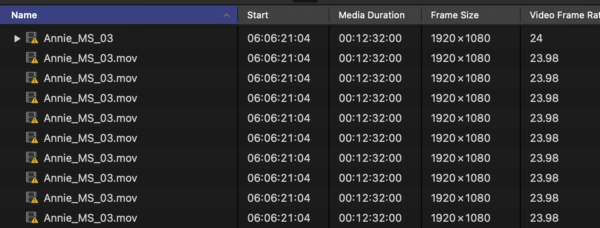
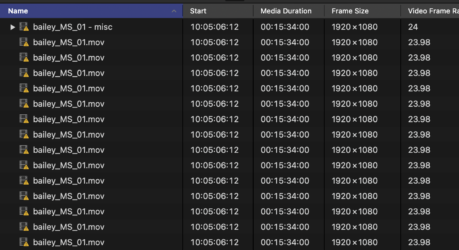
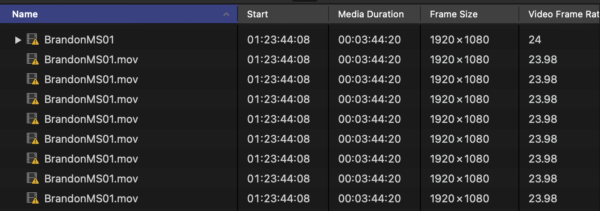
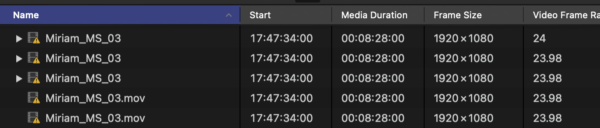
    Found something interesting. For each of those 5 clips, I did find a discrepancy in the instances – one shows as 24fps, while the rest with the same parent show 23.98… assuming they all should be the latter.

    I’d be inclined to highlight the instances with the correct frame rate and try to relink those first. I’m going through projects now to see if those outliers are connected to the same timeline or have some other common link:

Page 7 of 63

We use anonymous cookies to give you the best experience we can.
Our Privacy policy | GDPR Policy