Forum Replies Created

Page 5 of 66
  • David Cabestany

    February 24, 2021 at 12:42 am in reply to: Enable freeze frame with a checkbox control

    Hi Brendon,

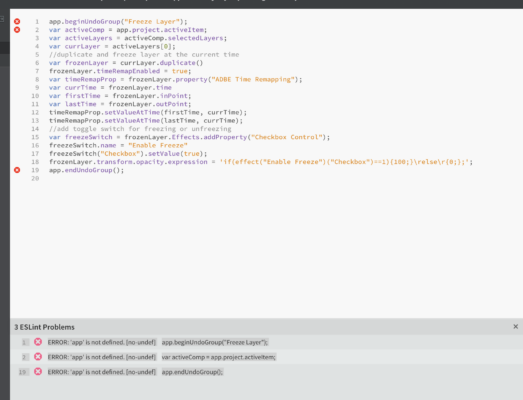
    I’m trying your script now and I’m getting a syntax error at line 1. I don’t really know a lot about scripting (more like nothing, really). Do you what could be causing it?

    I tried on both the Script UI folder and the other one.

    Thanks in advance.

  • David Cabestany

    February 23, 2021 at 11:09 pm in reply to: Enable freeze frame with a checkbox control

    Brendon, thanks so much. I already copied the text and compiled it, let me try it later (I’m in the middle of a massive render right now), and will let you know if it works.

    Thanks so much for taking the time to write this!

  • David Cabestany

    February 23, 2021 at 1:05 am in reply to: Enable freeze frame with a checkbox control

    It’s too much hassle for what I need. The checkbox is not keyframed. I just need to render a version with one layer animated and one without.

    I’ll just freeze the frame, render and unfreeze it again.

    Thanks anyway for looking into it.

  • David Cabestany

    December 18, 2020 at 12:59 am in reply to: Expression is happening before it’s supposed to

    Cool, thanks. I have your email somewhere. I’ll email it tonight.

    Thanks!

  • David Cabestany

    December 17, 2020 at 7:46 pm in reply to: Expression is happening before it’s supposed to

    I can send you an empty AE project if you want. Let me know.

  • David Cabestany

    December 17, 2020 at 7:29 pm in reply to: Expression is happening before it’s supposed to

    Yes it fades in (the opacity value goes up, but there’s nothing to show yet because there is no layer at that point).

    Yes, the expression works fine, I’ve used it thousands of times and I’m using it in the same composition with other similar layers (precomps) without issue.

    It’s just this one layer that is misbehaving. The in and out are the beginning and end of the precomp layer, I’m not trimming it in any way, which I’ve done in the past too.


    I think it’s a weird glitch, I will report it to Adobe later today.

  • David Cabestany

    October 28, 2020 at 12:41 am in reply to: Why this expression breaks with the new JavaScript?

    The comps are named Name1, Name2, etc.

    Each comp is a lower third with regular names, Mike Jones, Rob Smith, Cindy Anderson, etc.

    When I send to render I have to manually rename each output so I know which render belongs to what clip once I mount them on Premiere.

  • David Cabestany

    October 27, 2020 at 10:59 pm in reply to: Why this expression breaks with the new JavaScript?

    Now here’s an idea:

    Is it possible to have the renders take their name from the comment in the project panel instead of the name of the composition?

  • David Cabestany

    October 27, 2020 at 10:57 pm in reply to: Why this expression breaks with the new JavaScript?

    I don’t get the advantage of using csv files, I still have to manually enter the arrays for each text (for example 4,1, etc).

    Using this expression once I’m done creating the first comp all I have to do is duplicate it in the project panel and all the info updates automatically.

    I’m sure csv data is valuable but I have yet to find a project where I’d benefit from it.

  • David Cabestany

    October 27, 2020 at 8:04 pm in reply to: Why this expression breaks with the new JavaScript?

    Thanks Brandon,

    A (very quick) search for the open(‘r’) method did not yield anything useful, I mostly got intro to After Effects tutorials and posts.

    Can you elaborate a little on this method? never heard of it before

Page 5 of 66

We use anonymous cookies to give you the best experience we can.
Our Privacy policy | GDPR Policy